Life360: Live Location Sharing
Life360
Installs
100,000,000+
Developer
Life360
-
Category
Lifestyle
-
Content Rating
Rated for 3+
Developer Email
Privacy Policy
http://www.life360.com/mobile_privacy_policy
Screenshots
Expert Review
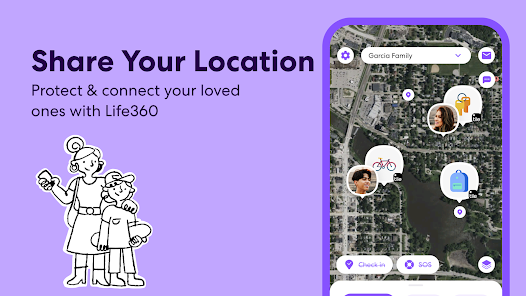
Life360 tackles a very specific need that many families face: staying connected and informed about each other's whereabouts without constant check-in texts. At its core, the app uses real-time location tracking on family members' phones to create a private map that everyone in the “Circle” can see. While this sounds straightforward, the app builds an entire system around that one function, turning a simple map into a digital safety net. It's designed for parents who worry about teenage drivers, adult children caring for elderly parents, or even groups of friends on a trip wanting to coordinate without endless group chat messages.
In practice, the core tracking works smoothly. I set up a Circle for my immediate family, and within minutes, everyone had the app running in the background. Seeing exactly when my younger brother arrived at school without him having to text felt genuinely useful. The driving features really stand out. After a rough winter storm, I got an alert about my mom's driving speed and a report on her trip's route, which gave me a weird sense of relief. The app also includes crash detection, which thankfully I haven't had to test, and a location history feature that helps settle the “where did I leave my bag” mystery. The extra stuff, like a built-in panic button, feels a bit heavy-handed for everyday use, but it's easy to ignore. The biggest downside is the battery drain. The constant GPS pinging is a hungry beast, and I found myself charging my phone more often. Also, the free version is so cluttered with ads and prompts for the premium tier that using it can feel like a chore.
I'd recommend Life360 to any family that has a mix of drivers or anyone who regularly worries about a loved one's trip. It's perfect for parents of new drivers or families with long commutes. For close-knit friend groups, the free location sharing features are solid, but you might get annoyed by the attempts to upsell you. If you value absolute privacy or want something more passive, this might not be your pick.
Key Functional Highlights
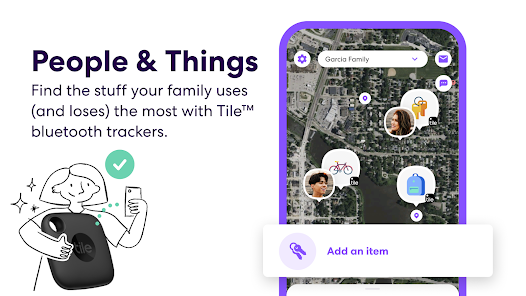
- 🔴 Real-time location tracking with Circle creation: The map updates everyone's position every few seconds when they are moving. You can create multiple Circles for family, friends, or roommates, and each has its own privacy controls. It's the bedrock of the app and the main reason you'd download it.
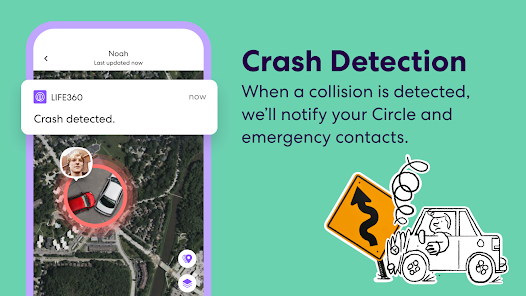
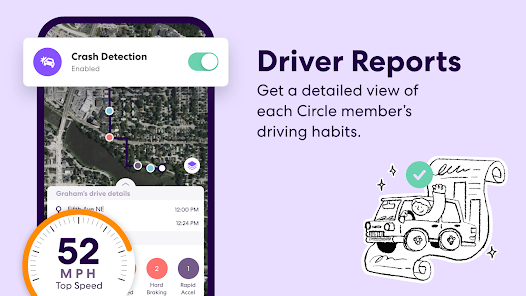
- 🚗 Detailed driving reports with crash detection: This goes far beyond just showing a dot on a map. After every drive, you get a summary that includes top speed, phone usage while driving, and hard braking events. The crash detection feature will automatically alert your emergency contacts and share your location if it senses a collision.
- 📍 Location history and place alerts: The app keeps a timeline of everywhere you and your Circle members have been. You can set up “Place Alerts” so you get a notification when someone arrives at or leaves a specific location, like home, school, or work. This is what makes the app feel proactive rather than just passive tracking.
Advantages & Benefits
- 🌍 Exceptional real-time accuracy: The map is incredibly precise, showing street-level location even in dense urban areas with tall buildings. It almost never shows someone in the wrong place, which is essential for its main purpose.
- ⛑️ Peace of mind for caregivers: For anyone with elderly parents or kids driving alone, the crash detection and driving reports offer a layer of safety that feels immediate and real. It solves anxiety proactively rather than reactively.
Areas for Improvement
- ⚡ Heavy battery drain: The constant background location tracking is a major battery hog. You will notice your phone getting warmer and your battery percentage dropping faster, especially on longer drives. It's the price you pay for the accuracy.
- 🔔 Overwhelming notifications by default: The app loves to send alerts for every single speed change, place arrival, and trip start. Without spending time in the settings to customize notifications, you might feel bombarded with updates all day.
Recommended Apps
![]()
AI Art Generator - AI Yearbook
Smart AI DEV3.9

![]()
Afterpay - Buy Now Pay Later
Afterpay3.8![]()
Anime Shimeji Screen Pets
NovaSoftLC Labs3.9![]()
Parallax: 4K 3D Live Wallpaper
Nebuchadnezzar DOO4.6![]()
Telegram
Telegram FZ-LLC4.2![]()
Elevate - Brain Training Games
The Mind Company4.6![]()
Heaven: Gay & LGBT+ Dating
Paradiz Social Ltd3.2![]()
Drone App: Forecast for UAV
Go Dreams4.4![]()
Google Gemini
Google LLC4.6![]()
Customuse: Skins Maker Roblox
Customuse4.7![]()
Brainzzot Universe: Prank Call
TeH Software0![]()
Prank Sounds: Hair Cut & Fart
Smart Utilities Hub4.2![]()
Photo Editor - Lumii
InShot Video Editor4.7![]()
GigaBody: AI Muscle filter
Bellential Inc.4.4![]()
FunVid: Funny Face Filters
Vibe Filter Club0












You May Like
-
![]()
Moonphase Filter: Love Test
Braly JSC0 -
![]()
How Did You Die In The Past?
BuzzMoy0 -
![]()
Secret Crush Detector App
Hopeitz Software4.8 -
![]()
Walli - HD, 4K Wallpapers
Tap AI4.4 -
![]()
Ace Hardware
Ace Hardware Corporation4.7 -
![]()
Planner 5D: Home Design, Decor
Planner 5D4.1 -
![]()
Snapchat
Snap Inc4.1 -
![]()
Live wallpaper - dope & anime
Jelly Dev4.4 -
![]()
WhatsApp Messenger
WhatsApp LLC4.5 -
![]()
Eye Test
arabtok0 -
![]()
Uber - Request a ride
Uber Technologies, Inc.4.5 -
![]()
Prank Call & Funny Video
TeH Software0 -
![]()
Bug Filter - Bug on Face Prank
Hades Bit0 -
![]()
Dola: Smart AI Assistant
SPRING (SG) PTE. LTD.3.9 -
![]()
Crush Love Finder: Fun Filter
Braly JSC0