Google Chat
Google LLC
Installs
10,000,000+
Developer
Google LLC
-
Category
Business
-
Content Rating
Rated for 3+
Developer Email
Privacy Policy
http://www.google.com/policies/privacy
Screenshots
Expert Review
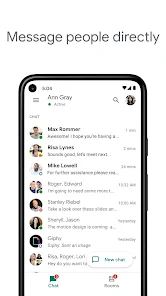
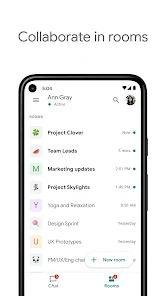
Google Chat is a professional communication and collaboration platform designed to integrate seamlessly with the broader Google Workspace ecosystem. Its core purpose is to move beyond simple messaging, providing a structured hub for team-based work. It organizes conversations into dedicated spaces for projects, departments, or topics, combining threaded discussions, shared files, and integrated apps into a single, searchable interface.
The app primarily targets teams and organizations already invested in Google Workspace, such as businesses, educational institutions, and non-profits. It solves the problem of fragmented communication by centralizing discussions, document collaboration, and task management, reducing the need to constantly switch between email, chat windows, and separate project tools. For users drowning in chaotic group chats or endless email threads, Google Chat offers a more organized and actionable alternative.
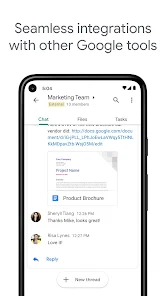
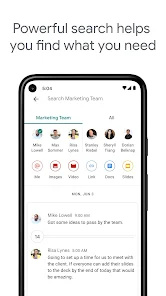
The core features function exceptionally well within the Google environment. Creating spaces for different initiatives keeps conversations focused and archives them logically. The deep integration with Google Drive, Docs, Sheets, and Meet is where the app truly shines; sharing and co-editing files happens almost instantaneously without leaving the chat window. In my own usage, managing a content calendar became significantly easier. We created a dedicated space, pinned the shared Sheet, and discussed edits in real-time threads attached to specific cells, eliminating the confusion of version history scattered across emails. The ability to search across all spaces and connected Drive files is a powerful time-saver.
I would strongly recommend Google Chat to any team or organization that relies heavily on Google Workspace tools. It is most useful for collaborative projects requiring ongoing discussion, document iteration, and meeting coordination. It is less ideal for purely social chatting or for individuals or teams using a disparate set of non-Google productivity tools, as its greatest strengths are tied to that integrated ecosystem.
Key Functional Highlights
- 🔗 Integrated Workspace Hub: Functions as the communication nerve center for Google Workspace, bringing together Chat, Spaces, Meet, and Drive file collaboration in one unified application.
- 🗂️ Structured Spaces: Replaces chaotic group chats with organized, topic-based rooms where conversations are threaded, files are centralized, and tasks can be assigned and tracked.
- 🔍 Powerful Unified Search: Allows users to find messages, files, and even specific content within shared documents across all chats and spaces from a single search bar.
- 🤖 Google Meet & App Integration: Enables one-click jumping into video meetings and allows for the addition of workflow bots and third-party apps directly into chat spaces for automation.
Advantages & Benefits
- ✅ Seamless Google Ecosystem Integration: The flawless connection with Drive, Calendar, and Meet creates a phenomenally efficient workflow for Workspace users.
- ✅ Superior Organization for Teams: Spaces provide a much clearer and more actionable structure for project communication compared to linear messaging apps.
- ✅ Strong Search Capabilities: The ability to search through chat history and linked Drive content simultaneously is a major productivity booster.
- ✅ Effective File Collaboration: Viewing, commenting on, and editing shared documents directly within the chat interface eliminates friction and context-switching.
Areas for Improvement
- ⚠️ Limited Standalone Appeal: Its value diminishes significantly for users or teams not committed to the Google Workspace ecosystem, as key features are dependent on it.
- ⚠️ Can Feel Overly Structured: For quick, informal social chats, the Spaces model can feel unnecessarily formal compared to simpler messaging apps.
- ⚠️ Learning Curve for New Users: The concepts of Spaces, threaded conversations, and integrated apps require some acclimatization for users familiar only with basic chat.
- ⚠️ Notification Management Complexity: Fine-tuning notifications across multiple active spaces and direct messages can be cumbersome and occasionally overwhelming.
Recommended Apps
![]()
AI Art Generator - AI Yearbook
Smart AI DEV3.9

![]()
Afterpay - Buy Now Pay Later
Afterpay3.8![]()
Anime Shimeji Screen Pets
NovaSoftLC Labs3.9![]()
Parallax: 4K 3D Live Wallpaper
Nebuchadnezzar DOO4.6![]()
Telegram
Telegram FZ-LLC4.2![]()
Elevate - Brain Training Games
The Mind Company4.6![]()
Heaven: Gay & LGBT+ Dating
Paradiz Social Ltd3.2![]()
Drone App: Forecast for UAV
Go Dreams4.4![]()
Google Gemini
Google LLC4.6![]()
Customuse: Skins Maker Roblox
Customuse4.7![]()
Brainzzot Universe: Prank Call
TeH Software0![]()
Prank Sounds: Hair Cut & Fart
Smart Utilities Hub4.2![]()
Photo Editor - Lumii
InShot Video Editor4.7![]()
GigaBody: AI Muscle filter
Bellential Inc.4.4![]()
FunVid: Funny Face Filters
Vibe Filter Club0












You May Like
-
![]()
Moonphase Filter: Love Test
Braly JSC0 -
![]()
How Did You Die In The Past?
BuzzMoy0 -
![]()
Secret Crush Detector App
Hopeitz Software4.8 -
![]()
Walli - HD, 4K Wallpapers
Tap AI4.4 -
![]()
Ace Hardware
Ace Hardware Corporation4.7 -
![]()
Planner 5D: Home Design, Decor
Planner 5D4.1 -
![]()
Snapchat
Snap Inc4.1 -
![]()
Live wallpaper - dope & anime
Jelly Dev4.4 -
![]()
WhatsApp Messenger
WhatsApp LLC4.5 -
![]()
Eye Test
arabtok0 -
![]()
Uber - Request a ride
Uber Technologies, Inc.4.5 -
![]()
Prank Call & Funny Video
TeH Software0 -
![]()
Bug Filter - Bug on Face Prank
Hades Bit0 -
![]()
Dola: Smart AI Assistant
SPRING (SG) PTE. LTD.3.9 -
![]()
Crush Love Finder: Fun Filter
Braly JSC0