To Do List
Splend Apps
Installs
10M+
Developer
Splend Apps
-
Category
Productivity
-
Content Rating
Everyone
Developer Email
Privacy Policy
https://splendapps.com/privacy
Screenshots
Expert Review
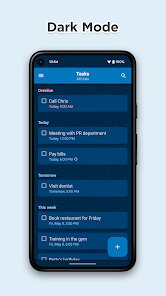
For years, I struggled with keeping track of grocery lists, project milestones, and random notes scattered across different apps. To Do List by Splend Apps aims to solve exactly this kind of chaos by providing a single, clean environment where you can manage tasks without the overwhelming complexity of something like Notion or Trello. The app's core purpose is straightforward: capture tasks quickly, organize them efficiently, and check them off without friction.
The target audience here is pretty broad, but I think it shines brightest for casual users, students, and busy professionals who need a no-nonsense task manager. If you have ever found yourself forgetting to buy milk at the store or missing a deadline at work, this app directly addresses that problem. It is not trying to replace enterprise project management tools; instead, it focuses on personal productivity and daily life management.
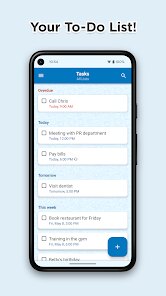
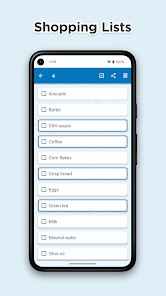
In my own usage, the core feature set works well most of the time. The ability to create multiple lists, set due dates, and add notes to each task covers the essentials. What impressed me more than I expected were the reminders and the widget support. I set a recurring reminder for my weekly grocery trip, and the widget on my home screen shows me exactly what I need to buy without me even opening the app. This genuinely solved my problem of forgetting small but important items. The interface is clean and fast, with no noticeable lag even when I have a few hundred tasks spread across different lists.
However, if you need heavy collaboration features, complex project dependencies, or deep integration with other productivity tools, this might feel a bit basic. I would recommend this app to anyone who wants a reliable, straightforward to-do list without the noise of unnecessary features. It is particularly useful for managing personal errands, daily routines, and small projects where simplicity matters more than advanced functionality.
Key Functional Highlights
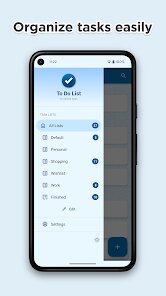
- Create and switch between multiple custom lists, such as Work, Home, Groceries, and Travel, keeping everything neatly separated and easy to locate.
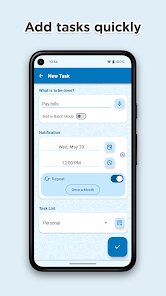
- Set due dates, recurring reminders, and priority levels for each task, so you never miss a deadline or forget a recurring chore like taking out the trash.
- Add detailed notes to individual tasks, which is perfect for storing addresses, product links, or any extra information you need to complete the task.
- Use the home screen widget to view your most urgent tasks at a glance without needing to open the app, saving you time and reducing distractions.
Advantages & Benefits
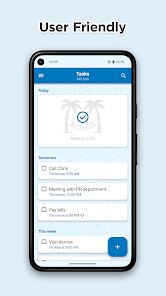
- The interface is clean and intuitive, requiring almost no learning curve. You can start adding tasks within seconds of installing the app.
- Performance is consistently smooth, with no crashes or freezes even when handling several hundred tasks across multiple lists.
- The reminder system is reliable and integrates well with the device notification system, ensuring you actually see the alerts when they fire.
Areas for Improvement
- There is no collaboration or sharing feature, so you cannot assign tasks to family members or colleagues within the app.
- The search functionality is basic and does not support filtering by date or priority, making it harder to find specific tasks in longer lists.
- Backup options are limited, and there is no cloud sync across devices unless you manually export and import data, which feels outdated.
Recommended Apps
![]()
AI Art Generator - AI Yearbook
Smart AI DEV3.9

![]()
Afterpay - Buy Now Pay Later
Afterpay3.8![]()
Anime Shimeji Screen Pets
NovaSoftLC Labs3.9![]()
Parallax: 4K 3D Live Wallpaper
Nebuchadnezzar DOO4.6![]()
Telegram
Telegram FZ-LLC4.2![]()
Elevate - Brain Training Games
The Mind Company4.6![]()
Heaven: Gay & LGBT+ Dating
Paradiz Social Ltd3.2![]()
Drone App: Forecast for UAV
Go Dreams4.4![]()
Google Gemini
Google LLC4.6![]()
Customuse: Skins Maker Roblox
Customuse4.7![]()
Brainzzot Universe: Prank Call
TeH Software0![]()
Prank Sounds: Hair Cut & Fart
Smart Utilities Hub4.2![]()
Photo Editor - Lumii
InShot Video Editor4.7![]()
GigaBody: AI Muscle filter
Bellential Inc.4.4![]()
FunVid: Funny Face Filters
Vibe Filter Club0












You May Like
-
![]()
Moonphase Filter: Love Test
Braly JSC0 -
![]()
How Did You Die In The Past?
BuzzMoy0 -
![]()
Secret Crush Detector App
Hopeitz Software4.8 -
![]()
Walli - HD, 4K Wallpapers
Tap AI4.4 -
![]()
Ace Hardware
Ace Hardware Corporation4.7 -
![]()
Planner 5D: Home Design, Decor
Planner 5D4.1 -
![]()
Snapchat
Snap Inc4.1 -
![]()
Live wallpaper - dope & anime
Jelly Dev4.4 -
![]()
WhatsApp Messenger
WhatsApp LLC4.5 -
![]()
Eye Test
arabtok0 -
![]()
Uber - Request a ride
Uber Technologies, Inc.4.5 -
![]()
Prank Call & Funny Video
TeH Software0 -
![]()
Bug Filter - Bug on Face Prank
Hades Bit0 -
![]()
Dola: Smart AI Assistant
SPRING (SG) PTE. LTD.3.9 -
![]()
Crush Love Finder: Fun Filter
Braly JSC0