MyHyundai with Bluelink
Hyundai Motor America
Installs
1M+
Developer
Hyundai Motor America
-
Category
Auto & Vehicles
-
Content Rating
Everyone
Developer Email
Privacy Policy
https://www.hyundaiusa.com/privacy-policy.aspx
Screenshots
Expert Review
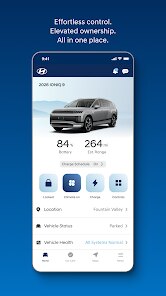
MyHyundai with Bluelink is Hyundai's official connected car app, designed primarily for owners of Hyundai vehicles equipped with the Bluelink telematics system. The app's main purpose is to bridge the gap between the driver and their car, offering a suite of remote control, monitoring, and maintenance management tools from a smartphone. It's targeted squarely at current Hyundai owners, particularly those who want to leverage modern connectivity features to simplify daily car ownership — from checking fuel levels in a parking lot to preheating the cabin on a freezing morning.
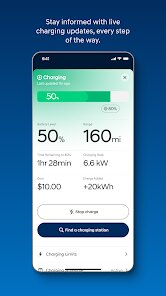
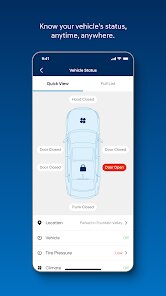
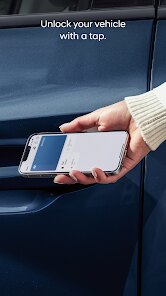
At its core, the app delivers remote start and climate control, door lock/unlock, and vehicle locator services. In practice, the remote start function works reliably within a reasonable range, and the command confirmation usually arrives within a few seconds — a clear time-saver when you're running late or need to defrost windows in winter. The maintenance tab automatically pulls service reminders and diagnostics like tire pressure and battery status, which I found genuinely useful for staying on top of upkeep without flipping through a manual. I've personally used it to locate my car in a crowded mall parking lot more than once, and it's saved me a good chunk of frustration. The app also integrates with roadside assistance and offers a monthly vehicle health report, which adds a layer of reassurance for long-distance trips.
I'd recommend MyHyundai with Bluelink to any Hyundai owner with a compatible vehicle — especially if you live in a cold climate or frequently park in large, unfamiliar areas. It's also a strong fit for drivers who like to keep a close eye on car maintenance without relying solely on dashboard lights. That said, the app's value is tightly bound to the Bluelink subscription; once the free trial expires, some features require a paid plan. So it's most beneficial for those willing to continue the service or who are still within the complimentary period.
Key Functional Highlights
- 🌟 Remote Start with Climate Control — You can start the engine and set the interior temperature before you get in. On hot summer days or icy winter mornings, this feature alone makes the app worth installing. I've used it countless times to cool down the cabin in July, and it consistently works within 10 to 15 seconds after sending the command.
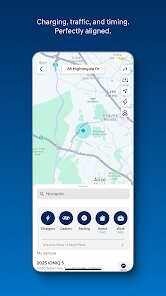
- 🌟 Vehicle Locator and Proximity Alerts — Lost your car in a giant parking structure? The app shows the car's exact location on a map, and you can even activate the horn and lights to pinpoint it. It also sends alerts if the car moves outside a geofenced area — handy for parents of new drivers.
- 🌟 Maintenance Dashboard — This section tracks your car's health in one place: oil life, tire pressure, battery voltage, and upcoming service intervals. It pulls data directly from the car, so you don't have to guess when the next oil change is due. I've found the reminders accurate and genuinely helpful for planning shop visits.
Advantages & Benefits
- ⚡ Seamless dealer integration — You can schedule service appointments through the app, and the system auto-populates your car's details. It cuts out the back-and-forth calls and reduces miscommunication.
- ⚡ Emergency assistance built-in — The SOS button and roadside assistance are accessible directly from the home screen. In a stressful situation, not having to search for a phone number is a small but real comfort.
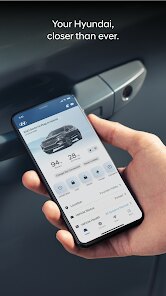
- ⚡ User-friendly layout — The dashboard organizes controls and alerts logically. Even if you're not tech-savvy, the main functions are easy to find without digging through menus.
Areas for Improvement
- ❌ Subscription costs — After the free trial, many core features require a paid Bluelink plan. At roughly $100-$200 per year, it adds a recurring expense that not every owner finds justifiable for remote start and location services alone.
- ❌ Occasional command failures — On rare occasions, a remote command will time out or fail without a clear reason. You have to retry, which slightly undermines the “set it and forget it” convenience.
- ❌ App speed inconsistencies — The interface can feel sluggish when loading the vehicle status page, especially if you have a weak cellular signal. A more optimized data refresh would improve the experience noticeably.
Recommended Apps
![]()
AI Art Generator - AI Yearbook
Smart AI DEV3.9

![]()
Afterpay - Buy Now Pay Later
Afterpay3.8![]()
Anime Shimeji Screen Pets
NovaSoftLC Labs3.9![]()
Parallax: 4K 3D Live Wallpaper
Nebuchadnezzar DOO4.6![]()
Telegram
Telegram FZ-LLC4.2![]()
Elevate - Brain Training Games
The Mind Company4.6![]()
Heaven: Gay & LGBT+ Dating
Paradiz Social Ltd3.2![]()
Drone App: Forecast for UAV
Go Dreams4.4![]()
Google Gemini
Google LLC4.6![]()
Customuse: Skins Maker Roblox
Customuse4.7![]()
Brainzzot Universe: Prank Call
TeH Software0![]()
Prank Sounds: Hair Cut & Fart
Smart Utilities Hub4.2![]()
Photo Editor - Lumii
InShot Video Editor4.7![]()
GigaBody: AI Muscle filter
Bellential Inc.4.4![]()
FunVid: Funny Face Filters
Vibe Filter Club0













You May Like
-
![]()
Moonphase Filter: Love Test
Braly JSC0 -
![]()
How Did You Die In The Past?
BuzzMoy0 -
![]()
Secret Crush Detector App
Hopeitz Software4.8 -
![]()
Walli - HD, 4K Wallpapers
Tap AI4.4 -
![]()
Ace Hardware
Ace Hardware Corporation4.7 -
![]()
Planner 5D: Home Design, Decor
Planner 5D4.1 -
![]()
Snapchat
Snap Inc4.1 -
![]()
Live wallpaper - dope & anime
Jelly Dev4.4 -
![]()
WhatsApp Messenger
WhatsApp LLC4.5 -
![]()
Eye Test
arabtok0 -
![]()
Uber - Request a ride
Uber Technologies, Inc.4.5 -
![]()
Prank Call & Funny Video
TeH Software0 -
![]()
Bug Filter - Bug on Face Prank
Hades Bit0 -
![]()
Dola: Smart AI Assistant
SPRING (SG) PTE. LTD.3.9 -
![]()
Crush Love Finder: Fun Filter
Braly JSC0