Photo Frames
Csmartworld
Installs
10M+
Developer
Csmartworld
-
Category
Video Players & Editors
-
Content Rating
Everyone
Developer Email
Privacy Policy
https://sites.google.com/view/csmartworld/home
Screenshots


Expert Review
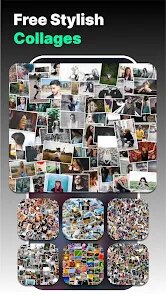
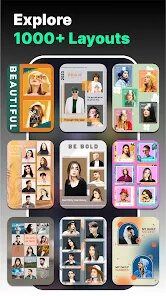
Photo Frames by Csmartworld is essentially a digital dressing-up box for your pictures. Its core purpose is straightforward: to let you slap a decorative border onto your existing photos. You pick an image from your gallery, select a frame from their collection, and save the finished product. That's it. There's no complex editing suite hiding behind the curtain, which is exactly the point. This app is built for someone who wants a quick, no-nonsense way to make a photo look a bit more special for sharing on social media or sending to family.
The target user here is someone who doesn't want to learn layers, masks, or color grading. It's for the person who needs a birthday photo to have a "Happy Birthday" border, or a vacation snap to look like a postcard with a stylized edge. The app solves the problem of a blank, boring image. It gives you a template to instantly dress it up.
Using it, I found the core feature works exactly as advertised. You tap, you choose, you save. It's incredibly fast. The additional features are minimal, which aligns with its simple mission. I used it to quickly frame a few pictures for a family group chat, and it saved me the hassle of opening a full editing program. It solved the specific problem of wanting a polished look without any effort. Based on its functions, I would recommend this app to grandparents wanting to jazz up family photos, casual social media users, or anyone who needs a quick decorative frame for a specific event. It's not for photographers or designers; it's for everyday people who just want their photos to have a nice edge.
Key Functional Highlights
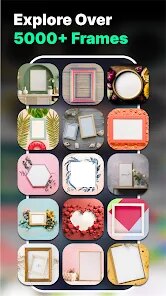
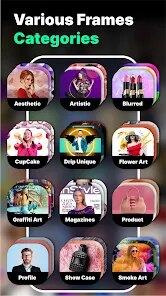
- 🖼️ The frame library is the heart of this app. It offers a solid variety of styles, from simple geometric lines to more thematic borders for holidays and events. You can find a frame for a birthday, a wedding, or just a classic vintage look. The selection is broad enough that you will likely find something suitable for most casual occasions.
- 🖼️ The application process is seamless. Once you select a photo, the frames are displayed as a scrollable list with a live preview. You see the border on your image instantly before you commit. This real-time preview is a huge time-saver. You avoid the frustration of applying a frame, saving it, and realizing it doesn't fit.
- 🖼️ The output quality is surprisingly good. The final images save in decent resolution without visible compression artifacts. You can share the framed photo directly to social media or messaging apps from within the interface. The whole workflow from selection to sharing feels polished for a tool of this simplicity.
Advantages & Benefits
- ✅ Instant results. The app is built for speed. You can go from opening the app to saving a framed photo in under thirty seconds. There is no waiting or loading.
- ✅ It is completely free. There are no hidden paywalls for the core features. You get access to the entire frame library without spending a dime.
- ✅ The interface is clear and intuitive. Every button does exactly what you expect. You will not get lost or confused trying to find the basic functions.
Areas for Improvement
- ❌ No editing tools. You cannot adjust the photo itself. If the frame covers a crucial part of the image, you are stuck. You must exit to another app to crop or edit first.
- ❌ The frame selection is static. You cannot resize or reposition the frame on your photo. It is a fixed overlay, which limits its flexibility for non-standard image compositions.
- ❌ It lacks a text tool. You cannot add your own caption or message inside the frame. This would be a valuable addition for creating custom greeting cards.
Recommended Apps
![]()
AI Art Generator - AI Yearbook
Smart AI DEV3.9

![]()
Afterpay - Buy Now Pay Later
Afterpay3.8![]()
Anime Shimeji Screen Pets
NovaSoftLC Labs3.9![]()
Parallax: 4K 3D Live Wallpaper
Nebuchadnezzar DOO4.6![]()
Telegram
Telegram FZ-LLC4.2![]()
Elevate - Brain Training Games
The Mind Company4.6![]()
Heaven: Gay & LGBT+ Dating
Paradiz Social Ltd3.2![]()
Drone App: Forecast for UAV
Go Dreams4.4![]()
Google Gemini
Google LLC4.6![]()
Customuse: Skins Maker Roblox
Customuse4.7![]()
Brainzzot Universe: Prank Call
TeH Software0![]()
Prank Sounds: Hair Cut & Fart
Smart Utilities Hub4.2![]()
Photo Editor - Lumii
InShot Video Editor4.7![]()
GigaBody: AI Muscle filter
Bellential Inc.4.4![]()
FunVid: Funny Face Filters
Vibe Filter Club0














You May Like
-
![]()
Moonphase Filter: Love Test
Braly JSC0 -
![]()
How Did You Die In The Past?
BuzzMoy0 -
![]()
Secret Crush Detector App
Hopeitz Software4.8 -
![]()
Walli - HD, 4K Wallpapers
Tap AI4.4 -
![]()
Ace Hardware
Ace Hardware Corporation4.7 -
![]()
Planner 5D: Home Design, Decor
Planner 5D4.1 -
![]()
Snapchat
Snap Inc4.1 -
![]()
Live wallpaper - dope & anime
Jelly Dev4.4 -
![]()
WhatsApp Messenger
WhatsApp LLC4.5 -
![]()
Eye Test
arabtok0 -
![]()
Uber - Request a ride
Uber Technologies, Inc.4.5 -
![]()
Prank Call & Funny Video
TeH Software0 -
![]()
Bug Filter - Bug on Face Prank
Hades Bit0 -
![]()
Dola: Smart AI Assistant
SPRING (SG) PTE. LTD.3.9 -
![]()
Crush Love Finder: Fun Filter
Braly JSC0