CapCut - Video Editor
Bytedance Pte. Ltd.
Installs
1B+
Developer
Bytedance Pte. Ltd.
-
Category
Video Players & Editors
-
Content Rating
Teen
Developer Email
Privacy Policy
https://sf16-draftcdn-sg.ibytedtos.com/obj/ies-hotsoon-draft-sg/capcut/via_clause_privacy_policy_en.html
Screenshots
Expert Review
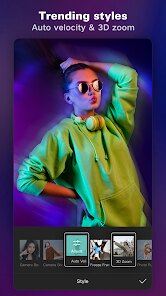
CapCut, developed by Bytedance Pte. Ltd., is a comprehensive and surprisingly powerful video editing application designed for the modern content creator. Its core purpose is to democratize video editing, providing professional-grade tools in an accessible, mobile-first package. The app excels at transforming raw clips into polished videos suitable for social media platforms like TikTok, Instagram Reels, and YouTube Shorts. It solves the common problem of needing complex, desktop-level editing capabilities—such as keyframe animation, multi-layer compositing, and advanced color grading—while on the go or without expensive software.
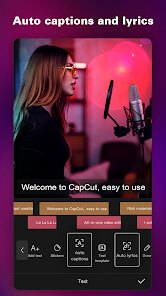
The target user group is broad, encompassing social media enthusiasts, aspiring filmmakers, small business owners, and educators. Whether you are a vlogger needing quick cuts and trendy effects or a marketer creating promotional content, CapCut addresses the need for speed, quality, and ease. From my experience, the core features work exceptionally well. The timeline is intuitive, performance is smooth even with multiple 4K layers, and the auto-captions feature has been a game-changer for boosting accessibility and engagement on my videos. It effectively solved my problem of creating subtitles manually, saving hours of tedious work.
Additional features like the vast template library and one-tap aesthetic filters add tremendous value, especially when inspiration is low. I would confidently recommend CapCut to anyone who creates video content regularly for digital platforms. It is most useful for scenarios requiring quick turnaround without sacrificing professional polish, such as daily social media posts, client project drafts, or educational tutorials where clear visual communication is key.
Key Functional Highlights
- 🎬 Pro-Level Timeline Editing: Offers a multi-track timeline for video, audio, text, and effects, supporting keyframe animation for precise control over movement, scaling, and opacity.
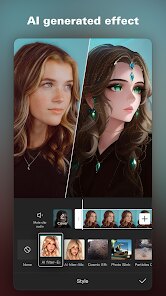
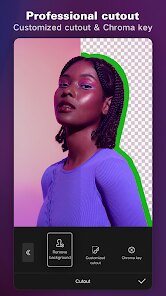
- 🤖 AI-Powered Tools: Features auto-captions that generate accurate subtitles from speech, along with AI-driven effects like background removal and style transfer to streamline editing.
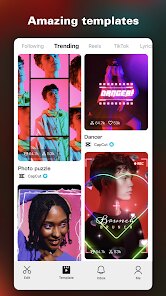
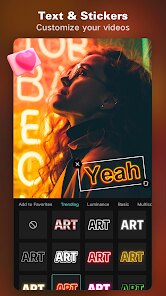
- 📱 Vast Effects & Template Library: Provides a constantly updated collection of trending filters, transitions, stickers, and pre-made templates that sync with popular social media trends.
- 🎵 Advanced Audio Control: Includes a rich royalty-free music and sound effects library, voice recording, and detailed audio editing tools like ducking and fade in/out.
Advantages & Benefits
- ✅ Zero-Cost Professional Tools: Delivers high-end editing features like curve speed adjustment and chroma key completely free, with no watermarks on exports.
- ✅ Exceptional Usability: Complex functions are presented in an intuitive interface, making advanced techniques accessible to beginners without a steep learning curve.
- ✅ Cloud Syncing & Collaboration: Projects can be saved to the cloud, allowing seamless work across different devices and enabling team collaboration on edits.
- ✅ Optimized for Social Media: Export presets are perfectly tailored for all major platforms, ensuring the correct aspect ratio and resolution every time.
Areas for Improvement
- ⚠️ Privacy Considerations: As a Bytedance product, some users express ongoing concerns about data handling practices, requiring careful review of the privacy policy.
- ⚠️ Internet Dependency: While core editing works offline, accessing the template library, cloud saves, and some AI features requires a stable internet connection.
- ⚠️ Occasional Performance Hiccups: On older device models, applying multiple complex effects or editing very high-resolution footage can sometimes lead to lag or crashes.
- ⚠️ Template Overuse Risk: The ease of using trendy templates can lead to a homogenized look in content if not customized sufficiently.
Recommended Apps
![]()
Depression Test
Inquiry Health LLC4.5

![]()
NAMA: Flower language keyboard
Andromeda App3.7![]()
Eye Test
arabtok0![]()
Emoji Battery Widget
MIA Studio Inc0![]()
Emoji Home: Make Messages Fun
Emoji Home4.5![]()
Clue Cycle & Period Tracker
Clue Period Tracker by BioWink4.4![]()
YouTube
Google LLC4.1![]()
Brainova: IQ Test & Logic Game
FALCON GAME4.5![]()
Funny Gay Test
Test Master Lab4.2![]()
Cool CallScreen-Birthday Theme
Hendrickson4.1![]()
Testerup: Test & Earn Rewards
aestimium GmbH4.2![]()
Lip Fall Challenge: Fun Filter
Braly JSC0![]()
AgeCam: Face Age Changer App
Fillog Studio3.5![]()
Finelo: Master Trading
Finelo Limited4.3![]()
Waymo
Waymo LLC4.9














You May Like
-
![]()
Screen Recorder Video Recorder
Video Screen Recorder, Voice Audio Editor, Cut MP34.4 -
![]()
Anima
ChristopherMoore03.2 -
![]()
Curso Inglés, Aprender Inglés
TomatoTB4.9 -
![]()
Girly Lock Screen Wallpaper
Prometheus Interactive LLC3.9 -
![]()
Emoji Home: Make Messages Fun
Emoji Home4.5 -
![]()
AR Draw Sketch - Trace & Paint
MØ Studios0 -
![]()
FestAI: Ghost Detector App
Now Tech3.2 -
![]()
U-Haul
U-Haul International3.2 -
![]()
TeraBox: 1TB Cloud & AI Space
Flextech Inc.4.4 -
![]()
Netflix
Netflix, Inc.3.9 -
![]()
Gay Test - Sexuality Quizzes
Zoshi4 -
![]()
FIFA+ Stream Live Football TV
FIFA3.9 -
![]()
Zodiac & Horoscope: CosmicVibe
Mysterious Apps LLC4.7 -
![]()
Fingerprint Scan Simulator
Dream-Up3.6 -
![]()
Meta AI
Meta Platforms, Inc.4.7