Photo Tool
COLIFER LAB
Installs
10M+
Developer
COLIFER LAB
-
Category
Video Players & Editors
-
Content Rating
Rated for 3+
Developer Email
Privacy Policy
https://www.colifer.vip/pt/pp.html
Screenshots


Expert Review
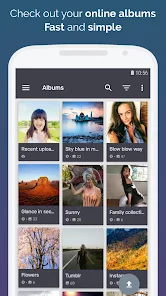
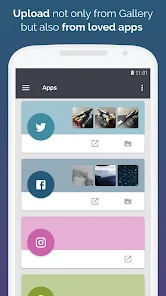
Photo Tool by COLIFER LAB is a comprehensive mobile application designed to streamline and enhance the process of editing and managing photos directly on your smartphone. Its core purpose is to provide a powerful, all-in-one toolkit that empowers users to transform ordinary images into visually striking creations without the need for complex desktop software. The app consolidates a wide array of editing functions, from basic adjustments like cropping and rotating to advanced AI-powered enhancements and artistic filters.
This app is ideally suited for social media enthusiasts, content creators, bloggers, and anyone who regularly shares photos online and desires more control over their visual content. It solves the common problem of needing multiple apps for different editing tasks by bundling essential tools into a single, cohesive platform. From my experience, the core editing suite is remarkably robust and responsive. Features like the object remover and background changer work with impressive accuracy, effectively solving the issue of unwanted elements or bland backdrops in my travel and family photos. The additional creative tools, such as the collage maker and text overlay options, add significant value by enabling the creation of polished, multi-element graphics for my social media posts directly within the app.
I would highly recommend Photo Tool to intermediate mobile photographers who have outgrown basic filter apps and seek more granular control. It is most useful for users who need to perform quick yet sophisticated edits on the go, whether for enhancing product photos for an online store, creating engaging content for Instagram, or simply perfecting personal snapshots before sharing them with friends and family.
Key Functional Highlights
- 🎨 AI-Powered Enhancements: Leverages artificial intelligence for one-tap photo improvement, automatic object removal, and intelligent background replacement, saving significant manual editing time.
- ✂️ Comprehensive Editing Suite: Offers a full spectrum of tools including precise cropping, rotation, exposure, contrast, saturation, and color temperature adjustments for complete creative control.
- 🖼️ Creative & Collage Tools: Features a built-in collage maker with various layouts and the ability to add custom text, stickers, and frames to design unique multi-photo compositions.
- 🔧 Batch Processing: Allows users to apply the same edit or filter to multiple photos simultaneously, a huge time-saver for processing large sets of images from an event or shoot.
Advantages & Benefits
- 🚀 All-in-One Convenience: Eliminates the need to switch between multiple apps, providing a surprisingly deep and unified editing workflow in a single package.
- 🤖 Smart AI Tools: The object removal and background changer are impressively effective for a mobile app, often producing clean results that rival more complex software.
- 📱 Intuitive Interface: The layout is clean and logical, making advanced features accessible without a steep learning curve, which is perfect for mobile use.
- ⚡ Solid Performance: Edits are applied quickly and previews render smoothly, even when using multiple adjustment layers or AI features.
Areas for Improvement
- 📶 Ad-Supported Model: The free version includes frequent full-screen video ads that can disrupt the editing flow, pushing users toward the premium subscription.
- 💾 Export Quality Concerns: Some users report a slight loss in image detail or compression artifacts when saving photos, especially after multiple edits.
- 📖 Limited Advanced Tutorials: While the interface is intuitive, deeper explanations for advanced tools like curve adjustments or layer blending are not provided in-app.
- 🔒 Premium Paywall: Several of the most powerful AI features and premium filters are locked behind a subscription, limiting the free version's capability.
Recommended Apps
![]()
Reverse Voice - Voice Changer
Hammad670
![]()
Famous Birthdays
Famous Birthdays4.1![]()
Neku: OC character creator
Neku Avatar Studio4.6
![]()
AstroSoul: Astro Palm Reader
Appmaking LTD4.5![]()
Wonder - LGBTQ+ Dating App
Bumpy Inc.4.3![]()
Chai: Chat AI Platform
Chai Research Corp.4.3![]()
Gorilla Skins for Monkey Arena
Dumitru Boico4![]()
Funny Ranking Filter Challenge
TriverSoft0![]()
My Name Meaning
KDR Games4![]()
Waymo
Waymo LLC4.9![]()
Silly Sounds: Prank Sounds App
Zenspin by Mindscape Applab llc0![]()
Prank Call & Funny Video
TeH Software0![]()
Moises: The Musician's AI App
Moises Systems4.5![]()
ImagineArt: AI Art & Design
Vyro AI4.3![]()
Prank Sounds: Hair Cut & Fart
Smart Utilities Hub4.2













You May Like
-
![]()
Pregnancy App & Baby Tracker
BabyCenter4.9 -
![]()
Meta AI
Meta Platforms, Inc.4.7 -
![]()
Cat & Dog Translator Simulator
Notebook & Notepad & CV & Resume Example & Piano4 -
![]()
Direct Express®
i2c Inc.4.3 -
![]()
Spider Hero Video Prank Call
Game Dot Studio3.9 -
![]()
Raccoon Prank Call & Chat
TopHopStudio LTD0 -
![]()
Pollo AI: AI Video Generator
COCOSOFT TECHNOLOGY PTE. LTD.4.4 -
![]()
Life360: Live Location Sharing
Life3604.6 -
![]()
Fingerprint Scan Simulator
Dream-Up3.6 -
![]()
DramaWave - Dramas & Reels
SKYWORK AI PTE.LTD.4.5 -
![]()
GPS Camera Timestamp & Geotag
Betasoft Mobile0 -
![]()
GPS Map Camera - Timestamp
Sliver AI Photo Editor0 -
![]()
Photo Tool
COLIFER LAB4 -
![]()
American Airlines
American Airlines, Inc.4.8 -
![]()
Ford™
Ford Motor Co.4.7