CapCut - Video Editor
Bytedance Pte. Ltd.
Installs
1B+
Developer
Bytedance Pte. Ltd.
-
Category
Video Players & Editors
-
Content Rating
Teen
Developer Email
Privacy Policy
https://sf16-draftcdn-sg.ibytedtos.com/obj/ies-hotsoon-draft-sg/capcut/via_clause_privacy_policy_en.html
Screenshots
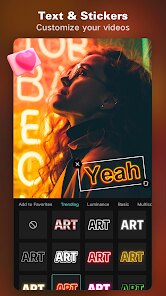
Expert Review
CapCut, developed by Bytedance Pte. Ltd., is a comprehensive and surprisingly powerful video editing application designed for the modern content creator. Its core purpose is to democratize video editing, providing professional-grade tools in an accessible, mobile-first package. The app excels at transforming raw clips into polished videos suitable for social media platforms like TikTok, Instagram Reels, and YouTube Shorts. It solves the common problem of needing complex, desktop-level editing capabilities—such as keyframe animation, multi-layer compositing, and advanced color grading—while on the go or without expensive software.
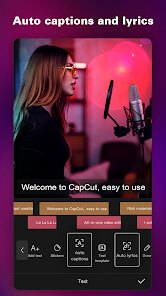
The target user group is broad, encompassing social media enthusiasts, aspiring filmmakers, small business owners, and educators. Whether you are a vlogger needing quick cuts and trendy effects or a marketer creating promotional content, CapCut addresses the need for speed, quality, and ease. From my experience, the core features work exceptionally well. The timeline is intuitive, performance is smooth even with multiple 4K layers, and the auto-captions feature has been a game-changer for boosting accessibility and engagement on my videos. It effectively solved my problem of creating subtitles manually, saving hours of tedious work.
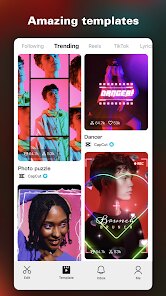
Additional features like the vast template library and one-tap aesthetic filters add tremendous value, especially when inspiration is low. I would confidently recommend CapCut to anyone who creates video content regularly for digital platforms. It is most useful for scenarios requiring quick turnaround without sacrificing professional polish, such as daily social media posts, client project drafts, or educational tutorials where clear visual communication is key.
Key Functional Highlights
- 🎬 Pro-Level Timeline Editing: Offers a multi-track timeline for video, audio, text, and effects, supporting keyframe animation for precise control over movement, scaling, and opacity.
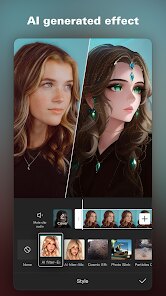
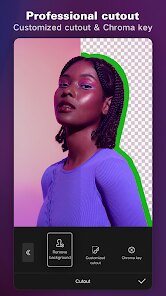
- 🤖 AI-Powered Tools: Features auto-captions that generate accurate subtitles from speech, along with AI-driven effects like background removal and style transfer to streamline editing.
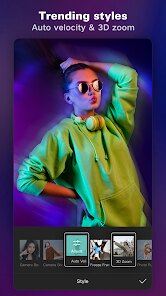
- 📱 Vast Effects & Template Library: Provides a constantly updated collection of trending filters, transitions, stickers, and pre-made templates that sync with popular social media trends.
- 🎵 Advanced Audio Control: Includes a rich royalty-free music and sound effects library, voice recording, and detailed audio editing tools like ducking and fade in/out.
Advantages & Benefits
- ✅ Zero-Cost Professional Tools: Delivers high-end editing features like curve speed adjustment and chroma key completely free, with no watermarks on exports.
- ✅ Exceptional Usability: Complex functions are presented in an intuitive interface, making advanced techniques accessible to beginners without a steep learning curve.
- ✅ Cloud Syncing & Collaboration: Projects can be saved to the cloud, allowing seamless work across different devices and enabling team collaboration on edits.
- ✅ Optimized for Social Media: Export presets are perfectly tailored for all major platforms, ensuring the correct aspect ratio and resolution every time.
Areas for Improvement
- ⚠️ Privacy Considerations: As a Bytedance product, some users express ongoing concerns about data handling practices, requiring careful review of the privacy policy.
- ⚠️ Internet Dependency: While core editing works offline, accessing the template library, cloud saves, and some AI features requires a stable internet connection.
- ⚠️ Occasional Performance Hiccups: On older device models, applying multiple complex effects or editing very high-resolution footage can sometimes lead to lag or crashes.
- ⚠️ Template Overuse Risk: The ease of using trendy templates can lead to a homogenized look in content if not customized sufficiently.
Recommended Apps
![]()
AI Art Generator - AI Yearbook
Smart AI DEV3.9

![]()
Afterpay - Buy Now Pay Later
Afterpay3.8![]()
Anime Shimeji Screen Pets
NovaSoftLC Labs3.9![]()
Parallax: 4K 3D Live Wallpaper
Nebuchadnezzar DOO4.6![]()
Telegram
Telegram FZ-LLC4.2![]()
Elevate - Brain Training Games
The Mind Company4.6![]()
Heaven: Gay & LGBT+ Dating
Paradiz Social Ltd3.2![]()
Drone App: Forecast for UAV
Go Dreams4.4![]()
Google Gemini
Google LLC4.6![]()
Customuse: Skins Maker Roblox
Customuse4.7![]()
Brainzzot Universe: Prank Call
TeH Software0![]()
Prank Sounds: Hair Cut & Fart
Smart Utilities Hub4.2![]()
Photo Editor - Lumii
InShot Video Editor4.7![]()
GigaBody: AI Muscle filter
Bellential Inc.4.4![]()
FunVid: Funny Face Filters
Vibe Filter Club0











You May Like
-
![]()
Moonphase Filter: Love Test
Braly JSC0 -
![]()
How Did You Die In The Past?
BuzzMoy0 -
![]()
Secret Crush Detector App
Hopeitz Software4.8 -
![]()
Walli - HD, 4K Wallpapers
Tap AI4.4 -
![]()
Ace Hardware
Ace Hardware Corporation4.7 -
![]()
Planner 5D: Home Design, Decor
Planner 5D4.1 -
![]()
Snapchat
Snap Inc4.1 -
![]()
Live wallpaper - dope & anime
Jelly Dev4.4 -
![]()
WhatsApp Messenger
WhatsApp LLC4.5 -
![]()
Eye Test
arabtok0 -
![]()
Uber - Request a ride
Uber Technologies, Inc.4.5 -
![]()
Prank Call & Funny Video
TeH Software0 -
![]()
Bug Filter - Bug on Face Prank
Hades Bit0 -
![]()
Dola: Smart AI Assistant
SPRING (SG) PTE. LTD.3.9 -
![]()
Crush Love Finder: Fun Filter
Braly JSC0