Photo Editor - Lumii
InShot Video Editor
Installs
50M+
Developer
InShot Video Editor
-
Category
Video Players & Editors
-
Content Rating
Rated for 3+
Developer Email
Privacy Policy
http://inshotapp.com/lumii/website/privacypolicy.html
Screenshots
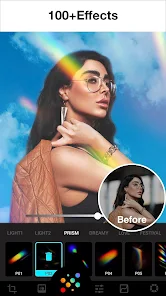
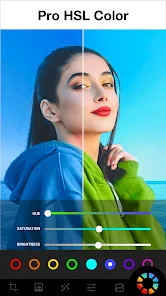
Expert Review
Lumii is a comprehensive photo editing application designed to transform ordinary images into visually striking works of art. Its core purpose is to provide users with a powerful yet intuitive toolkit for enhancing, retouching, and creatively manipulating their photos. The app goes beyond basic filters, offering advanced features like professional-grade color grading, AI-powered effects, and a vast library of overlays and textures. It's built for a wide range of users, from social media enthusiasts looking to elevate their Instagram feed to amateur photographers seeking desktop-level editing capabilities on their mobile devices. The fundamental problem it solves is the gap between complex professional software and overly simplistic filter apps, delivering high-quality results without a steep learning curve.
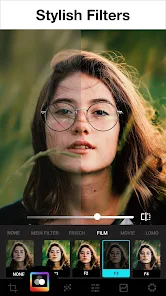
In my experience, Lumii's core features perform exceptionally well. The adjustment tools for exposure, contrast, and color are precise and responsive. The real standout is its collection of artistic filters and AI effects, which can apply sophisticated styles—from vintage film looks to modern graphic art—with a single tap. Additional features like the portrait retouching tools (skin smoothing, blemish removal) and the extensive library of light leaks, bokeh effects, and textures add significant value, allowing for deep customization. I used Lumii to quickly enhance a batch of travel photos that were shot in flat lighting; the app's 'Pro Color' tools and selective editing features helped me recover details in the shadows and make the colors pop, saving me from having to transfer the images to my computer for editing.
I would highly recommend Lumii to content creators, bloggers, and anyone who regularly shares photos online and wants to maintain a cohesive, professional aesthetic. It is most useful for scenarios requiring quick, high-impact edits—such as preparing images for social media posts, creating graphics for a blog, or retouching portrait photos before sharing them with friends and family. Its balance of power and simplicity makes it an ideal daily driver for mobile photo enhancement.
Key Functional Highlights
- ✨ Professional Color & Light Tools: Offers granular control over exposure, highlights, shadows, temperature, tint, and individual RGB channels for precise color correction and grading.
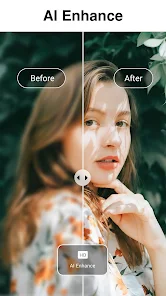
- ✨ AI-Powered Artistic Effects: Features a suite of intelligent filters that analyze your photo to apply complex artistic styles, portrait enhancements, and background effects automatically.
- ✨ Vast Overlay & Texture Library: Includes hundreds of customizable elements like light leaks, dust and scratch textures, bokeh shapes, and geometric patterns to add depth and mood.
- ✨ Advanced Retouching Suite: Provides tools specifically for portraits, including skin smoothing, blemish removal, teeth whitening, and eye brightening for flawless results.
Advantages & Benefits
- ✅ Depth and Quality of Filters: The artistic and AI filters are genuinely sophisticated, producing results that often surpass typical mobile app effects, mimicking high-end presets.
- ✅ Non-Destructive, Layer-Like Editing: Many effects and overlays can be adjusted or removed after application, offering a flexible workflow similar to layers in professional software.
- ✅ User Interface and Experience: The layout is clean and logical, making advanced features discoverable without feeling overwhelming, which is a difficult balance to achieve.
- ✅ Regular Content Updates: The developers frequently add new filter packs, overlays, and tools, keeping the app fresh and expanding its creative potential.
Areas for Improvement
- ⚠️ Performance with High-Resolution Files: Editing very large, high-megapixel photos can sometimes lead to slight lag or slower processing times on older device models.
- ⚠️ Premium Feature Cost: While the app is free to download, access to the full library of premium filters, overlays, and advanced tools requires a subscription, which may be a barrier for some.
- ⚠️ Occasional Overwhelm for Beginners: The sheer number of options, while a strength, might initially intimidate users who are completely new to photo editing concepts.
- ⚠️ Export Compression: Users need to manually select the highest quality export settings; the default can sometimes apply compression that is noticeable upon very close inspection.
Recommended Apps
![]()
Wise: International Transfers
Wise Payments Ltd.4.7

![]()
Love Tester Find Real Love App
Happy-verse4.6![]()
iCut: Video Editor & Maker
iCut -Video Editor & Video Maker App3.8![]()
Gay Meter - no offence
tharunoptimus4.8![]()
Fazee - Funny Face Filter
Vibe Filter Club0![]()
Anime Shimeji Screen Pets
NovaSoftLC Labs3.9![]()
ITVX
ITV PLC4![]()
Inura: Astrology & Horoscope
Improvs3.3![]()
Walli - HD, 4K Wallpapers
Tap AI4.4![]()
Tubi: Free Movies & Live TV
Tubi TV4.7![]()
GPS Map Camera - Timestamp
Sliver AI Photo Editor0![]()
Canva: AI Photo & Video Editor
Canva4.8![]()
HotPads Rent Apartments
HotPads (Owned by ZillowGroup)4.6![]()
Life360: Live Location Sharing
Life3604.6![]()
Anime Avatar: Couple Maker
MegaMod Studio3











You May Like
-
![]()
Period Calendar Period Tracker
Simple Design Ltd.4.9 -
![]()
Emoji Battery Widget
MIA Studio Inc0 -
![]()
Elevate - Brain Training Games
The Mind Company4.6 -
![]()
Halloween Call: Monster
TeH Software0 -
![]()
NAMA: Flower language keyboard
Andromeda App3.7 -
![]()
Prank Call: Fake Video Prank
MoranJiyounge3.7 -
![]()
Kissing Test Calculator
We Love pranks3 -
![]()
Girly Wallpapers
Wallpaper World Designs4.7 -
![]()
Anime Avatar: Couple Maker
MegaMod Studio3 -
![]()
Reverse Voice - Voice Changer
Hammad670 -
![]()
Video call Elssa
TOSSINGAME LTD0 -
![]()
Voice Changer – Voice Effects
All Excellent Apps0 -
![]()
Santa's Naughty List App
Steven J Q McAnena3.6 -
![]()
Brainzzot Universe: Prank Call
TeH Software0 -
![]()
Hair Clipper Prank, Fart Sound
duff hl studio4.1