Canva: AI Photo & Video Editor
Canva
Installs
500M+
Developer
Canva
-
Category
Art & Design
-
Content Rating
Everyone 10+
Developer Email
Privacy Policy
https://about.canva.com/privacy-policy/
Screenshots


Expert Review
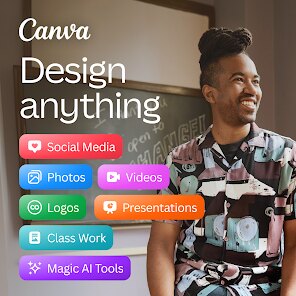
Canva has evolved far beyond its origins as a simple graphic design tool. The AI Photo & Video Editor app brings a substantial portion of that creative power to your phone, letting you craft anything from polished social media posts to short video clips with a surprising degree of finesse. Its primary aim is to democratize design, offering a vast library of templates, elements, and now, a suite of generative AI tools, all within a single, user-friendly interface. This isn't just a scaled-down version of the web app; it's a purpose-built mobile experience that feels both powerful and approachable for everyone from a small business owner to a student pulling together a last-minute presentation.
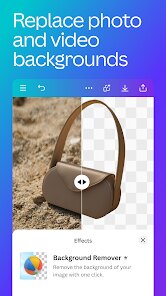
The app's core strength lies in its seamless integration of design and editing workflows. You can start from a blank canvas or a template and then effortlessly add your own photos, adjusting them with filters, background removers, and a set of intuitive sliders. The Magic Studio, powered by AI, is particularly impressive for tasks like generating images from text prompts, expanding a photo's borders, or instantly cleaning up unwanted objects from a shot. The video editor, once a weak point, now feels robust, allowing for basic trimming, splitting, and the addition of transitions and soundtracks that can be synced with a simple tap. During my testing, I found the Magic Eraser to be astonishingly effective at removing photobombers from a beach picture, and the background remover handled complex hair details better than many standalone apps I've used. This suite of tools genuinely saved me from opening multiple different programs to get the same job done.
For anyone whose daily life involves creating visual content, this app is practically indispensable. I would wholeheartedly recommend it to content creators, marketing professionals on the go, or anyone managing a brand's social media presence. It is equally beneficial for educators, event organizers, and small business owners who need to produce eye-catching flyers, announcements, or promotional graphics without hiring a designer. If you have ever struggled with complex editing software or lacked the skills to bring a creative vision to life, Canva's guided and template-first approach will feel like a superpower. While the most advanced AI features are tucked behind a Pro subscription, the free version offers an enormous range of capabilities that are more than sufficient for most everyday tasks, making it a genuinely invaluable tool in my own mobile arsenal for both professional and personal projects.
Key Functional Highlights
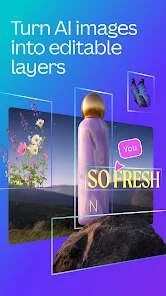
- 🎨 Magic Studio: This is the heart of the AI functionality. You get access to tools like Magic Media for generating custom images from text, Magic Edit for inpainting and replacing objects, and Magic Expand which cleverly extrapolates the edges of any photo to resizing it for a different aspect ratio without cropping. It feels like having a mini version of Photoshop's generative fill, right in your pocket.
- ⏪ One-Tap Branding & Resize: For social media managers, this is a godsend. You can upload your brand kit with fonts, logos, and colors, and then with a single tap, resize any existing design to fit a story, a post, or a banner. It maintains all your elements perfectly, saving hours of manual adjustment and ensuring your content always looks consistent across every platform.
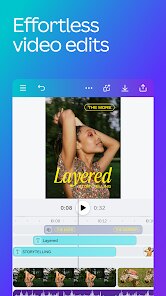
- 🎬 The New Video Editor: The video suite has been significantly upgraded. It now supports multi-track editing, letting you overlay a voiceover, background music, and text on top of your video clips. The "Beat Sync" feature automatically aligns your video cuts to the beat of the chosen soundtrack, which instantly gives your edits a professional and dynamic feel that would typically require much more complex software to achieve.
Advantages & Benefits
- ⚡️ Incredible Speed: Whether it's exporting a final project, applying a filter, or generating an AI image, the processing is impressively quick, which keeps your creative flow uninterrupted.
- 📚 Extensive Template Library: The sheer volume of professionally designed templates for virtually any occasion is staggering. It eliminates the "blank page" problem and provides a perfect starting point for anyone, regardless of their design skill.
- 🤝 Exceptional Collaboration: Sharing a design is simple, and the real-time collaboration features allow multiple users to comment and edit a project simultaneously, mirroring a streamlined, on-the-go team workflow.
Areas for Improvement
- 💸 Feature Paywall: The most powerful AI functions, like Magic Media and Background Remover, are locked behind the Pro tier. While understandable, it can be frustrating for free users who see the tools advertised only to find they are inaccessible.
- 🔊 Music Selection: The vast stock music library is searchable by genre and mood, but lacks a more granular search function. For instance, you cannot search for "mellow acoustic guitar with a fast tempo," which would make finding the exact perfect track a much faster process.
- 📤 Occasional Export Hiccups: On a few rare occasions with very large, multi-layer video projects, the export process stuttered or failed on an older test device, requiring me to close the app and retry.
Recommended Apps
![]()
AI Art Generator - AI Yearbook
Smart AI DEV3.9

![]()
Afterpay - Buy Now Pay Later
Afterpay3.8![]()
Anime Shimeji Screen Pets
NovaSoftLC Labs3.9![]()
Parallax: 4K 3D Live Wallpaper
Nebuchadnezzar DOO4.6![]()
Telegram
Telegram FZ-LLC4.2![]()
Elevate - Brain Training Games
The Mind Company4.6![]()
Heaven: Gay & LGBT+ Dating
Paradiz Social Ltd3.2![]()
Drone App: Forecast for UAV
Go Dreams4.4![]()
Google Gemini
Google LLC4.6![]()
Customuse: Skins Maker Roblox
Customuse4.7![]()
Brainzzot Universe: Prank Call
TeH Software0![]()
Prank Sounds: Hair Cut & Fart
Smart Utilities Hub4.2![]()
Photo Editor - Lumii
InShot Video Editor4.7![]()
GigaBody: AI Muscle filter
Bellential Inc.4.4![]()
FunVid: Funny Face Filters
Vibe Filter Club0













You May Like
-
![]()
Moonphase Filter: Love Test
Braly JSC0 -
![]()
How Did You Die In The Past?
BuzzMoy0 -
![]()
Secret Crush Detector App
Hopeitz Software4.8 -
![]()
Walli - HD, 4K Wallpapers
Tap AI4.4 -
![]()
Ace Hardware
Ace Hardware Corporation4.7 -
![]()
Planner 5D: Home Design, Decor
Planner 5D4.1 -
![]()
Snapchat
Snap Inc4.1 -
![]()
Live wallpaper - dope & anime
Jelly Dev4.4 -
![]()
WhatsApp Messenger
WhatsApp LLC4.5 -
![]()
Eye Test
arabtok0 -
![]()
Uber - Request a ride
Uber Technologies, Inc.4.5 -
![]()
Prank Call & Funny Video
TeH Software0 -
![]()
Bug Filter - Bug on Face Prank
Hades Bit0 -
![]()
Dola: Smart AI Assistant
SPRING (SG) PTE. LTD.3.9 -
![]()
Crush Love Finder: Fun Filter
Braly JSC0