Video Live Wallpaper Maker
ZipoApps
Installs
10M+
Developer
ZipoApps
-
Category
Productivity
-
Content Rating
Rated for 3+
Developer Email
Privacy Policy
https://zipoapps.com/videowallpaper/privacy
Screenshots
Expert Review
Video Live Wallpaper Maker by ZipoApps transforms your smartphone's home and lock screens into dynamic, personalized displays. This app allows users to set any video from their gallery as a live wallpaper, effectively turning their device into a unique canvas for memories, favorite clips, or stunning visual loops. Its core purpose is to break the monotony of static backgrounds, offering a vibrant and engaging way to personalize one's device.
The app is designed for users who value deep personalization and visual flair. It solves the problem of generic, uninspired phone backgrounds by giving users full creative control. Whether you want to showcase a memorable vacation video, a clip from a favorite movie, a calming nature scene, or an abstract animation, this app makes it simple. It caters to both casual users looking for a fun change and enthusiasts who enjoy customizing every aspect of their device's interface.
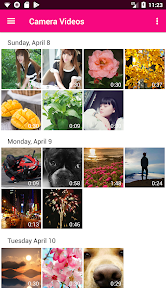
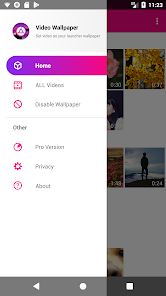
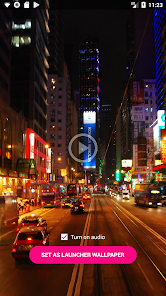
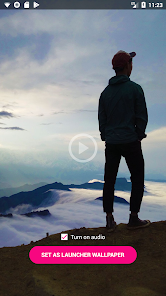
The core feature of setting a video wallpaper works reliably. The process is straightforward: select a video, trim it if needed, and apply it. The app generally handles playback smoothly, creating a seamless loop. Additional features like the ability to set different wallpapers for the home and lock screens, adjust playback speed, or mute the audio add significant value, allowing for fine-tuned customization. In my experience, using a short, looping clip of ocean waves created a surprisingly calming effect every time I glanced at my phone, effectively turning my lock screen into a personal moment of zen. It solved the need for a more lively and personal touch that static wallpapers couldn't provide.
I would recommend Video Live Wallpaper Maker to anyone bored with standard wallpapers and eager to express their personality through their device. It is most useful for users who have specific video clips they cherish—like pet videos, travel highlights, or favorite artistic loops—and want to see them daily. It's also a great tool for those who use their phone for presentations or as a digital photo frame, as it can display compelling visual content prominently.
Key Functional Highlights
- 🎬 Video-to-Wallpaper Conversion: Easily convert any video from your gallery into a live background for your home or lock screen with just a few taps.
- 🛠️ Dual-Screen Customization: Set different video wallpapers for your home screen and lock screen independently, allowing for varied visual themes.
- ✂️ Built-in Video Editor: Trim your clips directly within the app to select the perfect segment for your looping wallpaper, ensuring a clean start and end point.
- ⚙️ Playback Controls: Adjust the video playback speed and mute the audio to create the perfect silent, slow-motion, or sped-up visual effect.
Advantages & Benefits
- 👍 Intuitive Process: The setup is remarkably user-friendly. Selecting, editing, and applying a video is a quick and hassle-free experience.
- 👍 Strong Performance: Once set, the wallpapers typically run smoothly without causing significant battery drain or lag on the home screen.
- 👍 High Customization: The separate settings for lock and home screens, plus editing tools, offer a high degree of personalization.
- 👍 Creative Freedom: It unlocks the potential of your video library, turning ordinary clips into engaging, moving artwork.
Areas for Improvement
- 👎 Potential Battery Impact: As with any live wallpaper, especially video-based ones, there can be a noticeable impact on battery life compared to a static image.
- 👎 Occasional Stability: On some older or less powerful devices, the live wallpaper might occasionally stutter or fail to load immediately.
- 👎 Limited Advanced Features: It lacks more advanced editing options like filters, overlays, or resolution optimization for different screen types.
- 👎 Ad-Supported Model: The free version includes advertisements, which can be intrusive during the setup and browsing process.
Recommended Apps
![]()
Perfect365 Video Makeup Editor
Perfect365, Inc.4.7

![]()
Wise: International Transfers
Wise Payments Ltd.4.7![]()
Lethal Love: a Yandere game
AniByte!4.4![]()
Face DNA: AI Ethnicity Test
Ineptlyawesome4![]()
Gopuff - Grocery Delivery
Gopuff4.5![]()
Chatbot AI & Smart Assistant
Codespace Dijital4.5![]()
Funny Gay Test
Test Master Lab4.2![]()
Zoom - One Platform to Connect
zoom.us4.1![]()
AnimalFace - face types test
Lucky Puzzle Team4![]()
Wallpaper 4K, HD – Wallcraft
Nebuchadnezzar DOO4.4![]()
Neku: OC character creator
Neku Avatar Studio4.6![]()
Toyota
Toyota Motor North America, Inc.4.7![]()
Funny Insect Prank Filter
GAdventure0![]()
Dog Prank Call & Chat
GOBEEZ YAZILIM TİCARET3.4![]()
Weather Radar & Weather Live
Avn Global Application4













You May Like
-
![]()
Instagram
Instagram3.9 -
![]()
Calorie Control & Diet Tracker
Willson Studio3.8 -
![]()
Pollo AI: AI Video Generator
COCOSOFT TECHNOLOGY PTE. LTD.4.4 -
![]()
Affirm: Buy now, pay over time
Affirm, Inc4.7 -
![]()
TouchTunes: Live Bar JukeBox
Touchtunes Interactive Networks3.2 -
![]()
Monster Girl Maker 2
GHOULKISS4.3 -
![]()
Mini Quiz Filter Challenge
GjangHa3.9 -
![]()
Spotify: Music and Podcasts
Spotify AB4.3 -
![]()
Sora by OpenAI
OpenAI4.7 -
![]()
How Old Are Your Ears Fun Test
team5stars0 -
![]()
Live Wallpapers HD 4K
Wallpaper app4.4 -
![]()
Wise: International Transfers
Wise Payments Ltd.4.7 -
![]()
Heaven: Gay & LGBT+ Dating
Paradiz Social Ltd3.2 -
![]()
Find Your Phone By Clap
Trusted App Global4.5 -
![]()
PayPal - Send, Shop, Manage
PayPal Mobile4.3