

Remote Play Controller for PS
Vulcan Labs
Installs
5M+
Developer
Vulcan Labs
-
Category
Productivity
-
Content Rating
Everyone
Developer Email
+84868189312
Privacy Policy
http://vulcanlabs.co/privacy-policy/
Screenshots



Expert Review
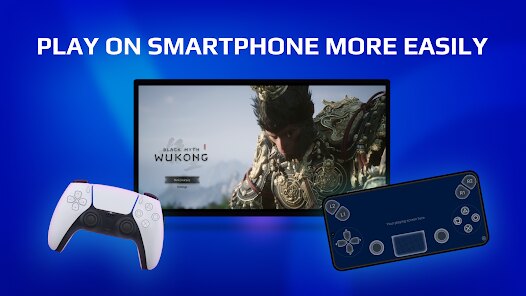
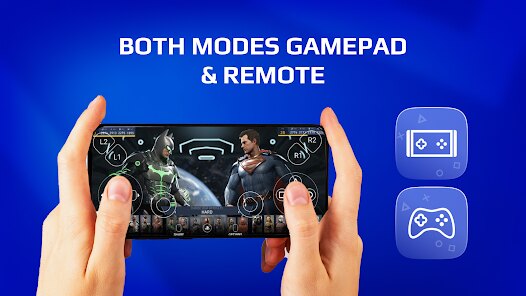
Remote Play Controller for PS by Vulcan Labs is a dedicated mobile application designed to transform your smartphone into a fully functional wireless controller for your PlayStation 4 or PlayStation 5 console. Its core purpose is to provide a seamless remote play experience, allowing you to play your favorite games even when you're away from your main TV. This is achieved by connecting your mobile device directly to your console over the same Wi-Fi network.
This app is a lifesaver for gamers in multi-user households or for anyone whose primary TV is often occupied. It solves the specific problem of console access by enabling gameplay directly on your phone or tablet. From my own experience, the core features work remarkably well. The connection is stable with minimal input lag on a good network, and the on-screen layout is a faithful recreation of a DualSense controller. I've used it to continue my game progress from the comfort of my bed, which was incredibly convenient. The additional features, like customizable touch zones and haptic feedback intensity, genuinely add value by letting you tailor the virtual controller to your preference.
I would highly recommend this app to any PlayStation owner who finds themselves frequently competing for TV time or who simply enjoys the flexibility of playing from different locations within their home. It is most useful in scenarios where the main display is unavailable, but you still want to dive into your gaming session without interruption.
Key Functional Highlights
- 🎮 Full Controller Emulation: Accurately mirrors the layout and functionality of a standard DualSense or DualShock 4 controller, including all face buttons, triggers, bumpers, and analog sticks.
- 🎮 Stable Low-Latency Connection: Leverages your local Wi-Fi network to create a direct link with your PS4 or PS5, ensuring responsive controls for a smooth gaming experience.
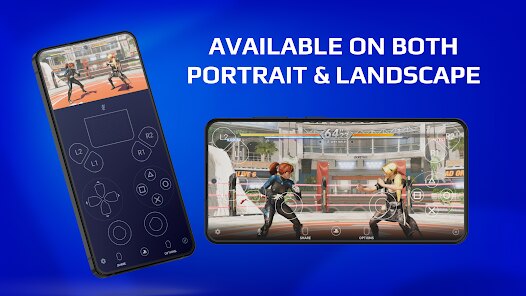
- 🎮 Customizable Touch Interface: Allows you to adjust the size, position, and transparency of the virtual buttons and sticks to suit your hand size and gameplay style.
- 🎮 Haptic Feedback Integration: Your device vibrates to simulate controller rumble, providing tactile feedback that enhances immersion during gameplay.
Advantages & Benefits
- 🌟 Incredible Convenience: Offers genuine freedom to play your console games from anywhere in your home without needing the TV.
- 🌟 Faithful Recreation: The on-screen layout is intuitive and mirrors the physical controller almost perfectly, making it easy to adapt.
- 🌟 Cost-Effective: Serves as a reliable backup controller, which is especially useful for local multiplayer sessions.
- 🌟 Regular Updates: The developers consistently work on improving stability and adding support for new features.
Areas for Improvement
- ⚠️ Network Dependent: Performance is entirely reliant on a strong and stable Wi-Fi signal; any network issues result in lag or disconnection.
- ⚠️ Lack of Physical Feel: The touchscreen cannot replicate the tactile feedback of physical buttons and analog sticks, which can affect precision in fast-paced games.
- ⚠️ Battery Drain: Running the app and maintaining a constant connection can significantly drain your mobile device's battery.
- ⚠️ Setup Learning Curve: Initial pairing with the console can be slightly confusing for users unfamiliar with the Remote Play feature's settings.
Recommended Apps
![]()
MyTherapy Pill Reminder
MyTherapy4.8

![]()
What is my name meaning
Code Play0![]()
Video Surveillance Ivideon
Mobile Video Solutions4.4![]()
Sports Predictor: Fantasy Game
Boom Shakalaka Inc4.4![]()
Netflix
Netflix, Inc.3.9![]()
Call Santa Claus & Prank Call
WELLY GLOBAL PUBLISHING3.5![]()
To Do List
Splend Apps4.8![]()
PhotoScan by Google Photos
Google LLC4.2![]()
Google Chat
Google LLC4.4![]()
Inura: Astrology & Horoscope
Improvs3.3![]()
TRANSFLO Mobile+
PegasusTransTech3![]()
Perplexity - Ask Anything
PerplexityAI4.7![]()
My Calendar - Period Tracker
SimpleInnovation4.9![]()
The 99 Store
99 Cents Only Stores4![]()
Motion Ninja Video Editor
changpeng4.4















You May Like
-
![]()
Secret Crush Detector App
Hopeitz Software4.8 -
![]()
Zodiac & Horoscope: CosmicVibe
Mysterious Apps LLC4.7 -
![]()
Publix Delivery & Curbside
Publix Super Markets Inc.4.6 -
![]()
Call Santa Claus: Prank Call
Jaadoo Studio0 -
![]()
Human to Dog Translator
Outlookdaily4.4 -
![]()
Clue Cycle & Period Tracker
Clue Period Tracker by BioWink4.4 -
![]()
Spotify - Music and Podcasts
Spotify AB3.2 -
![]()
Social Messenger All in One
Leo Legaltech Limited4.2 -
![]()
Famous Birthdays
Famous Birthdays4.1 -
![]()
My Name Facts - Name Meaning
videostatus studio4.4 -
![]()
Klover - Instant Cash Advance
Klover Holdings4.1 -
![]()
Fear Test
Freeyourbase0 -
![]()
adidas
adidas4.7 -
![]()
Antistress trivia - Zen Quiz
Quiz & Trivia Games by Mno Go Apps4.8 -
![]()
Halloween Call: Monster
TeH Software0













Disclaimer
1.Allofapk does not represent any developer, nor is it the developer of any App or game.
2.Allofapk provide custom reviews of Apps written by our own reviewers, and detailed information of these Apps, such as developer contacts, ratings and screenshots.
3.All trademarks, registered trademarks, product names and company names or logos appearing on the site are the property of their respective owners.
4. Allofapk abides by the federal Digital Millennium Copyright Act (DMCA) by responding to notices of alleged infringement that complies with the DMCA and other applicable laws.
5.If you are the owner or copyright representative and want to delete your information, please contact us [email protected].
6.All the information on this website is strictly observed all the terms and conditions of Google Ads Advertising policies and Google Unwanted Software policy .



