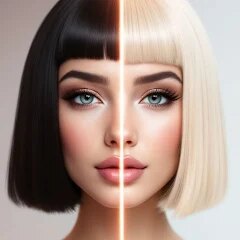
Hair Color & Hairstyle Try On
Toon Tech Ltd
Installs
100K+
Developer
Toon Tech Ltd
-
Category
Generative AI
-
Content Rating
Everyone
Developer Email
Privacy Policy
https://toontech.uk/ai-hairstyle--colour-changer--privacy-policy
Screenshots
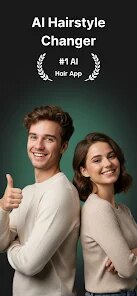
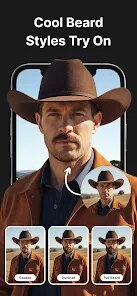
Expert Review
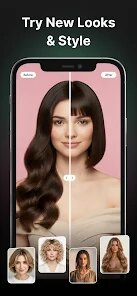
Hair Color & Hairstyle Try On is a virtual makeover tool that lets people experiment with different hairstyles and hair colors before making any real-world changes. The app is especially useful for someone who is thinking about a new look, but feels unsure which direction to go. Instead of guessing, you can upload a photo of yourself and try on a wide variety of styles and shades to see what actually suits you.
The main audience for this app includes people who want to change their hair but are hesitant to commit to a salon visit first. It also helps those who simply enjoy playing around with their appearance for fun, without any pressure. The app promises to eliminate the guesswork and possibly save someone from a bad haircut or a color that doesn't fit their skin tone.
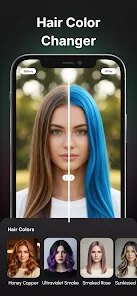
I gave the app a test run with a few photos, and the results were better than I expected. The core feature is the hair color portion. You can choose from a big palette of natural tones like brunette, blonde, and auburn, as well as bolder fantasy shades like pink, purple, and blue. The app does a decent job of mapping the color to your hair in the photo. It does not always get the edges perfect, but it looks realistic enough to give you a solid idea of how a color might look on you. The hairstyle try-on is a nice extra, though the results depend heavily on the photo you upload. Selfies with clear lighting and your hair pulled back work best. For me, the biggest win was trying out a few lighter shades before deciding not to bleach my hair. The app saved me from a lot of damage and regret.
I would recommend Hair Color & Hairstyle Try On to anyone who is thinking about coloring their hair, especially for the first time, or to people who just want a fun way to experiment with different looks from the comfort of home. It is also useful for stylists who want to show clients some possible options before touching their hair. If you are bored with your current style and need some inspiration, this is a good tool to explore without any commitment.
Key Functional Highlights
- 🔹 Real-time color preview: The app lets you see how any color interacts with your skin tone in real time, which is a huge time saver compared to flipping through magazines or guessing from a swatch.
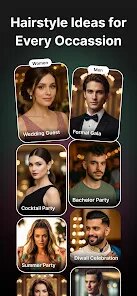
- 🔹 Style library with variety: There is a solid mix of short cuts, long layers, updos, and edgy styles. You are not limited to just a few options, and the library covers a range of face shapes and hair textures.
- 🔹 Save and compare tool: You can save multiple looks side by side, which makes it much easier to narrow down your choices. This feature is especially helpful if you are torn between two or three different colors or cuts.
- 🔹 Undo and reset easily: If you make a mistake or want to start over, the app does not force you to re-upload your photo. A simple reset button gets you back to your original look instantly.
Advantages & Benefits
- - 🟢 User-friendly interface: Navigating the app is straightforward, even for someone who is not very tech-savvy. Everything is labeled clearly, and the controls are responsive.- 🟢 Works with your own photos: You are not stuck with generic models. The ability to use your own face makes the try-on experience feel personal and relevant.- 🟢 No subscription trap: Unlike many beauty apps, this one does not lock core features behind a subscription. You get a solid amount of free content to work with.
Areas for Improvement
- - 🔴 Hairstyle mapping inconsistencies: The app sometimes struggles to blend the hairstyle naturally with your face shape, especially if your photo has odd angles or shadows. It can look a bit cut-and-paste.- 🔴 Color blending is not perfect: On certain hair textures, especially very curly or fine hair, the color overlay can look patchy or unnatural.- 🔴 Limited editing tools: There is no way to manually adjust the hair line or fine-tune the edges. You have to rely on the app's auto-detection, which does not always get it right.
Recommended Apps
![]()
God messages
dragonplay0
![]()
Mini Quiz Filter Challenge
GjangHa3.9
![]()
iGirl: AI Girlfriend
Anima AI Ltd4![]()
Chai: Chat AI Platform
Chai Research Corp.4.3![]()
Wave Live Wallpapers Maker 3D
Live Wallpapers by Wave Studio4.3![]()
Gorilla Skins for Monkey Arena
Dumitru Boico4![]()
FalFal: Astrology, Tarot, Love
FalFal Team4.8![]()
PayByPhone
PayByPhone Technologies Inc .4.9![]()
Telegram
Telegram FZ-LLC4.2![]()
Boom Chip Blast: 2-Player
Black Pyramid 3D Games Studio0![]()
Perfect Me -Face & Body Editor
ryzenrise4.5![]()
Live wallpaper - dope & anime
Jelly Dev4.4![]()
FishAngler: Fishing Guide App
FishAngler, LLC4.3![]()
AstroBella Astrology & Healing
Moonphase Apps GmbH4.7![]()
Fingerprint Scanner App
Zen Solutions Apps4.1







You May Like
-
![]()
Idol Prank Video Call & Chat
84devs Studio0 -
![]()
Monster Call: Prank Video Call
TeH Software4.2 -
![]()
AgeCam: Face Age Changer App
Fillog Studio3.5 -
![]()
Allergy Plus by Pollen.com
IQVIA Inc.3.9 -
![]()
Ace Hardware
Ace Hardware Corporation4.7 -
![]()
Gay Test - Sexuality Quizzes
Zoshi4 -
![]()
FishAngler: Fishing Guide App
FishAngler, LLC4.3 -
![]()
Cool Wallpapers HD Steampunk
Live Wallpapers and Emoji Keyboard Themes4.4 -
![]()
Anime Shimeji Screen Pets
NovaSoftLC Labs3.9 -
![]()
The Prank App - Funny Sounds
Apps from da Woodz4.5 -
![]()
Monster Detector: Alien, Ghost
Game Palette3.8 -
![]()
ITVX
ITV PLC4 -
![]()
What Type of Girl Are You?
BuzzForFun0 -
![]()
HairApp: Hair Styler App, Bald
Lyrebird Studio Teknoloji Limited Şirketi3.5 -
![]()
Magic Voice Changer
PerryLeeGame32.3