PayByPhone
PayByPhone Technologies Inc .
Installs
10M+
Developer
PayByPhone Technologies Inc .
-
Category
Productivity
-
Content Rating
Everyone
Developer Email
Privacy Policy
https://www.paybyphone.com/about/terms-privacy
Screenshots


Expert Review
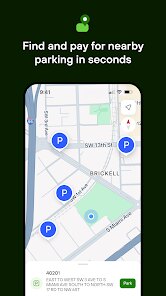
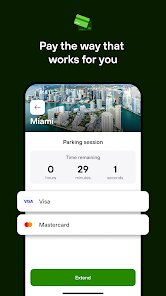
PayByPhone solves a very specific urban headache: fumbling for coins or waiting at a central payment machine when you're already running late. This app is built for anyone who drives in cities where pay-and-display parking is the norm, from daily commuters to occasional visitors. At its core, it lets you pay for parking directly from your smartphone, track remaining time, and extend sessions remotely. The main interface is clean and straightforward. You create an account, add a payment method, and then simply enter the zone number posted on your parking sign, select your vehicle and duration, and confirm. The entire transaction takes about ten seconds once you've set up your profile.
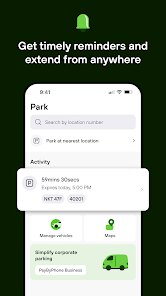
What I found most valuable was the ability to extend my parking session without having to walk back to the car. I've been in situations where a meeting ran over or I decided to stay longer at a cafe, and being able to add time from wherever I was saved me from potential tickets. The app also sends reminders before your time expires, which is a simple but effective feature. On the downside, there are service fees attached to each transaction, so the total cost ends up being higher than paying at the meter with coins or a card. Additionally, not all parking zones support the app, so it's not a universal solution for every spot you find.
I'd recommend PayByPhone to drivers who frequently park in metered areas and want to avoid carrying change or rushing back to their car. It's particularly useful for business travelers, urban residents, and anyone with a tight schedule. If you're the type who hates worrying about parking tickets or enjoys the convenience of managing everything from a phone, this app is a solid fit. Just be prepared for the extra fees and check coverage in your area before relying on it.
Key Functional Highlights
- 🅿️ Zone-based payment system – Instead of typing a full address, you enter a short zone number posted on the parking sign. This speeds up the payment process significantly, especially in unfamiliar neighborhoods or busy districts where reading street names is difficult.
- ⏱️ Remote session extension – Once your parking session is active, you can add more time from anywhere within the app. The system shows how much time remains and allows you to extend in increments. This is arguably the single most useful feature for anyone who has ever worried about a meter expiring during an important errand.
- 🔔 Expiration reminders – The app sends a push notification a few minutes before your parking session ends. You can then choose to extend or let it expire. This small alert can prevent costly parking tickets and adds a layer of mental relief when you're distracted by other tasks.
- 📱 Multiple vehicle profiles – You can save several license plates and vehicle details within one account. This is helpful for households with multiple cars or for people who drive different vehicles for work and personal use. Switching between profiles takes only a tap.
Advantages & Benefits
- 👍 Time-saving convenience – The entire payment process is much faster than walking to a central machine, especially in large parking lots where the pay station might be far from your spot.
- 👍 Ticket avoidance – The combination of reminders and easy extension directly reduces the chance of getting a ticket for expired parking. This alone justifies the service fees for many users.
- 👍 Reliable transaction history – Every payment is logged with timestamps and receipts. This makes expense tracking easy for business users who need to submit parking costs for reimbursement.
Areas for Improvement
- 👎 Service fees – Each transaction includes a convenience fee, usually between $0.25 and $0.50. Over time, these add up, making PayByPhone noticeably more expensive than paying at the meter.
- 👎 Limited coverage – The app only works in participating zones. In some cities, coverage is patchy, and you may still need to carry coins as a backup. This inconsistency can be frustrating.
- 👎 No offline mode – The app requires an active internet connection to function. If you're in a parking garage with poor cellular reception, you might struggle to start or extend a session.
Recommended Apps
![]()
GRUBL™ 4D Live Wallpapers + AI
TarrySoft4.6

![]()
Heaven Messenger - chat, map
SKYTRACK0![]()
iCut: Video Editor & Maker
iCut -Video Editor & Video Maker App3.8![]()
Secret Crush Detector App
Hopeitz Software4.8![]()
Football Jersey Maker
AJ DEVS3.4![]()
How Old Are Your Ears Fun Test
team5stars0![]()
Future Self Face Aging Changer
AMOBEAR TECHNOLOGY GROUP4![]()
ALDI Grocery Pickup & Delivery
ALDI International Services SE & Co. oHG4.6![]()
PixVerse: AI Video Generator
PixVerse4.5![]()
Ghost Photo Prank
Nachosware Prank Games4![]()
Voice Changer – Voice Effects
All Excellent Apps0![]()
Football Wallpaper HD 4K
Orange Infotech Studio4.6![]()
Brainzzot Universe: Prank Call
TeH Software0![]()
ChatGPT
OpenAI4.8![]()
TickTock-TikTok Live Wallpaper
TikTok Pte. Ltd.4.5














You May Like
-
![]()
Beauty Camera -Selfie, Sticker
Leopard V74.7 -
![]()
YouTube
Google LLC4.1 -
![]()
Anti Theft Alarm–Find my Phone
Phone Lock & Utilities Apps4.3 -
![]()
AR Draw Sketch - Trace & Paint
MØ Studios0 -
![]()
AI Detector & Humanizer
Wallet Passes Alliance4.4 -
![]()
Google Voice
Google LLC4.3 -
![]()
Face Camera: Live Stickers
Selfie Camera & Photo Editor & Beauty Snap4.3 -
![]()
Monster Detector: Alien, Ghost
Game Palette3.8 -
![]()
FunVid: Funny Face Filters
Vibe Filter Club0 -
![]()
Idol Prank Video Call & Chat
84devs Studio0 -
![]()
Old Me: AI Age & Future Aging
happy.ai.app2.4 -
![]()
Wave Live Wallpapers Maker 3D
Live Wallpapers by Wave Studio4.3 -
![]()
Medic Scanner - skin analyze
Investment Analytics3.7 -
![]()
GoFan: Buy Tickets to Events
GoFan4.8 -
![]()
Neon Love Theme
Delicate theme for Android App4.6