Skins Master for Roblox Shirts
Nin Nguyen
Installs
5M+
Developer
Nin Nguyen
-
Category
Adventure
-
Content Rating
Everyone
Developer Email
Privacy Policy
https://ninnstudio.com/privacy.html
Screenshots
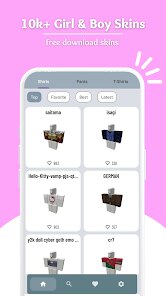
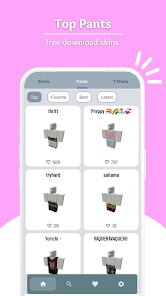
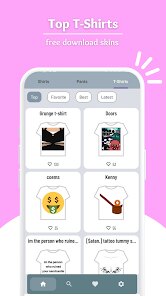
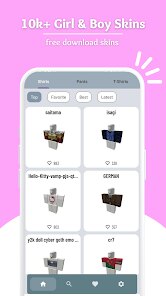
In-Depth Game Analysis
Skins Master is a Roblox utility app that transforms how players create and customize shirts for their avatars. At its core, it is a design tool wrapped in a mobile interface, letting users draw or upload artwork, apply it to a Roblox shirt template, and preview the result on a 3D character before exporting. The genre sits somewhere between creative sandbox and productivity accessory. It is aimed squarely at Roblox players who want custom clothing without leaving the platform or wrestling with external image editors. I first noticed it while scrolling through the Roblox app store, curious whether a third-party tool could genuinely streamline the shirt-making process. The promise of a built-in template and live preview was enough to download it.
Jumping in, the experience was surprisingly immediate. You pick a base shirt model, then use the drawing tools or import an image from your device. Brushes, color pickers, and layer controls are all there, though they are simplified compared to desktop software. The 3D preview updates in real time, which is a small but satisfying touch. I spent an hour recreating a band logo shirt, and watching it wrap around the avatar without distortion felt genuinely rewarding. Performance was smooth on a mid-range Android phone, with no crashes during my sessions. The learning curve is gentle for anyone who has used a basic paint app, but absolute beginners might need a few minutes to understand UV mapping. One standout moment: I accidentally rotated the canvas and the preview adjusted instantly, which saved me from a frustrating export error. The only immersion breaker was occasional lag when switching between brush sizes, and the UI feels a bit cramped on smaller screens. Turning off the grid overlay helped me focus on finer details.
I have reviewed several Roblox design tools, and most either lock basic features behind paywalls or export watermarked images. Skins Master does neither, which kept me coming back. The export process is cleaner, and the absence of forced ads during editing made it feel more like a genuine utility than a cash grab. It also handles transparency better than similar apps I have tried, which matters for shirts with cutouts or logos. In a crowded category, it stands out by respecting the player's time and creativity. That said, it will not replace Photoshop for serious designers, and the lack of cloud saving means you cannot easily switch devices mid-project. Still, for quick, on-the-go shirt creation, it earns its place on my home screen.
Core Gameplay Features
- Template library 📚: Offers a handful of Roblox-compatible shirt bases, from classic tees to hoodies, each ready for immediate editing.
- Live 3D preview 👕: Shows your design on a rotating avatar in real time, helping you catch alignment issues before export.
- Layer support 🎨: Lets you stack multiple drawings or imported images, with basic opacity and reorder controls for flexible composition.
- Direct export 📤: Saves the final shirt as a PNG tailored for Roblox upload, skipping the need for external resizing or conversion.
Strengths & Highlights
- No watermarks or forced ads 🚫: You get clean exports without branding, which is rare for free Roblox design tools.
- Real-time preview accuracy 🔍: The avatar preview matches the exported result closely, reducing trial and error when uploading to Roblox.
- Lightweight performance ⚡: Runs smoothly on budget phones, so you can design without worrying about frame drops or crashes.
- Simple, focused interface 🧭: Every button serves a purpose, making it easy to jump in without reading a manual.
Limitations to Consider
- Limited advanced tools ✏️: Missing features like symmetry brushes, custom brush shapes, or text insertion, which serious designers will miss.
- No cloud saving ☁️: Projects live only on your device, so switching phones or clearing cache wipes your work.
- Occasional UI lag 🐢: Brush size adjustments and layer switching can stutter on older hardware, breaking the creative flow.
- Small template selection 👕: Only a few shirt models are included, and there is no option to import custom mesh templates.
Recommended Apps
![]()
Camo Sniper
Supersonic Studios LTD4.3
![]()
Sprunki Funky Beat
Gotstar Studio4.7
![]()
Papa's Bakeria To Go!
Flipline Studios4.7![]()
Mob Control
VOODOO4.2![]()
Halloween Chronicles 4 f2p
Do Games Limited4.5![]()
MONOPOLY GO!
Scopely4.6![]()
Sonic Dash Endless Runner Game
SEGA4.7![]()
Airport City transport manager
Game Insight4.1![]()
IQ Test - IQ Arena
Neorem4.4![]()
Amazing Digital Game2D
CaterGames4.1![]()
Monster Studio: Music Beats
Tappy Game3![]()
Christmas Jigsaw Puzzle Games
LoveColoring Game4.9![]()
AFK Arena
LilithGames4.6![]()
The Survival Hunter Games 2
Aeria Canada4.2![]()
Space shooter - Galaxy attack
1SOFT4.8







You May Like
-
![]()
Sprunki Beat: Full Mod Music
Gotstar Studio4.7 -
![]()
Bluey: Let's Play!
Budge Studios4.1 -
![]()
Fruit Ninja®
Halfbrick Studios4.5 -
![]()
Garten of Banban 7
Euphoric Brothers Games4.3 -
![]()
Five Nights at Freddy's 2
Clickteam USA LLC4.6 -
![]()
STAR: Super Tricky Amazing Run
CASUAL AZUR GAMES4.2 -
![]()
Airport City transport manager
Game Insight4.1 -
![]()
Draw 2 Save: Stickman Puzzle
WONDER GROUP4.3 -
![]()
Color Pencil Run: Drawing Game
OSA Studio4.1 -
![]()
YOYO Decor: Dress Up Games
YoYo Dress Up Games4 -
![]()
Go Fish It
Koci Game0 -
![]()
Mario Kart Tour
Nintendo Co., Ltd.4.3 -
![]()
K-Pop Ringtones
AppsJag0 -
![]()
Going Up Rooftop - Parkour 3D
GenI Games3 -
![]()
Honkai: Star Rail
COGNOSPHERE PTE. LTD.4.3