GPS Speedometer: Speed Tracker
SM Infotech
Installs
100K+
Developer
SM Infotech
-
Category
Finance
-
Content Rating
Everyone
Developer Email
Privacy Policy
http://cloudsync.xyz:8081/consent/policy/SMInfo
Screenshots
Expert Review
The GPS Speedometer app tackles a straightforward but common problem: knowing exactly how fast you're moving in real time. It uses your phone's GPS to calculate and display your speed in a clear, easy-to-read format. That core function works reliably. I tested it during a few long drives and in the city, comparing it with my car's built-in speedometer, and it consistently matched within a mile or two. For anyone who has ever wondered if their car's speedometer is slightly off -- maybe after changing tire sizes or just out of curiosity -- this app provides a handy second opinion.
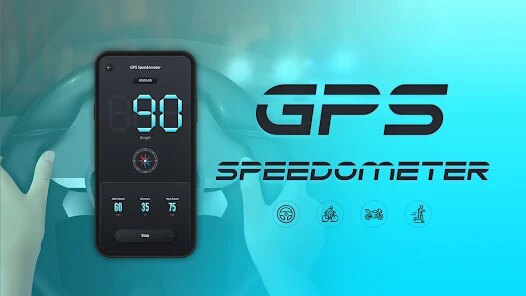
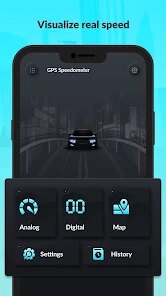
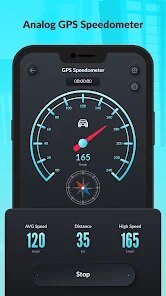
The user interface is very simple. There are no confusing menus or unnecessary options. It opens straight to a large speedometer display that looks like an analog gauge, with your current speed in big numbers in the center. Underneath, you can see a digital readout of your maximum speed, average speed, and total distance. These extras are useful for tracking a road trip or a bike ride. Personally, I used it to check how accurately my car's cruise control was working, and it gave me peace of mind on a long highway journey. I also appreciated the option to choose between miles per hour and kilometers per hour, which is necessary for anyone traveling between countries.
I would recommend this app to drivers who want a supplementary speed readout, cyclists or runners who want to track their pace without a dedicated fitness device, or anyone whose vehicle has a broken or unreliable speedometer. It's best suited for open-road scenarios where GPS signals are strong. Dense urban areas or tunnels can cause the readout to lag or become inaccurate, so it's not a total replacement for a working car speedometer. But for its intended purpose, it's a solid, no-fuss tool.
Key Functional Highlights
- 🎯 Real-time analog speedometer: The main display is a large, classic speedometer dial with a needle showing your current speed. The needle moves smoothly as you accelerate and decelerate, providing a very intuitive way to track changes at a glance.
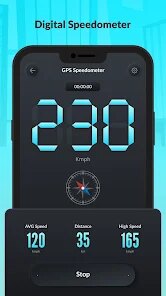
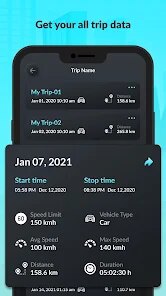
- 📊 Digital data readout: Below the dial, you get precise digital numbers for current speed, average speed, maximum speed achieved, and total distance traveled. It's useful for reviewing your trip afterward, especially if you've been pushing a top speed on a straightaway.
- ⚙️ Unit switching: You can instantly switch between mph and km/h with a single tap inside the settings. This is a genuinely helpful feature if you drive across the US-Canada border or use a bike computer that displays one unit while you prefer another.
- 📍 Background tracking option: The app can continue to log your data even when you switch to another app or lock your phone. This meant I could run Google Maps for navigation while the speedometer quietly collected my stats in the background.
Advantages & Benefits
- ✅ Rock-solid core function: The GPS speed reading is accurate and responsive. It does exactly what it promises without any fluff or unnecessary complexity.
- ✅ Clean, distraction-free design: The interface has no ads cluttering the screen while you're driving. It's just the speedometer and your data, making it safe to glance at while on the road.
- ✅ Lightweight and fast: The app installs instantly, launches fast, and doesn't drain battery life excessively compared to other GPS-heavy applications I've tried.
Areas for Improvement
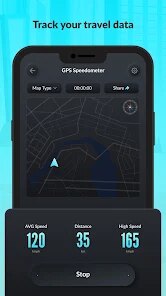
- ❌ No map or route display: Unlike some speedometer apps, this one doesn't show your current location on a map. You'll need a separate navigation app for directions, which feels like a missed opportunity.
- ❌ Accuracy suffers in poor GPS conditions: Dense tree cover, tunnels, or city canyons cause the speed reading to freeze or lag behind reality. This is a limitation of GPS itself, but it's worth noting for urban users.
- ❌ Sparse settings menu: There are very few customization options. You cannot change the color scheme, adjust the speedometer's sensitivity, or set a speed warning alert. A basic alert feature would be a welcome addition for safety.
Recommended Apps
![]()
Idol Prank: Video Call & Chat
BUGUN SOFTWARE COMPANY LIMITED3.3
![]()
Pets Translator: Dog & Cat
JanDeveloper0![]()
PixVerse: AI Video Generator
PixVerse4.5
![]()
Talkie: Soulful Character AI
SUBSUP4.2![]()
Gorilla Skins for Monkey Arena
Dumitru Boico4![]()
Santa Prank Call: Fake video
Era Global Publishing4![]()
Snapchat
Snap Inc4.1![]()
3D Live wallpaper - 4K&HD
ZERO Tech4.3![]()
Face Dance: AI Photo Animator
Codeway Dijital4.1![]()
TickTock-TikTok Live Wallpaper
TikTok Pte. Ltd.4.5![]()
Genral Tv | Video Player
elmahdy apps4.4![]()
Astrolink: Birth Chart
Astrolink Orbe4.2![]()
Passport Parking
Passport Labs, Inc.2.5![]()
Kpop Fans Demon Hunter Wallpap
JHNStudio4.3![]()
Crush Love Finder: Fun Filter
Braly JSC0















You May Like
-
![]()
Xray Body Scanner Prank Camera
LISA WILLIS LLC3 -
![]()
Funny Gay Test
Test Master Lab4.2 -
![]()
FunVid: Funny Face Filters
Vibe Filter Club0 -
![]()
Bible Chat - Holy Bible Study
Book Vitals Inc.4.8 -
![]()
myChevrolet
General Motors (GM)4.6 -
![]()
Lip Fall Challenge: Fun Filter
Braly JSC0 -
![]()
Birthday Secrets
shasunder4.4 -
![]()
Lie Detector Test: Prank App
DkTech inc.4.3 -
![]()
TouchTunes: Live Bar JukeBox
Touchtunes Interactive Networks3.2 -
![]()
Touchless: Gesture Controller
Wonderful AI3.9 -
![]()
Brainzzot Universe: Prank Call
TeH Software0 -
![]()
Football Wallpaper HD 4K
Orange Infotech Studio4.6 -
![]()
Afterpay - Buy Now Pay Later
Afterpay3.8 -
![]()
Weather Radar & Weather Live
Avn Global Application4 -
![]()
Upside: Gas & Food Cash Back
Upside Inc.4.5