Blood Pressure Log
Sharon Evans
Installs
1M+
Developer
Sharon Evans
-
Category
Health & Fitness
-
Content Rating
Everyone
Developer Email
Privacy Policy
https://www.sharon-apps.com/privacy_policy.html
Screenshots
Expert Review
Blood Pressure Log by Sharon Evans is a straightforward health tracking app aimed at individuals who need to monitor their blood pressure regularly. This could include people diagnosed with hypertension, those at risk of developing high blood pressure, or anyone managing a heart condition under a doctor's supervision. The core purpose of the app is to replace the traditional paper logbook with a digital solution that simplifies the recording, organization, and review of your readings.
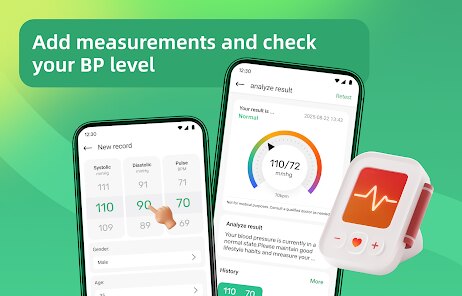
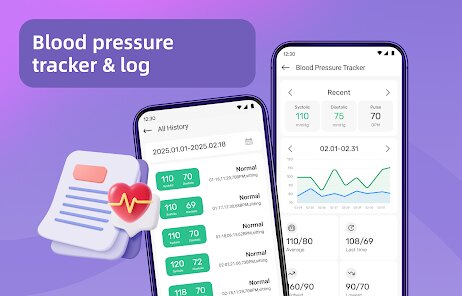
The main feature works well enough. You can quickly input both systolic and diastolic numbers along with your pulse rate, and the app records the date and time automatically. It also allows for tagging readings with notes, which is useful for documenting things like medication timing, stress levels, or physical activity that might affect the results. I found this especially helpful when I needed to show my cardiologist a clear pattern of my morning readings over several weeks. Instead of shuffling through a messy notebook, I could just hand them my phone. The basic charts and averages generated by the app made our conversation much more productive. However, I did notice the lack of more advanced analytical features, like the ability to compare this month's averages to last month's, which would have been a welcome addition.
Given its simple, focused design, this app is best suited for users who want a no-frills tool for basic blood pressure tracking. It's ideal for older adults who may be less tech-savvy, or for anyone who just wants to quickly log a reading without getting lost in a sea of complex health metrics. If you have straightforward needs and prefer clarity over complexity, this is a solid choice. On the other hand, if you are looking for comprehensive health dashboards or integrations with other health platforms, this app will likely feel too limited for your requirements.
Key Functional Highlights
- 📝 Quick and intuitive data entry. The process of logging a new reading takes just a few seconds. When you open the app, the input fields are right there, front and center. There is no clutter, no unnecessary steps, and no confusing buttons. You simply tap on the numbers and save. This simplicity is the app's greatest strength and ensures that you won't skip logging a reading because the process feels like a chore.
- 📝 Automatic timestamping and history display. Every entry is automatically marked with the date and time you recorded it. This is critical for accuracy because manually remembering and typing in the time is prone to error. The history view then presents all your readings in a clear, chronological list, making it easy to scroll back and see how your numbers have changed over the past days or weeks.
- 📝 Color-coded status indicators. After you log a reading, the app shows a simple color code based on common medical guidelines. Green suggests a normal reading, yellow indicates it's slightly elevated, and red is a warning for high readings. This visual feedback is an excellent way to instantly see where you stand without having to mentally interpret the numbers against standard ranges.
Advantages & Benefits
- - ✅ Lightweight and fast: it takes up very little space on your phone and performs smoothly even on older devices. There is no noticeable lag when loading or saving data.- ✅ No unnecessary permissions: the app does not demand access to your contacts, location, or other sensitive data, which makes it feel more trustworthy and private.- ✅ Simple and clean interface: the user interface is uncluttered and easy to navigate. There are no ads or distracting pop-ups to mess with your productivity.
Areas for Improvement
- - " Design is outdated: the overall visual appearance feels basic and a bit dated. It lacks the polished look of modern apps, which makes the experience feel less premium.- " No data export or backup: there is no clear way to export your data to a CSV or PDF file to share with your doctor, and there is no cloud backup option. If you lose your phone, you lose all your data.- " No trend analysis: beyond simple averages, the app offers no deeper analysis. It cannot show you how your readings correlate with your notes or identify long-term trends, which is a missed opportunity.
Recommended Apps
![]()
Bug Filter - Bug on Face Prank
Hades Bit0
![]()
TouchTunes: Live Bar JukeBox
Touchtunes Interactive Networks3.2![]()
SillyGlow: Smile Wallpaper 4K
BizApp Inc.0![]()
Love Tester Find Real Love App
Happy-verse4.6
![]()
Old Me: AI Age & Future Aging
happy.ai.app2.4![]()
Hair Clipper Prank, Fart Sound
duff hl studio4.1![]()
Bug Filter: Funny Prank App
HKL Game Studio0![]()
Tripo - AI 3D Model Generator
Tripo AI4.4![]()
Pregnancy Tracker & Baby Diary
Willson Studio2.4![]()
Zipper Lock Screen - ZippyLock
EZProducts4.7![]()
Blood Pressure Log
Sharon Evans4.1![]()
Cute Wallpapers Cool Wallpaper
DevTeamIn20200![]()
Moonphase Filter: Love Test
Braly JSC0![]()
Eye Test
arabtok0![]()
Halloween Call: Monster
TeH Software0









You May Like
-
![]()
PolyBuzz: Chat with AI Friends
CLOUD WHALE INTERACTIVE TECHNOLOGY LLC.3.8 -
![]()
Zipper Lock Screen - ZippyLock
EZProducts4.7 -
![]()
LeafCheck: Plant Identifier
AMOBEAR TECHNOLOGY GROUP4.1 -
![]()
GPS Map Camera - Timestamp
Sliver AI Photo Editor0 -
![]()
Find my Phone - Clap, Whistle
FunGear inc4.4 -
![]()
Google Voice
Google LLC4.3 -
![]()
Gay Dating & LGBT Hookup App
Hookup Apps to Hook up Local Dating4.5 -
![]()
Telegram
Telegram FZ-LLC4.2 -
![]()
Hair Clipper Prank, Fart Sound
duff hl studio4.1 -
![]()
Call From Princess Elsa video
dev riad saoud Apps3.5 -
![]()
GigaBody: AI Muscle filter
Bellential Inc.4.4 -
![]()
MagicWidgets: Themepack & Icon
One Office Premium3.3 -
![]()
April Fools Pranks Funny Prank
Express Dev Inc4.7 -
![]()
WeChat
WeChat International Pte. Ltd.3.5 -
![]()
Parallax 3D Live Wallpapers
TarrySoft4.3