Tuya- Smart Life, Smart Living
Tuya Smart Inc.
Installs
10M+
Developer
Tuya Smart Inc.
-
Category
Lifestyle
-
Content Rating
Everyone
Developer Email
Privacy Policy
https://developerapp.tuyaus.com/protocol/1a81698945002037?lang=en
Screenshots
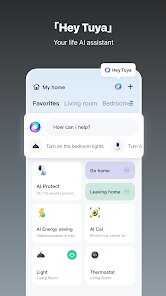
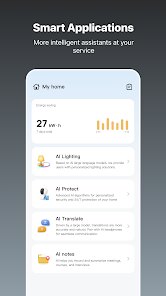
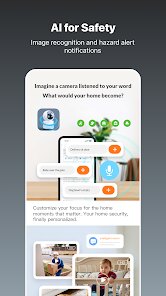
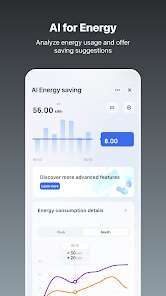
Expert Review
I've been using Tuya Smart Life for a few months now, and it's become a central hub for managing my home. The app's primary role is to connect and control a wide variety of smart home devices from different brands, all within a single interface. It supports everything from light bulbs and plugs to sensors, cameras, and even larger appliances like air conditioners. The core idea is to unify the often fragmented smart home ecosystem, so you don't need a separate app for every gadget in your house.
The main audience here is anyone starting to build a smart home or looking to simplify their existing setup. I fall into the latter category—I had a few random Wi-Fi plugs and a security camera, each with its own clunky app, and I was tired of switching back and forth. Tuya solved that beautifully. The setup process was surprisingly smooth. After downloading the app, I just scanned the QR codes on my devices, and they connected within seconds. The interface is clean and logically organized, letting me group devices by room or create automated routines. For example, I set a scene called “Goodnight” that turns off all my lights and locks the front door with one tap. That kind of convenience is where this app truly shines. It's eliminated the daily nuisance of checking whether I left a hallway light on, which might sound small, but it genuinely reduces a bit of mental clutter.
Beyond the basics, I was impressed by the scheduling features. I can program my coffee maker to start brewing at 7 AM, and my bedside lamp to gradually brighten as a gentle wake-up call. The voice control integration with Alexa and Google Assistant works flawlessly, too, which adds another layer of hands-free convenience. If you're someone who enjoys automating tedious tasks, or if you just want a single app to manage your growing smart home empire, this is a solid choice. It's especially useful for renters or those not ready for a permanent installation, since most devices are simple plug-and-play setups. The app handles everything from daily routines to energy monitoring with ease.
Key Functional Highlights
- 🔌 Multi-Device Compatibility: The most valuable feature in my book is how Tuya brings together devices from countless brands. I've mixed and matched a no-name motion sensor with a major brand's smart plug, and they all appear in the same dashboard. No more hunting for lost credentials or hopping between apps—everything lives here.
- 🔌 Scene and Automation Editor: This is the app's secret weapon. You can chain actions together with simple “if this, then that” logic. For instance, I have an automation that turns on the hallway light when the front door unlocks after sunset. It's surprisingly flexible without being intimidating, and the visual flow builder makes it feel like you're drawing a simple diagram.
- 🔌 Voice Assistant Integration: Tuya plays nice with Alexa, Google Assistant, and even Siri shortcuts. Once linked, you can control any device with a voice command. It's become second nature to say “Alexa, set the living room to movie mode,” which dims the lights and closes the curtains. The response time is near-instant, which makes the whole experience feel polished.
Advantages & Benefits
- ✅ User-Friendly Interface: The app is intuitive and easy to navigate. Menus are clearly labeled, and the onboarding process walks you through setup without confusion. It's great for less tech-savvy family members, as they can learn the basics in minutes.
- ✅ Reliable Cloud Sync: All your devices and scenes are backed up to the cloud. I once switched phones, and after logging in, everything was exactly as I left it. No re-pairing, no lost automations. That peace of mind is underrated but huge.
- ✅ Battery-Friendly Background Operation: Unlike some other smart home hubs, Tuya doesn't drain your phone's battery when running in the background. It uses push notifications for critical events, which saves juice while still keeping you informed.
Areas for Improvement
- ❌ Occasional Reconnection Delays: Sometimes, after a power outage or Wi-Fi hiccup, a device may take a few minutes to reconnect. I've had to manually refresh the device list once or twice, which is a small annoyance but noticeable.
- ❌ Limited Custom Notification Settings: You can't fine-tune notifications for every device individually. For example, I'd like alerts for my motion sensor only during certain hours, but the current setup only allows all-or-nothing toggles for certain categories.
- ❌ No Native Apple Watch App: If you're an Apple Watch user, you're out of luck for direct wrist control. You can use Siri shortcuts, but it's not as seamless as a dedicated app. This is a minor gap in an otherwise comprehensive experience.
Recommended Apps
![]()
GRUBL™ 4D Live Wallpapers + AI
TarrySoft4.6

![]()
Heaven Messenger - chat, map
SKYTRACK0![]()
iCut: Video Editor & Maker
iCut -Video Editor & Video Maker App3.8![]()
Secret Crush Detector App
Hopeitz Software4.8![]()
Football Jersey Maker
AJ DEVS3.4![]()
How Old Are Your Ears Fun Test
team5stars0![]()
Future Self Face Aging Changer
AMOBEAR TECHNOLOGY GROUP4![]()
ALDI Grocery Pickup & Delivery
ALDI International Services SE & Co. oHG4.6![]()
PixVerse: AI Video Generator
PixVerse4.5![]()
Ghost Photo Prank
Nachosware Prank Games4![]()
Voice Changer – Voice Effects
All Excellent Apps0![]()
Football Wallpaper HD 4K
Orange Infotech Studio4.6![]()
Brainzzot Universe: Prank Call
TeH Software0![]()
ChatGPT
OpenAI4.8![]()
TickTock-TikTok Live Wallpaper
TikTok Pte. Ltd.4.5












You May Like
-
![]()
Beauty Camera -Selfie, Sticker
Leopard V74.7 -
![]()
YouTube
Google LLC4.1 -
![]()
Anti Theft Alarm–Find my Phone
Phone Lock & Utilities Apps4.3 -
![]()
AR Draw Sketch - Trace & Paint
MØ Studios0 -
![]()
AI Detector & Humanizer
Wallet Passes Alliance4.4 -
![]()
Google Voice
Google LLC4.3 -
![]()
Face Camera: Live Stickers
Selfie Camera & Photo Editor & Beauty Snap4.3 -
![]()
Monster Detector: Alien, Ghost
Game Palette3.8 -
![]()
FunVid: Funny Face Filters
Vibe Filter Club0 -
![]()
Idol Prank Video Call & Chat
84devs Studio0 -
![]()
Old Me: AI Age & Future Aging
happy.ai.app2.4 -
![]()
Wave Live Wallpapers Maker 3D
Live Wallpapers by Wave Studio4.3 -
![]()
Medic Scanner - skin analyze
Investment Analytics3.7 -
![]()
GoFan: Buy Tickets to Events
GoFan4.8 -
![]()
Neon Love Theme
Delicate theme for Android App4.6