AR Drawing - Sketchar App
Braly JSC
Installs
10M+
Developer
Braly JSC
-
Category
Art & Design
-
Content Rating
Everyone
Developer Email
Privacy Policy
https://bralyvn.com/privacy-policy.php
Screenshots
Expert Review
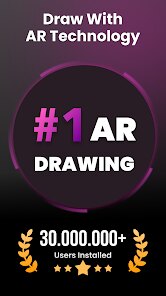
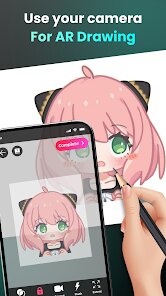
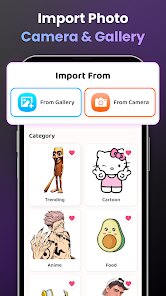
AR Drawing - Sketchar App is a unique mobile application that blends traditional drawing with augmented reality (AR) technology. Its core purpose is to simplify the learning process for aspiring artists by projecting virtual guides directly onto a physical surface, such as paper or canvas. This allows users to trace over the projected lines, effectively bridging the gap between seeing an image and replicating it with their own hand.
The app primarily targets beginners and hobbyists who feel intimidated by the blank page or struggle with proportions and perspective. It solves the fundamental problem of 'where to start' by providing a structured, step-by-step framework. From my experience, the core feature of AR projection works remarkably well when conditions are optimal. It successfully helped me sketch a complex portrait by breaking it down into manageable layers, something I had previously failed at numerous times. The additional features, like the vast library of drawing lessons and the social community for sharing artwork, add significant value by providing both education and motivation.
I would recommend Sketchar to absolute beginners seeking a confidence boost, hobbyists looking to explore new styles without the pressure of freehand drawing, and even parents or educators as a fun, interactive tool for teaching art basics. It is most useful for learning foundational techniques, practicing specific subjects like animals or faces, and for anyone who wants to experience the joy of creating a recognizable piece of art quickly and with guided support.
Key Functional Highlights
- 🎯 AR Drawing Projection: The flagship feature uses your device's camera to overlay a chosen sketch onto any real-world surface, turning your desk into a virtual tracing pad for guided practice.
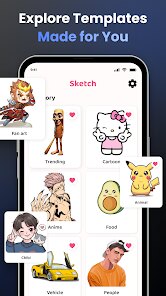
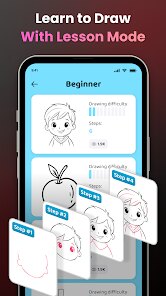
- 🎯 Extensive Lesson Library: Offers a structured curriculum with hundreds of step-by-step tutorials ranging from simple shapes to advanced portraits, catering to various skill levels and interests.
- 🎯 Drawing Tools & Canvas: Provides a full suite of digital drawing tools (pencils, brushes, layers) within the app, allowing users to create artwork directly on their screen without any physical materials.
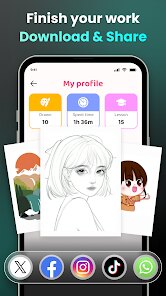
- 🎯 Social Art Community: Integrates a platform where users can publish their creations, participate in challenges, and get inspired by the work of other artists worldwide.
Advantages & Benefits
- ✨ Lowered Learning Barrier: The AR tracing function is a revolutionary tool for beginners, dramatically reducing initial frustration and making art accessible to everyone.
- ✨ Structured Skill Progression: The lesson plans are well-organized, logically building from fundamentals to more complex concepts, which provides a clear learning path.
- ✨ High-Quality Visual Content: The artwork and tutorials within the app are professionally crafted, offering excellent reference material for users to study and emulate.
- ✨ Motivational Ecosystem: The integrated social features and regular challenges foster a sense of community and provide continuous motivation to keep practicing.
Areas for Improvement
- ⚠️ AR Function Dependency: The core projection feature requires stable lighting, a steady hand or mount, and a perfectly flat surface; it can be finicky and lose calibration easily.
- ⚠️ Subscription Model Pressure: While there is free content, access to the full lesson library and advanced features is locked behind a recurring subscription, which may deter some users.
- ⚠️ Potential Crutch Effect: Over-reliance on the tracing function might slow the development of essential freehand drawing skills and spatial understanding for some learners.
- ⚠️ Device Performance Variance: The AR experience and overall app smoothness can vary significantly depending on the processing power and camera quality of the user's smartphone or tablet.
Recommended Apps
![]()
Zipper Lock Screen - ZippyLock
EZProducts4.7

![]()
Mini Quiz Filter Challenge
GjangHa3.9![]()
Reverse Voice - Voice Changer
Hammad670![]()
April Fools Pranks Funny Prank
Express Dev Inc4.7![]()
Kpop Fans Demon Hunter Wallpap
JHNStudio4.3![]()
Culver's
Culver's3.3![]()
Monster High™ Beauty Salon
CrazyLabs LTD4.5![]()
Daily Horoscope
KADO Apps4.4![]()
PayByPhone
PayByPhone Technologies Inc .4.9![]()
U-Haul
U-Haul International3.2![]()
16Personalities
16Personalities4![]()
Sprout - AI Job Search
Magnifex4.4![]()
Lip Fall Challenge: Fun Filter
Braly JSC0![]()
Character AI: Chat, Talk, Text
Character.AI3.4![]()
Toyota
Toyota Motor North America, Inc.4.7














You May Like
-
![]()
16Personalities
16Personalities4 -
![]()
Xray Body Scanner Prank Camera
LISA WILLIS LLC3 -
![]()
AgeCam: Face Age Changer App
Fillog Studio3.5 -
![]()
FIFA World Cup 2026™
FIFA2.8 -
![]()
BabyGenerator Guess baby face
DBAI4.7 -
![]()
Cat & Dog Translator Simulator
Notebook & Notepad & CV & Resume Example & Piano4 -
![]()
DIY Emoji - Sticker Maker
Braly JSC0 -
![]()
ALDI Grocery Pickup & Delivery
ALDI International Services SE & Co. oHG4.6 -
![]()
Heaven Messenger - chat, map
SKYTRACK0 -
![]()
Beauty Camera -Selfie, Sticker
Leopard V74.7 -
![]()
Prank Call - Fake Call & Chat
Bravestars Casual4.1 -
![]()
Clue Cycle & Period Tracker
Clue Period Tracker by BioWink4.4 -
![]()
Moises: The Musician's AI App
Moises Systems4.5 -
![]()
Prank Zone - Hilarious Call
Allegany Boys Camp Inc4.1 -
![]()
Life Palmistry - Palm & Aging
Bluewolf Technology Limited4.3