Ai Smart Remote
whitesandmedia
Installs
10K+
Developer
whitesandmedia
-
Category
Lifestyle
-
Content Rating
Everyone
Developer Email
Privacy Policy
https://aismartremote.com/#/privacy-policy
Screenshots
Expert Review
Ai Smart Remote is an application that aims to turn your smartphone into a universal remote control. Instead of juggling multiple remotes for your TV, set-top box, air conditioner, or other infrared-enabled devices, this app consolidates everything into one interface. The core idea is straightforward: replace the physical remotes scattered around your living room with a single digital solution that lives on a device you already carry daily.
The intended audience here is broad. It targets anyone who has ever lost a remote between couch cushions, dealt with a dying remote battery at the worst moment, or simply wants to declutter their coffee table. The app solves the specific problem of remote control fragmentation by using your phone's built-in infrared blaster. Many Android phones still come equipped with this hardware, and the app leverages it to communicate with various home electronics. For older devices that rely on IR signals, this is particularly useful since those units often lack modern smart connectivity options.
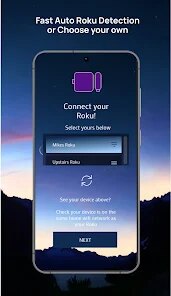
During my testing, the setup process was relatively painless. The app guides you through selecting your device type and brand, then lets you test different signal codes until you find the one that works. This code-matching approach is not always perfect, and I did encounter a few minutes of trial and error with an older television model. However, once the correct code was locked in, the controls responded reliably. The interface itself is clean, with well-organized buttons that mimic standard remote layouts. I appreciated having access to a custom favorites section where I could store the exact channels or functions I use most frequently. This saved me from navigating through layers of menus just to switch inputs. While the app does its job effectively for infrared devices, it won't help with Bluetooth-only gadgets like smart speakers or newer streaming sticks that operate on Wi-Fi. That is a notable boundary to keep in mind.
Given its capabilities, I would recommend this app to anyone who still owns IR-controlled appliances and wants a backup or replacement for physical remotes. It is especially handy in households where remotes frequently go missing or for people who like having a centralized control option. If your phone lacks an IR blaster, the app will not function for this purpose, so checking your device's hardware first is essential. For those with compatible hardware, it offers a dependable and clutter-free way to manage your home entertainment.
Key Functional Highlights
- 📡 Universal IR code library: The app boasts an extensive database of brands and models. You can search by brand and model number, or let the app auto-scan through codes until your device responds. This flexibility covers a wide range of older and less common electronics, making it a versatile tool for various home setups.
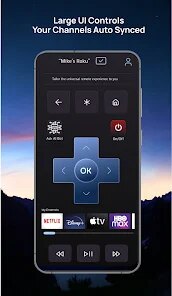
- 🖥️ Customizable interface layout: You are not stuck with a fixed remote design. The app allows you to rearrange buttons, create macros for multi-step actions, and design a control panel that matches your preferences. This personalization reduces the mental effort needed to operate your devices daily.
- 📱 Favorites and quick actions: Frequently used functions, like specific channels or input switches, can be saved to a dedicated quick-access bar. This eliminates the need to navigate through multiple screens for routine tasks, speeding up everyday interactions with your entertainment system.
- 🔗 Device grouping and scenes: You can group multiple devices, such as a TV and a soundbar, into a single scene. Activating that scene triggers all devices simultaneously, simplifying complex setups that would otherwise require pressing multiple buttons on different remotes.
Advantages & Benefits
- ✅ Reliable signal response: Once a correct code is found, the transmitted signal is consistent and responsive. I did not observe any significant lag between pressing a button on my phone and seeing the TV react, which is crucial for a smooth user experience.
- ✅ Offline functionality: The app works entirely offline after installation. You do not need an internet connection to control your devices, which is a major plus for reliability and privacy. This also means no cloud dependencies or subscription requirements for basic use.
- ✅ Clean and intuitive design: The visual layout is straightforward, with clear icons and logical grouping of controls. Even a first-time user can figure out how to set up a new remote without consulting a manual, reducing the initial learning curve significantly.
Areas for Improvement
- ❌ Reliance on IR hardware: The app is completely dependent on your phone having an infrared blaster. Many modern flagship smartphones have dropped this feature, which severely limits the app's user base. Without this hardware, the app is essentially non-functional.
- ❌ Code matching can be tedious: For uncommon device models, the auto-scan process can take several minutes and require repeated attempts. It is not always instant, and occasionally, the app fails to find the right code altogether, leaving you without a solution for that particular device.
- ❌ No support for modern protocols: The app only handles infrared signals. It does not work with devices that use Bluetooth, Wi-Fi, or Zigbee for control. This makes it a partial solution, as newer smart home gadgets will likely remain incompatible, requiring you to keep their original remotes anyway.
Recommended Apps
![]()
Co–Star Personalized Astrology
Co–Star Astrology Society4.7

![]()
Wave Live Wallpapers Maker 3D
Live Wallpapers by Wave Studio4.3![]()
Gay Meter - no offence
tharunoptimus4.8![]()
Beauty Camera -Selfie, Sticker
Leopard V74.7![]()
Colliz - DIY Wallpaper Craft
Braly JSC2.9![]()
ANIME Live Wallpapers
Live Wallpapers Expert4.3![]()
Lockscreen Drawing
EZTech Apps4.4![]()
Learn to Draw Cartoon
Creative APPS3.9![]()
Live Wallpaper- 4k Backgrounds
DEHA4.6![]()
Pregnancy App & Baby Tracker
BabyCenter4.9![]()
Live football TV
Findy360 Software LLC3.7![]()
Mivo: Face swap video bride
Mivo studio4.3![]()
TouchTunes: Live Bar JukeBox
Touchtunes Interactive Networks3.2![]()
Transparent Live Wallpaper
R Apps Studio4.4![]()
Google Voice
Google LLC4.3










You May Like
-
![]()
Lockscreen Drawing
EZTech Apps4.4 -
![]()
Affirm: Buy now, pay over time
Affirm, Inc4.7 -
![]()
Battle Challenge: Funny Filter
Braly JSC0 -
![]()
Bikii Cloud Game
Bikii Game Dev3.5 -
![]()
Finelo: Master Trading
Finelo Limited4.3 -
![]()
Funny Reverse Audio - Singing
PlayStudioInc0 -
![]()
Brainova: IQ Test & Logic Game
FALCON GAME4.5 -
![]()
TeraBox: 1TB Cloud & AI Space
Flextech Inc.4.4 -
![]()
How Old Do I Look - Age Camera
Lucky Studio Games & App4 -
![]()
FIFA Player App
FIFA3 -
![]()
Funny Ranking Filter Challenge
TriverSoft0 -
![]()
Funny Prank: Monster Sound
Mirai Games3.4 -
![]()
Girly Wallpapers
Wallpaper World Designs4.7 -
![]()
Zodiac & Horoscope: CosmicVibe
Mysterious Apps LLC4.7 -
![]()
Pollo AI: AI Video Generator
COCOSOFT TECHNOLOGY PTE. LTD.4.4