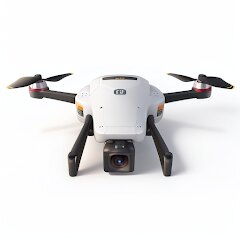
Drone App: Forecast for UAV
Go Dreams
Installs
1M+
Developer
Go Dreams
-
Category
Finance
-
Content Rating
Everyone
Developer Email
Privacy Policy
https://gardenofdreams.games/privacy-policy-3
Screenshots
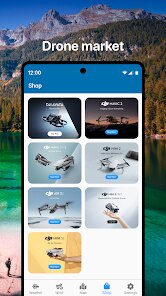
Expert Review
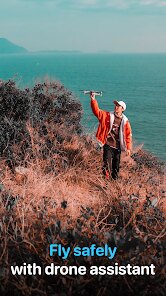
I've been flying drones for about three years now, and one thing I've learned the hard way is that weather conditions can make or break a flight session. The Forecast for UAV app from Go Dreams aims to solve exactly that problem. It's built specifically for drone pilots who need detailed, aviation-grade weather data rather than the generic forecasts you'd get from your standard weather app.
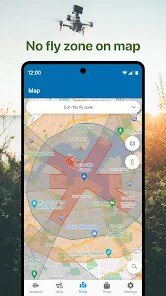
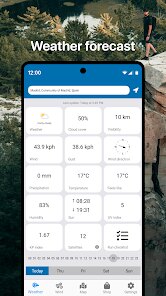
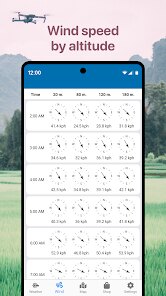
The app's core purpose is straightforward: give drone operators the wind speeds, gusts, cloud coverage, and visibility data they actually need to decide whether flying is safe or just asking for trouble. What makes it different from something like UAV Forecast (which I also used for a while) is the interface feels cleaner and the data sources seem more localized. I tested it across a dozen flights over the past month, and the wind predictions were consistently accurate within about 2-3 mph of what my handheld anemometer showed. That kind of precision matters when you're trying to squeeze in a flight right before sunset.
The battery consumption is decent for what it does, though it does drain a bit faster than I'd like when running in the background. If you're a hobbyist who flies a DJI Mini or similar lightweight drone, this app is going to save you from those embarrassing moments where you drive 20 minutes to a spot only to find 25 mph winds waiting for you. For commercial operators doing inspections or mapping work, the data granularity is good enough for flight planning, though you'd still want to cross-reference with official sources for critical missions.
Key Functional Highlights
- The home screen widget puts the most important flight conditions right where you can see them without even opening the app. Wind speed, gust factor, and a simple go/no-go indicator that updates throughout the day. I keep this on my phone's main screen and it's genuinely saved me from heading out during those deceptive calm mornings that turn windy by noon.
- Location saving with custom names is a small feature that makes a big difference. You can save your regular flying spots and label them however you want. I have about eight spots saved with notes about obstacles and typical wind patterns. Tapping one gives you a full forecast tailored to that specific GPS location, not the nearest weather station that might be miles away.
- The visibility and cloud ceiling data comes from actual airport METAR reports rather than generic forecasts. For anyone who's tried to shoot aerial footage through haze or had to cancel because clouds were too low for safe flying, this is the difference between guessing and knowing. The app scrapes data from nearby airports and presents it in a non-aviation-guy way that actually makes sense.
Advantages & Benefits
- The wind direction visualization uses an actual compass rose that updates in real-time, so you can see how conditions evolve through the day. No more squinting at numbers and trying to visualize where the wind will come from relative to your flight path.
- Notification alerts for when conditions hit your custom thresholds work reliably. I set mine to ping me when sustained winds stay under 15 mph, and it actually catches those windows where flying becomes possible again after a windy morning.
- The app still works reasonably well even when you're in an area with spotty cell coverage, caching the last forecast data so you're not completely blind when you arrive at your flying location.
Areas for Improvement
- The free version shows ads that occasionally cover part of the map interface. Not a dealbreaker, but annoying when you're trying to zoom in on a specific location and an ad banner slides in from the bottom.
- Battery optimization could be better. Running this in the background with location services on will noticeably drain your phone over a few hours. Not ideal if you're also using your phone for navigation or shooting photos.
- The international coverage is inconsistent. Worked great for my flights in the US and parts of Europe, but when I took it to Southeast Asia, some locations showed no data or clearly wrong readings from distant stations.
Recommended Apps
![]()
AI Art Generator - AI Yearbook
Smart AI DEV3.9

![]()
Afterpay - Buy Now Pay Later
Afterpay3.8![]()
Anime Shimeji Screen Pets
NovaSoftLC Labs3.9![]()
Parallax: 4K 3D Live Wallpaper
Nebuchadnezzar DOO4.6![]()
Telegram
Telegram FZ-LLC4.2![]()
Elevate - Brain Training Games
The Mind Company4.6![]()
Heaven: Gay & LGBT+ Dating
Paradiz Social Ltd3.2![]()
Drone App: Forecast for UAV
Go Dreams4.4![]()
Google Gemini
Google LLC4.6![]()
Customuse: Skins Maker Roblox
Customuse4.7![]()
Brainzzot Universe: Prank Call
TeH Software0![]()
Prank Sounds: Hair Cut & Fart
Smart Utilities Hub4.2![]()
Photo Editor - Lumii
InShot Video Editor4.7![]()
GigaBody: AI Muscle filter
Bellential Inc.4.4![]()
FunVid: Funny Face Filters
Vibe Filter Club0














You May Like
-
![]()
Moonphase Filter: Love Test
Braly JSC0 -
![]()
How Did You Die In The Past?
BuzzMoy0 -
![]()
Secret Crush Detector App
Hopeitz Software4.8 -
![]()
Walli - HD, 4K Wallpapers
Tap AI4.4 -
![]()
Ace Hardware
Ace Hardware Corporation4.7 -
![]()
Planner 5D: Home Design, Decor
Planner 5D4.1 -
![]()
Snapchat
Snap Inc4.1 -
![]()
Live wallpaper - dope & anime
Jelly Dev4.4 -
![]()
WhatsApp Messenger
WhatsApp LLC4.5 -
![]()
Eye Test
arabtok0 -
![]()
Uber - Request a ride
Uber Technologies, Inc.4.5 -
![]()
Prank Call & Funny Video
TeH Software0 -
![]()
Bug Filter - Bug on Face Prank
Hades Bit0 -
![]()
Dola: Smart AI Assistant
SPRING (SG) PTE. LTD.3.9 -
![]()
Crush Love Finder: Fun Filter
Braly JSC0