Lockscreen Drawing
EZTech Apps
Installs
1M+
Developer
EZTech Apps
-
Category
Productivity
-
Content Rating
Everyone
Developer Email
Privacy Policy
https://sites.google.com/view/eztechapps/home
Screenshots
Expert Review
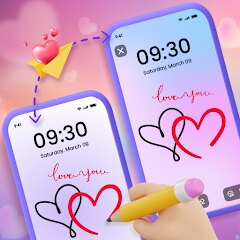
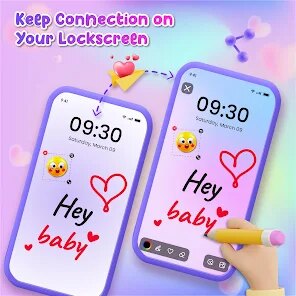
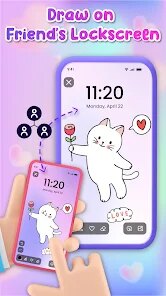
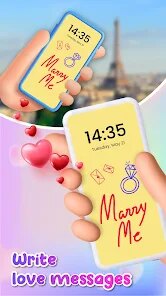
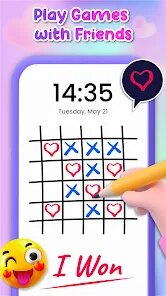
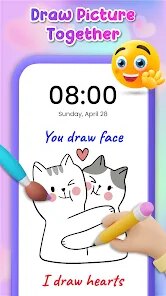
Lockscreen Drawing is a fun and creative application designed for those who love expressing themselves through digital art. As the name suggests, it allows users to create drawings directly on their device's lock screen. Whether you're someone who likes to jot down quick notes, sketch a doodle, or unleash your artistic side, this app makes it incredibly easy to add a splash of art to your everyday mobile experience. It's a tool that transforms your lock screen into a canvas, making each glance at your phone a little more personal and engaging.
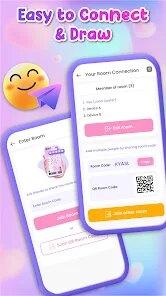
Using Lockscreen Drawing is straightforward and intuitive, making it accessible to both beginners and experienced users. Once downloaded and installed, it's just a matter of setting it up according to your preferences. Users can pick from a variety of brushes and colors to start their creations. The app provides a smooth drawing experience, allowing for precise control and adjustments. There are tools for erasing, undoing, and redoing actions, ensuring that users can freely explore their creativity without worrying about making mistakes. For those who are new to digital drawing, starting with simple sketches or experimenting with colors can be a good way to get comfortable with the app's features. Remember, practice makes perfect, and playing around with different tools and settings will help you enhance your artistic skills over time.
What sets Lockscreen Drawing apart from other drawing apps is its unique focus on the lock screen experience. While there are numerous drawing applications available, few offer the convenience of integrating art directly onto the lock screen, which is viewed multiple times a day. This makes it perfect for individuals looking to add a personal touch to their device without needing to unlock it constantly. I recommend this app to anyone who enjoys personalizing their tech gadgets. It's especially suited for creative individuals who appreciate having a canvas readily available at any moment. Additionally, its ease of use means even those unfamiliar with digital art tools can enjoy creating with little effort.
Key Functional Highlights
- 🎨 Intuitive Drawing Interface: The app boasts a user-friendly design that allows users to draw with precision, using various brushes and colors. This interface is simple enough for newcomers while offering advanced options for seasoned artists.
- 🖌️ Customizable Tools: Users have a wide selection of brushes, colors, and tools, making it easy to customize their drawings according to their preferences. This variety ensures that artists can switch styles depending on their mood or project.
- 🔒 Lock Screen Integration: One of the standout features, this app allows drawing directly on your lock screen, making everyday interactions with your device more engaging and personalized.
Advantages & Benefits
- 🌟 Unique Personalization: Lockscreen Drawing offers a distinctive way to personalize your device, setting it apart from traditional drawing apps that lack this feature.
- 🌀 Ease of Use: The straightforward setup and intuitive tools make it accessible to all levels of artists, promoting creativity without requiring advanced technical knowledge.
- 🎉 Frequent Viewing Fun: The ability to create art on the lock screen means users can enjoy their creations frequently throughout the day, turning routine phone checks into delightful moments.
Areas for Improvement
- ⏳ Limited Drawing Space: Drawing directly on the lock screen might restrict the size and complexity of your artwork, which could be a downside for those who prefer larger canvases.
- ⚠️ Battery Usage: Keeping dynamic graphics on the lock screen might impact battery performance, especially for older devices, which is something users need to keep in mind.
- 🔍 Detail Limitations: While great for quick sketches, the app might not accommodate detailed artwork perfectly due to the limitations of space and resolution on lock screens.
Recommended Apps
![]()
Bug Filter - Bug on Face Prank
Hades Bit0
![]()
TouchTunes: Live Bar JukeBox
Touchtunes Interactive Networks3.2![]()
SillyGlow: Smile Wallpaper 4K
BizApp Inc.0![]()
Love Tester Find Real Love App
Happy-verse4.6
![]()
Old Me: AI Age & Future Aging
happy.ai.app2.4![]()
Hair Clipper Prank, Fart Sound
duff hl studio4.1![]()
Bug Filter: Funny Prank App
HKL Game Studio0![]()
Tripo - AI 3D Model Generator
Tripo AI4.4![]()
Pregnancy Tracker & Baby Diary
Willson Studio2.4![]()
Zipper Lock Screen - ZippyLock
EZProducts4.7![]()
Blood Pressure Log
Sharon Evans4.1![]()
Cute Wallpapers Cool Wallpaper
DevTeamIn20200![]()
Moonphase Filter: Love Test
Braly JSC0![]()
Eye Test
arabtok0![]()
Halloween Call: Monster
TeH Software0



You May Like
-
![]()
PolyBuzz: Chat with AI Friends
CLOUD WHALE INTERACTIVE TECHNOLOGY LLC.3.8 -
![]()
Zipper Lock Screen - ZippyLock
EZProducts4.7 -
![]()
LeafCheck: Plant Identifier
AMOBEAR TECHNOLOGY GROUP4.1 -
![]()
GPS Map Camera - Timestamp
Sliver AI Photo Editor0 -
![]()
Find my Phone - Clap, Whistle
FunGear inc4.4 -
![]()
Google Voice
Google LLC4.3 -
![]()
Gay Dating & LGBT Hookup App
Hookup Apps to Hook up Local Dating4.5 -
![]()
Telegram
Telegram FZ-LLC4.2 -
![]()
Hair Clipper Prank, Fart Sound
duff hl studio4.1 -
![]()
Call From Princess Elsa video
dev riad saoud Apps3.5 -
![]()
GigaBody: AI Muscle filter
Bellential Inc.4.4 -
![]()
MagicWidgets: Themepack & Icon
One Office Premium3.3 -
![]()
April Fools Pranks Funny Prank
Express Dev Inc4.7 -
![]()
WeChat
WeChat International Pte. Ltd.3.5 -
![]()
Parallax 3D Live Wallpapers
TarrySoft4.3