Google Meet (original)
Google LLC
Installs
500,000,000+
Developer
Google LLC
-
Category
Business
-
Content Rating
Rated for 3+
Developer Email
Privacy Policy
http://www.google.com/policies/privacy
Screenshots

Expert Review
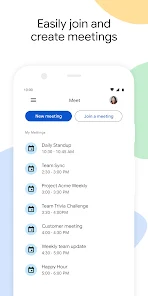
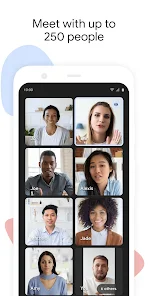
Google Meet, developed by Google LLC, is a robust and reliable video conferencing solution designed to facilitate seamless communication for individuals and teams. Its core purpose is to provide a stable, high-quality platform for virtual meetings, webinars, and collaborative sessions. The app excels in delivering clear audio and video, screen sharing, and real-time captions, forming a solid foundation for remote interaction.
The app primarily targets professionals, educators, and organizations of all sizes, aiming to solve the fundamental challenge of connecting people across distances. It effectively bridges the gap between remote teams, enables virtual classrooms, and supports client meetings without the need for physical presence. From my experience, the reliability is its strongest suit; meetings start on time, connections are stable, and the interface remains intuitive even during lengthy calls. It has been instrumental in solving coordination issues for my distributed project team, allowing for weekly sync-ups and impromptu discussions that feel almost as natural as in-person meetings.
I would highly recommend Google Meet to any business or educational institution that prioritizes reliability and ease of use over a plethora of advanced social features. It is most useful for structured meetings, formal presentations, and collaborative work sessions where clarity and stability are paramount. For users already embedded in the Google Workspace ecosystem, it becomes an indispensable, frictionless tool for daily communication.
Key Functional Highlights
- 🔗 Effortless Joining: Participants can enter meetings instantly via a shared link or code, requiring no account creation, which drastically reduces entry barriers for guests and clients.
- 📹 Adaptive Video Quality: The platform intelligently adjusts video resolution based on network conditions, ensuring a smooth call experience even on slower internet connections.
- 📝 Live Captions: Powered by Google's speech recognition, real-time captions provide accessibility and aid comprehension, especially in noisy environments or for participants with hearing difficulties.
- 🖥 Integrated Screen Sharing: Users can easily share their entire screen, a specific application window, or a Chrome tab, making presentations and collaborative reviews straightforward and efficient.
Advantages & Benefits
- ✅ Rock-Solid Reliability: Meetings are consistently stable with minimal drops or quality issues, providing a dependable platform for critical business discussions.
- ✅ Clean, Intuitive Interface: The layout is simple and uncluttered, allowing users to focus on the conversation rather than navigating complex menus.
- ✅ Deep Google Integration: Seamless calendar scheduling, Gmail invites, and Workspace file sharing create a cohesive productivity experience.
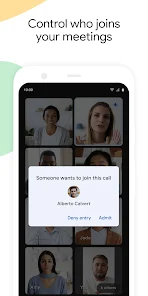
- ✅ Strong Security: Encryption in transit, anti-abuse features, and secure meeting controls help protect sensitive conversations.
Areas for Improvement
- ⚠️ Limited Fun Features: It lacks built-in interactive tools like virtual backgrounds, advanced polls, or co-annotation features found in some competitors, which can make long meetings less engaging.
- ⚠️ Mobile Screen Sharing Restrictions: On mobile devices, screen sharing capabilities are often limited compared to the desktop version, which can hinder collaboration on the go.
- ⚠️ Free Tier Limitations: The free version has constraints on meeting duration and participant count, which may not suffice for larger or longer gatherings without a paid subscription.
- ⚠️ Network Dependency: While adaptive, performance still heavily relies on individual participants' internet stability, which is outside the app's direct control.
Recommended Apps
![]()
PND AI Photo Enhancer HD
PND AI 3604.8

![]()
Funny Ranking Filter Challenge
TriverSoft0![]()
Home AI - AI Interior Design
HubX4.6![]()
Rolling Icon: 3D Wallpaper
Maxlabs Personalization Tools4.4![]()
+1 Super Anime Wallpaper
ThichTruyenTranh4.2![]()
4D Parallax Wallpaper 3D HD 4K
Wallpapers by Vinwap4.5![]()
SillyGlow: Smile Wallpaper 4K
BizApp Inc.0![]()
Video call Elssa
TOSSINGAME LTD0![]()
LastSeen
Web-Source Ltd3.4![]()
Piano: Learn & Play Piano
Enable Startup4.1![]()
GoFan: Buy Tickets to Events
GoFan4.8![]()
Kpop Fans Demon Hunter Wallpap
JHNStudio4.3![]()
Cool Wallpapers HD Steampunk
Live Wallpapers and Emoji Keyboard Themes4.4![]()
Mini Quiz Filter Challenge
GjangHa3.9![]()
Brain Test: Alzheimer's
Living Maples Healthy Aging0













You May Like
-
![]()
Nebula: Horoscope & Astrology
OBRIO3.5 -
![]()
Google Meet (original)
Google LLC3.9 -
![]()
Astroscope: Astrology Guide
Astroscope App4.5 -
![]()
Instagram
Instagram3.9 -
![]()
Crafto
Kutumb App4.7 -
![]()
Impulse - Brain Training Games
GMRD Apps Limited4.5 -
![]()
GPS Map Camera - Timestamp
Sliver AI Photo Editor0 -
![]()
Love Detector - Fingerprints
KOSHINA APPS0 -
![]()
PolyBuzz: Chat with AI Friends
CLOUD WHALE INTERACTIVE TECHNOLOGY LLC.3.8 -
![]()
Monster Detector: Alien, Ghost
Game Palette3.8 -
![]()
FaceMagic - AI Face Editor
Apero Vision Lab3.9 -
![]()
Thumb Dance Challenge
GAdventure4.1 -
![]()
Face DNA: AI Ethnicity Test
Ineptlyawesome4 -
![]()
GigaBody: AI Muscle filter
Bellential Inc.4.4 -
![]()
Voice Changer – Voice Effects
All Excellent Apps0