Skin Editor 3D for Minecraft
Remoro Studios
Installs
10M+
Developer
Remoro Studios
-
Category
Productivity
-
Content Rating
Rated for 3+
Developer Email
Privacy Policy
http://remoro-studios.com/privacy_policy
Screenshots
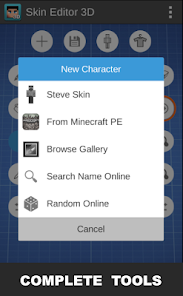
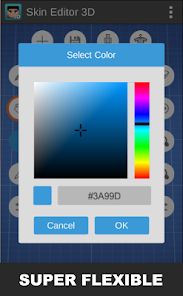
Expert Review
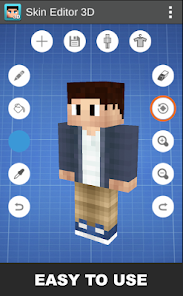
Skin Editor 3D for Minecraft by Remoro Studios is a dedicated mobile application designed to empower players to create, edit, and customize their in-game avatars from the ground up. The app's core purpose is to move beyond simple skin downloads, offering a full-fledged 3D modeling suite that brings the creative process directly to your fingertips. It targets Minecraft enthusiasts who crave a unique identity in the blocky world, solving the problem of generic or hard-to-modify skins found elsewhere. Whether you're a budding digital artist, a roleplayer wanting a specific character look, or just a player tired of the same old options, this app provides the tools.
The core feature—the 3D editor—works impressively well. Manipulating the model by rotating, zooming, and painting on a three-dimensional figure provides an intuitive and accurate preview that flat, 2D skin editors lack. Additional features like a vast library of base templates, a color picker with a palette, and layer-based editing add tremendous value, transforming a complex task into an accessible one. In my experience, it helped me solve a very specific problem: creating a skin that matched a custom character from a story I was writing. Being able to visualize how the stripes on the character's jacket would wrap around the arms in real-time was invaluable and saved me from the tedious trial-and-error of traditional editors.
I would highly recommend this app to two main groups: first, to players with a clear visual idea who need precision tools to execute it, and second, to those new to skin creation who want to learn by experimenting on a 3D model. It's most useful when you need a skin that doesn't exist, when you want to tweak an existing skin's details (like changing a logo on a character's shoulder), or when you're preparing a unique skin for a multiplayer server to stand out. It turns skin creation from a chore into a core part of the creative Minecraft experience.
Key Functional Highlights
- 🎨 Full 3D Modeling Canvas: Paint directly onto a rotatable, zoomable 3D model of the Minecraft character, providing a true WYSIWYG (What You See Is What You Get) editing experience that eliminates guesswork.
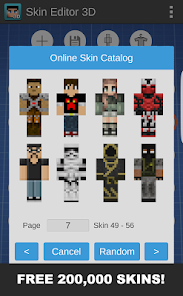
- 📚 Extensive Template & Community Library: Jumpstart your creation with hundreds of pre-made base skins or browse and import designs shared by other users for inspiration and remixing.
- 🛠️ Advanced Layer & Tool System: Utilize layer-based editing similar to professional software, along with tools like a precise color picker, symmetry painting, and brush size adjustment for detailed work.
- 📤 Seamless Game Integration: Export your finished skin directly to your Minecraft game with one tap, or share your creation with the app's built-in community hub.
Advantages & Benefits
- 🌟 The intuitive 3D interface is a game-changer, making skin editing feel natural and significantly reducing the learning curve compared to 2D pixel maps.
- 🌟 The sheer volume of starting points, from blank templates to complex community designs, ensures you're never starting from absolute zero.
- 🌟 The layer system allows for non-destructive editing, letting you experiment with colors and patterns without ruining your previous work.
- 🌟 Direct export functionality streamlines the entire process from creation to in-game use, removing frustrating file management steps.
Areas for Improvement
- ⚠️ The free version includes persistent ads and locks some premium templates and tools behind a paywall, which can interrupt the creative flow.
- ⚠️ On older or less powerful devices, manipulating the 3D model can sometimes lead to slight lag or stuttering during rotation or zooming.
- ⚠️ The community library, while large, can be difficult to search through effectively due to limited filtering options.
- ⚠️ Advanced features like custom model importing or animation are not available, which may limit the app for expert creators looking for the next level.
Recommended Apps
![]()
Anti Theft Alarm–Find my Phone
Phone Lock & Utilities Apps4.3
![]()
Crafto
Kutumb App4.7
![]()
Tap Challenge - Funny Filter
Andromeda App0![]()
Dog & Cat Translator Prank
King Clover Studio0![]()
Home AI - AI Interior Design
HubX4.6![]()
4D Live Wallpaper–HD Wallpaper
ZERO Tech4.5![]()
The Prank App - Funny Sounds
Apps from da Woodz4.5![]()
Kpop Demon Draw and Coloring
Youssoft LTD0![]()
ThemeKit - Themes & Widgets
ThemeKit4.4![]()
Depression Test
Inquiry Health LLC4.5![]()
Chai: Chat AI Platform
Chai Research Corp.4.3![]()
Get RBX Counters : RBX Pro
SS Corp Fam0![]()
Future Self Face Aging Changer
AMOBEAR TECHNOLOGY GROUP4![]()
Monster High™ Beauty Salon
CrazyLabs LTD4.5![]()
GPS Speedometer: Speed Tracker
SM Infotech3.2









You May Like
-
![]()
Recovery Pro - File Recovery
Makes Your Life Easier4.3 -
![]()
Heaven: Gay & LGBT+ Dating
Paradiz Social Ltd3.2 -
![]()
Tripo - AI 3D Model Generator
Tripo AI4.4 -
![]()
Face Changer 2
Scoompa4.3 -
![]()
Emochi: Chat With Character
FlowGPT4.5 -
![]()
Transparent Live Wallpaper
Mobi Softech3.9 -
![]()
Call From Princess Elsa video
dev riad saoud Apps3.5 -
![]()
Mirror of Past Life : Magic, P
Game Palette3.3 -
![]()
ParkMobile: Park. Pay. Go.
Parkmobile, LLC4.3 -
![]()
GasBuddy: Find & Pay for Gas
PDI Software, Inc.3.1 -
![]()
Bipolar Test
Inquiry Health LLC4.2 -
![]()
BitMind: AI Detector & Creator
BitMindAI2.8 -
![]()
Planner 5D: Home Design, Decor
Planner 5D4.1 -
![]()
Heaven Messenger - chat, map
SKYTRACK0 -
![]()
Elf Cam : Santa's elf tracker
Scibble LLC3.7