Makerblox - Create Skins
White Platform Studio
Installs
10M+
Developer
White Platform Studio
-
Category
Entertainment
-
Content Rating
Everyone
Developer Email
Privacy Policy
https://pandarobotstudio.wixsite.com/websiteplatfoms
Screenshots
Expert Review
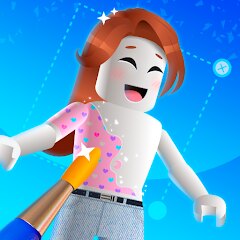
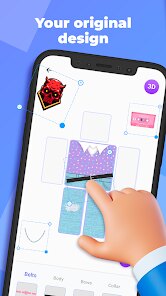
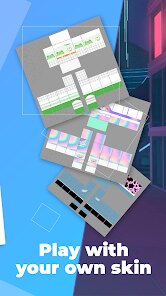
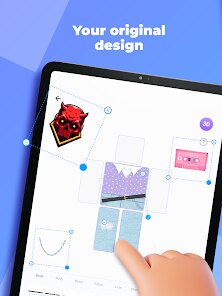
Makerblox - Create Skins is a mobile application that lets users design custom character skins for Roblox, the massively popular online game platform. The app provides a simplified 3D modeling environment where players can create, edit, and preview their own avatar clothing and accessories without needing advanced design software. Its primary audience is Roblox players, particularly younger users, who want to stand out in-game with unique looks but lack the technical skills to build skins from scratch using professional tools.
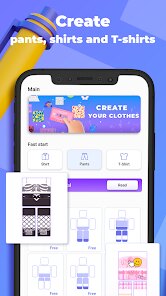
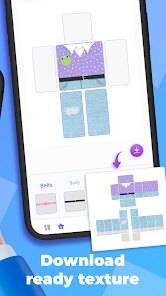
The core problem Makerblox addresses is accessibility. Creating Roblox skins normally requires familiarity with 3D modeling programs, UV mapping, and the specific technical requirements of the Roblox marketplace. This app strips away most of that complexity by offering a template-based system. Users pick a base model, apply colors and patterns, and export the result. In practice, the core creation tools work reasonably well for simple designs. The interface is touch-friendly, and the live preview helps users understand how their skin will look on a character. However, the editing options are fairly basic, and anyone hoping for fine control over texture details will hit limitations quickly. Additional features like preset templates and a small library of decorative elements do add some value, especially for beginners who need a starting point.
From my own experience, I used Makerblox to make a simple hoodie design for a friend's Roblox avatar. The process took about fifteen minutes, and the export worked without issues. It solved the problem of not wanting to learn Blender just to make one casual outfit. That said, the result looked a bit blocky compared to skins made with more advanced tools.
I would recommend this app to younger Roblox players, parents helping their kids create content, and casual users who want a quick custom skin without a steep learning curve. It is most useful for simple, color-based designs and for experimenting with ideas before committing to more serious software. Anyone aiming for professional-quality skins should look elsewhere.
Key Functional Highlights
- 🎨 Template-based skin creation: Users select from pre-built Roblox character models and apply their own colors, patterns, and simple graphics, which speeds up the design process considerably.
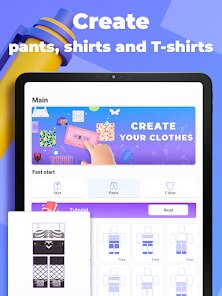
- 👕 Clothing and accessory editing: The app supports basic modifications to shirts, pants, and a few accessory types, allowing users to assemble a complete outfit rather than just a single item.
- 👀 Real-time 3D preview: Changes appear instantly on a rotating character model, so users can judge how their design looks from multiple angles before exporting.
- 📤 Export and sharing: Finished skins can be saved and transferred for use in Roblox, though the export options are somewhat limited compared to desktop alternatives.
Advantages & Benefits
- 👍 Beginner-friendly interface: The touch controls and clear layout make it easy for newcomers to start designing within minutes.
- ⚡ Fast workflow: Simple skins can be completed in a short session, which suits users who want quick results.
- 🆓 Low barrier to entry: No prior 3D modeling knowledge is required, making creative expression accessible to a wider audience.
- 📱 Mobile convenience: Being able to design on a phone or tablet means users can work on ideas anywhere.
Areas for Improvement
- 👎 Limited editing depth: Advanced users will find the toolset too basic for detailed or professional-quality work.
- 🐢 Performance issues: The app can lag on older devices, especially when rendering more complex designs.
- 📉 Sparse asset library: The selection of templates and decorative elements feels thin, which restricts creative variety.
- 🔒 Export restrictions: Some users report difficulty transferring skins into Roblox smoothly, and the process is not always intuitive.
Recommended Apps
![]()
DIY Battery: 3D Charge & Emoji
Braly JSC0
![]()
Upside: Gas & Food Cash Back
Upside Inc.4.5
![]()
Uber - Request a ride
Uber Technologies, Inc.4.5![]()
Neku: OC character creator
Neku Avatar Studio4.6![]()
U-Haul
U-Haul International3.2![]()
GPS Camera Timestamp & Geotag
Betasoft Mobile0![]()
DeepSeek - AI Assistant
DeepSeek4.2![]()
Mirror of Past Life : Magic, P
Game Palette3.3![]()
Brain Test: Alzheimer's
Living Maples Healthy Aging0![]()
Nebula: Horoscope & Astrology
OBRIO3.5![]()
Tesla
Tesla, Inc.4.7![]()
God messages
dragonplay0![]()
Call Santa Claus: Prank Call
Jaadoo Studio0![]()
Brainova: IQ Test & Logic Game
FALCON GAME4.5![]()
Blood Pressure Log
Sharon Evans4.1











You May Like
-
![]()
Artplay - AI Photo & Video
Hideaway Technology Limited4.5 -
![]()
Future You: See your old face
Future Self Studio3.4 -
![]()
GPS Speedometer: Speed Tracker
SM Infotech3.2 -
![]()
ZEPETO: Avatar, Connect & Play
Naver Z Corporation4.3 -
![]()
4D Live Wallpaper–HD Wallpaper
ZERO Tech4.5 -
![]()
Santa's Naughty List App
Steven J Q McAnena3.6 -
![]()
Idol Prank Call - Video & Chat
LeafMotion Software4.7 -
![]()
AR Drawing - Sketchar App
Braly JSC4.2 -
![]()
Suno - AI Music & Songs Maker
Suno, Inc4.8 -
![]()
Silly Sounds: Prank Sounds App
Zenspin by Mindscape Applab llc0 -
![]()
Audible: Audio Entertainment
Audible, Inc.4.5 -
![]()
Funny Reverse Audio - Singing
PlayStudioInc0 -
![]()
Duolingo: Language & Chess
Duolingo4.7 -
![]()
Call Santa Claus: Prank Call
Jaadoo Studio0 -
![]()
Flipped:Chat with AI Character
First Group pte ltd4.1