PixVerse: AI Video Generator
PixVerse
Installs
50M+
Developer
PixVerse
-
Category
Generative AI
-
Content Rating
Teen
Developer Email
Privacy Policy
https://docs.pixverse.ai/Privacy-Policy-97a21aaf01f646ad968e8f6a0e1a2400
Screenshots
Expert Review
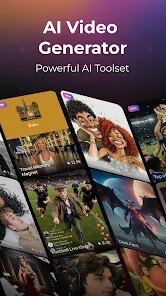
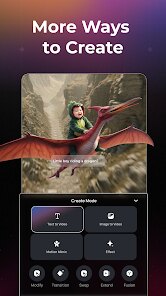
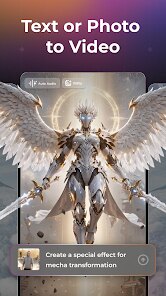
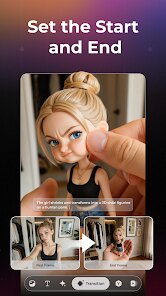
PixVerse positions itself as a versatile AI video creation platform, but its actual utility stretches far beyond the typical text-to-video toy. At its heart, it lets you conjure short, stylized video clips from a text description, an existing image, or even another video. You can pick from a range of animation styles—from anime to cinematic live-action—and tweak aspects like motion strength and aspect ratio. The platform also includes a character-to-video feature, letting you upload a face and see it animated in different generated scenes. For anyone who needs quick, shareable visuals without touching a traditional editing suite, this tool is a genuine time-saver.
The core engine performs admirably for short bursts of content. Prompts like 'a cyberpunk cat walking through a neon alley' yield surprisingly coherent results, with decent motion physics and a strong adherence to the requested mood. I found the image-to-video workflow particularly effective; it gave me precise control over the composition and lighting, avoiding the hit-or-miss nature of purely text-based generation. The additional tools, like the ability to extend clips or upscale them, add practical value, though they sometimes feel bolted on rather than seamlessly integrated. In my own workflow, PixVerse solved a recurring headache: producing background loops for client presentations. Instead of hours of shooting or licensing footage, I had a set of ready-to-use, royalty-free clips in minutes.
Given its current feature set, I would recommend PixVerse to social media managers, indie game developers creating promo snippets, and educators who want to spice up lecture slides. It is less suited for filmmakers seeking narrative-length coherence, as the clips are short and the generation can be unpredictable with complex sequences. This app shines when you need a rapid, aesthetically pleasing, and customizable visual asset, and its value drops when you need precise, long-form storytelling.
Key Functional Highlights
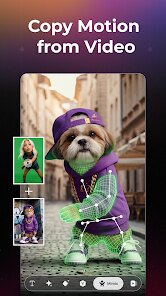
- ✨ Multi-Modal Input: You aren't stuck with just text. You can upload a base image to animate it or even provide a reference video to guide the style and motion of a new clip. This flexibility is a huge boost for creative control.
- 🎬 Style and Aspect Ratio Control: The generator offers a built-in library of visual styles, from vibrant anime to photorealistic renditions. Combined with multiple output ratios, you can craft assets that fit specific platforms like TikTok, YouTube Shorts, or Instagram Reels without any external cropping.
- 🚀 Camera Motion Settings: You have options to control the virtual camera's movement—like zooming, panning, or a dynamic tracking shot. This adds a professional feel to the output that static generations lack, making the final product look more intentional.
Advantages & Benefits
- ⚡ Speed and Efficiency: The generation process is remarkably quick, often producing a usable 4-second clip in under a minute. This speed allows for rapid iteration, letting you experiment with multiple prompt variations without a long wait.
- 🎯 Prompt Adherence: In my testing, the model was surprisingly good at capturing the key subjects and atmosphere described in the prompt. It rarely missed the 'main character' or fogged up the scene with irrelevant elements, making the output feel reliable.
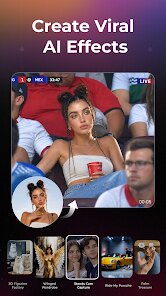
- 🔄 Character Consistency: The face-to-video function performs better than most competitors, maintaining a recognizable likeness of the uploaded face across different generations. This is a powerful feature for creating personalized avatars or storyboarding.
Areas for Improvement
- 🐢 Queue and Credit System: The free tier often lands you in a long queue, and the credit system depletes very quickly. A few tests can exhaust your daily allowance, which is frustrating for new users trying to learn the platform's nuances.
- 🧩 Short Clip Length: The native output remains quite brief, typically only a few seconds long. Extending a clip requires a separate, sometimes glitchy, process that can introduce visual artifacts or sudden jumps, limiting its use for longer narratives.
- 💬 Occasional Misinterpretation: While often good, the model can still struggle with abstract concepts or complex interactions between multiple objects, sometimes resulting in a jumbled or surreal output that requires a re-do of the prompt.
Recommended Apps
![]()
DramaBox - Stream Drama Shorts
STORYMATRIX4.6

![]()
NAMA: Flower language keyboard
Andromeda App3.7![]()
FWC2026 Mobile Tickets
FIFA2.1![]()
Idol Prank Video Call & Chat
84devs Studio0![]()
Sprout - AI Job Search
Magnifex4.4![]()
Idol Prank Call - Video & Chat
LeafMotion Software4.7![]()
PND AI Photo Enhancer HD
PND AI 3604.8![]()
Perplexity - Ask Anything
PerplexityAI4.7![]()
Live Score Football
YakinGlobal4.5![]()
Tai Chi Workout at Home
Hazard Studio4.8![]()
Audible: Audio Entertainment
Audible, Inc.4.5![]()
Live Scores: Football Match
SCTV Digital0![]()
Wallpapers HD - Backgrounds 4K
TarrySoft4.4![]()
SillyGlow: Smile Wallpaper 4K
BizApp Inc.0![]()
Emoji Home: Make Messages Fun
Emoji Home4.5














You May Like
-
![]()
SillyGlow: Smile Wallpaper 4K
BizApp Inc.0 -
![]()
Fingerprint Scan
T-Bridge Technologies2 -
![]()
4D Parallax Wallpaper 3D HD 4K
Wallpapers by Vinwap4.5 -
![]()
Live Score Football
YakinGlobal4.5 -
![]()
Funny Prank Sounds: Fart, Horn
Lite Media4.6 -
![]()
PixVerse: AI Video Generator
PixVerse4.5 -
![]()
Neku: OC character creator
Neku Avatar Studio4.6 -
![]()
Funny Prank: Monster Sound
Mirai Games3.4 -
![]()
Google One
Google LLC4.1 -
![]()
Ford™
Ford Motor Co.4.7 -
![]()
Wonder - LGBTQ+ Dating App
Bumpy Inc.4.3 -
![]()
How Old Are Your Ears Fun Test
team5stars0 -
![]()
April Fools Pranks Funny Prank
Express Dev Inc4.7 -
![]()
TeraBox: 1TB Cloud & AI Space
Flextech Inc.4.4 -
![]()
Grindr - Gay Dating & Chat
Grindr LLC4.1