PND AI Photo Enhancer HD
PND AI 360
Installs
100K+
Developer
PND AI 360
-
Category
Generative AI
-
Content Rating
Everyone
Developer Email
Privacy Policy
https://pndai.ai/en/privacy.html
Screenshots
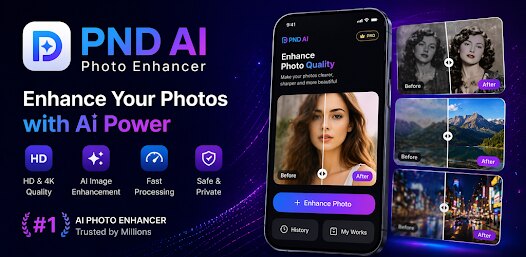
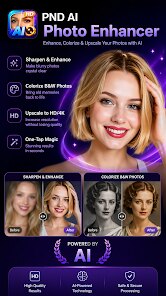
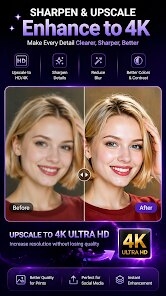
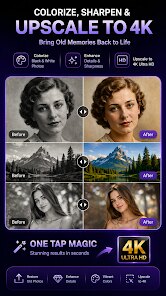
Expert Review
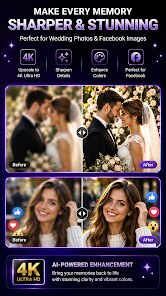
Let's be real for a second: we've all got that one album on our phone filled with blurry, dark, or just plain disappointing photos. You know the ones—the concert shot where the stage lights washed everyone out, the precious family photo that's grainy because you zoomed in too far, or that perfect moment captured on an older phone camera. For years, I accepted these as lost causes or spent way too much time fumbling with complicated desktop software like Photoshop. That's where PND AI Photo Enhancer HD comes into the picture, promising to breathe new life into those forgotten images without demanding a degree in graphic design.
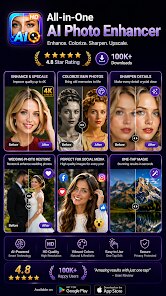
At its core, this app is a straightforward solution for anyone who wants to improve their existing photos using the power of artificial intelligence. Whether you're a social media enthusiast trying to polish your feed, someone digitizing old family archives, or just a regular person who wants better-looking pictures, PND AI has you covered. The main appeal is its ability to fix common photo issues like low resolution, blurriness, and poor lighting with just a few taps. In my own experience, the results were genuinely surprising. I tested it on a scan of an old polaroid from the 90s, packed with noise and fading colors. The app not only sharpened the details but also restored colors in a way that felt natural, not artificially saturated. It saved me a headache and probably an hour of manual editing.
For anyone sitting on a library of subpar photos, this app is a practical tool to get results fast. I'd recommend it specifically if you need to quickly clean up images for printing, sharing on social media, or just making your digital albums look more consistent. It's less about creative manipulation and more about polishing what's already there. If your goal is turning a bad snapshot into something you'd proudly show off, this is worth a look.
Key Functional Highlights
- 🎨 One-Tap Enhancement with AI Precision: The standout feature is the automatic enhancement that analyzes your photo and applies corrections for color, lighting, and sharpness. It works like a charm on portraits, bringing out details in a way that feels organic rather than overly processed. I noticed skin tones looked warmer and more natural compared to other apps that give everyone a plastic-like finish.
- 📸 Powerful Face and Detail Sharpening: Ever taken a selfie where your face is slightly soft or out of focus? This feature applies targeted sharpening to facial features and other crucial details. The AI seems to understand facial structure well, avoiding the common pitfall of making everything look jagged or unnatural. It brought back the texture of hair and fabric in a group photo that I had written off as a lost cause.
- 📷 Smart Denoising and Color Restoration: Low-light photos are the app's real battleground. It excels at removing grain while keeping image edges crisp. The color correction goes beyond just boosting saturation—it actually adjusts white balance and exposure levels to mimic what you saw with your own eyes. A dimly lit dinner photo came out looking like I had used professional studio lighting.
Advantages & Benefits
- 👍 Incredibly User-Friendly Interface: The whole process takes seconds. You don't need to adjust sliders or understand technical terms. It's genuinely designed for the average person.
- 🚀 Fast Processing Speed: Even with high-resolution images, the app processes enhancements nearly instantly. No waiting around for progress bars to crawl along.
- 🎯 Consistent Results Across Different Photo Types: It handles everything from landscapes to text-heavy screenshots without breaking a sweat. The AI adapts its algorithm based on what it detects in the image.
Areas for Improvement
- ⚠️ Subscription Model for Full Access: The free version is very limited, often leaving a watermark or capping resolution. Unlocking the best features requires a subscription, which might feel steep for casual users.
- 🔒 Limited Batch Processing Options: You can only enhance one photo at a time. For someone with hundreds of photos to clean up, the lack of a bulk mode is a serious time drag.
- 📦 Occasional Over-Processing on Text or Graphics: While great for photos, the AI tends to over-sharpen text-heavy images or graphics, sometimes creating slight halos around letters. A dedicated toggle for different enhancement modes would help.
Recommended Apps
![]()
Bugzz: Insect Prank Filters
Smart Utilities Hub3.8

![]()
FaceLab: Face Editor, Aging
Lyrebird Studio4.4![]()
TickTock-TikTok Live Wallpaper
TikTok Pte. Ltd.4.5![]()
Mirror of Past Life : Magic, P
Game Palette3.3![]()
The Choicer Voicer
KARBON COFFEE GAME1.2![]()
GPS Speedometer: Speed Tracker
SM Infotech3.2![]()
4D Live Wallpaper–HD Wallpaper
ZERO Tech4.5![]()
ParkMobile: Park. Pay. Go.
Parkmobile, LLC4.3![]()
Santa Prank Call: Fake video
Era Global Publishing4![]()
Picsart AI Photo Editor, Video
PicsArt, Inc.4.1![]()
FaceMagic - AI Face Editor
Apero Vision Lab3.9![]()
Reverse Voice - Voice Changer
Hammad670![]()
Life Palmistry - Palm & Aging
Bluewolf Technology Limited4.3![]()
FWC2026 Mobile Tickets
FIFA2.1![]()
Find Your Phone By Clap
Trusted App Global4.5











You May Like
-
![]()
Boom Chip Blast: 2-Player
Black Pyramid 3D Games Studio0 -
![]()
Pets Translator: Dog & Cat
JanDeveloper0 -
![]()
Labyrinthos Tarot Cards
Labyrinthos Academy4.7 -
![]()
Hailuo Al: Image&Video Maker
MiniMax AI4 -
![]()
Brain Test: Alzheimer's
Living Maples Healthy Aging0 -
![]()
Poe - Fast AI Chat
Quora, Inc.4.7 -
![]()
Simple Calendar - easy planner
Komorebi Inc.4.7 -
![]()
Face Changer 2
Scoompa4.3 -
![]()
Mirror of Past Life : Magic, P
Game Palette3.3 -
![]()
Direct Express®
i2c Inc.4.3 -
![]()
Voice Changer – Voice Effects
All Excellent Apps0 -
![]()
The Choicer Voicer
KARBON COFFEE GAME1.2 -
![]()
Scan My Teeth
Tabica Group1.8 -
![]()
K-Pop Girls Fashion Dress Up
cinnamonroll4 -
![]()
Call Santa Claus: Prank Call
Jaadoo Studio0