GPS Camera Timestamp & Geotag
Betasoft Mobile
Installs
10K+
Developer
Betasoft Mobile
-
Category
Productivity
-
Content Rating
Everyone
Developer Email
Privacy Policy
https://sites.google.com/betasoftmobile.com/policy-remote-control-for-tv
Screenshots
Expert Review
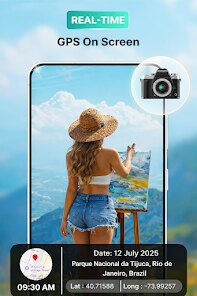
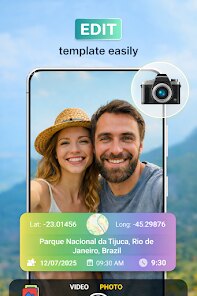
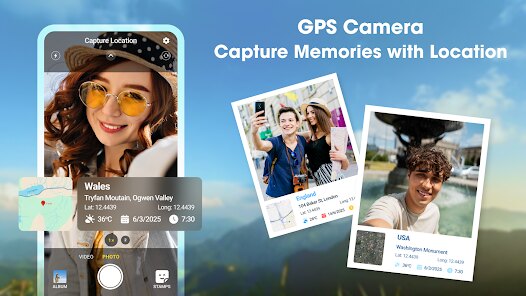
GPS Camera Timestamp & Geotag by Betasoft Mobile is a practical utility app that overlays location data, timestamps, and customizable watermarks directly onto photos at the moment they are captured. The app's main purpose is to transform ordinary smartphone photos into documented, verifiable records that clearly show when and where an image was taken. This is especially useful for people who need photo evidence for work, documentation, travel logs, or personal archives where proving the time and place matters.
The target audience is quite broad. Field workers, real estate agents, contractors, insurance adjusters, and delivery drivers rely on this app to create a trail of location-stamped images for reports and claims. Travelers and outdoor enthusiasts also use it to geotag memories without needing to manually add locations later. But it is not just for professionals — anyone who wants to keep a precise visual diary of their day-to-day life will find value in it.
After testing it for a week, I found the core functionality works reliably. The GPS lock is fast, usually within a few seconds, and the timestamp overlay is clear without being obtrusive. I used it to document some home renovation progress, and having each photo automatically stamped with the date and location saved me a lot of sorting later. It also came in handy during a weekend hike where I wanted to remember exactly which trail I was on at each point. The extra features — like custom text overlays, map view integration, and adjustable watermark opacity — do add real value, though they require a bit of time to set up initially. I would recommend this app to anyone who regularly takes photos for documentation, whether for work or personal projects. It is particularly useful for contractors needing proof of work, travelers wanting to keep a location-based photo journal, or anyone who values organized, evidence-backed photo albums.
Key Functional Highlights
- 📍 The timestamp and geotag overlay is the main draw. It embeds the exact date, time, GPS coordinates, and even altitude directly onto the photo. The text is legible but does not ruin the image, and you can adjust the font size, color, and position to suit your needs. In my tests, the GPS accuracy was within a few meters, which is more than sufficient for most documentation work.
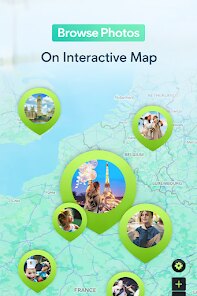
- 🗺️ The map view integration is a surprisingly useful bonus. After taking a batch of photos, the app can plot all your geotagged images on an interactive map. This gives you a bird's-eye view of your entire photo trail, which is great for planning or reviewing field work. I used this after a day of exploring a new city, and it was satisfying to see all my stops laid out clearly.
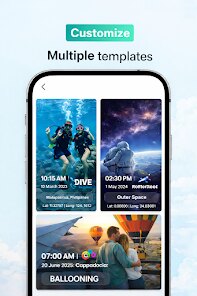
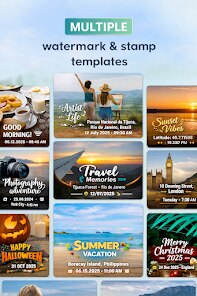
- ✏️ Custom watermarks let you add text like project names, client IDs, or personal notes directly on the photo. This is a small but powerful feature for professionals who need to brand or categorize images on the spot. It saves the hassle of editing photos later, and the watermark settings can be saved as presets for different workflows.
- ⚙️ The batch processing and export options are practical. You can apply the same timestamp and geotag settings to multiple photos at once, which is a huge time-saver. Exporting is straightforward, with support for original resolution and JPEG compression control, so you can balance quality and file size.
Advantages & Benefits
- 🎯 The GPS lock is impressively fast and accurate. Even indoors near windows, it usually locks within a few seconds, which is critical when you need to capture something quickly without waiting.
- 🛠️ The interface is straightforward and clutter-free. There is no confusing jargon or buried settings. The main screen shows the camera view with the overlay preview, and all options are accessible from a simple toolbar.
- 🔋 Battery consumption is surprisingly low. I took about 200 geotagged photos over two hours, and the battery drain was barely noticeable compared to the default camera app. This matters for field work where you might be out all day.
Areas for Improvement
- 📷 The camera quality is a step down from the default phone camera. The app uses its own camera interface, and the resulting images lack the processing and enhancement that stock camera apps apply. For documentation this is fine, but for artistic shots it is disappointing.
- 🔧 The watermark customization is powerful but has a learning curve. Setting up custom text, choosing fonts, and positioning the overlay took me several tries before I got it right. A preset library would be helpful here.
- 📂 The app does not integrate seamlessly with all cloud storage services. I had to manually export photos to my Google Drive folder instead of having them automatically synced. This adds an extra step to the workflow that could be smoother.
Recommended Apps
![]()
April Fools Pranks Funny Prank
Express Dev Inc4.7

![]()
Lethal Love: a Yandere game
AniByte!4.4![]()
CapCut - Video Editor
Bytedance Pte. Ltd.4![]()
Gopuff - Grocery Delivery
Gopuff4.5![]()
Santa Prank Call: Fake video
Era Global Publishing4![]()
Ghost Detector Real Life Radar
Spot Among Party4.3![]()
Face DNA: AI Ethnicity Test
Ineptlyawesome4![]()
Blood Pressure Log
Sharon Evans4.1![]()
Kpop Demon Draw and Coloring
Youssoft LTD0![]()
Walloop - Live Wallpapers
Walloop4.5![]()
Period Tracker and Calendar
SimpleInnovation4.9![]()
Scan My Teeth
Tabica Group1.8![]()
WhatsApp Messenger
WhatsApp LLC4.5![]()
AstroBella Astrology & Healing
Moonphase Apps GmbH4.7![]()
Google Gemini
Google LLC4.6













You May Like
-
![]()
Custom Kicks
Sneakerz4.5 -
![]()
Learn to Draw Flower
Creative APPS4.2 -
![]()
Prank Zone - Hilarious Call
Allegany Boys Camp Inc4.1 -
![]()
Halloween Call: Monster
TeH Software0 -
![]()
Moonphase Filter: Love Test
Braly JSC0 -
![]()
Telegram
Telegram FZ-LLC4.2 -
![]()
TouchTunes: Live Bar JukeBox
Touchtunes Interactive Networks3.2 -
![]()
K-Pop Girls Fashion Dress Up
cinnamonroll4 -
![]()
Doodle Art: Magic Drawing App
Peaksel Games4.4 -
![]()
Prank Call & Funny Video
TeH Software0 -
![]()
Chatbot AI & Smart Assistant
Codespace Dijital4.5 -
![]()
Stranger Things 5 Challenges
MVH Entertainment Team5 -
![]()
Future Self Face Aging Changer
AMOBEAR TECHNOLOGY GROUP4 -
![]()
3D My Name Live Wallpaper
My Name Cube Apps4.4 -
![]()
Alien Detector : Alien Radar,
Game Palette4.3