GPS Speedometer: Speed Tracker
SM Infotech
Installs
100K+
Developer
SM Infotech
-
Category
Finance
-
Content Rating
Everyone
Developer Email
Privacy Policy
http://cloudsync.xyz:8081/consent/policy/SMInfo
Screenshots
Expert Review
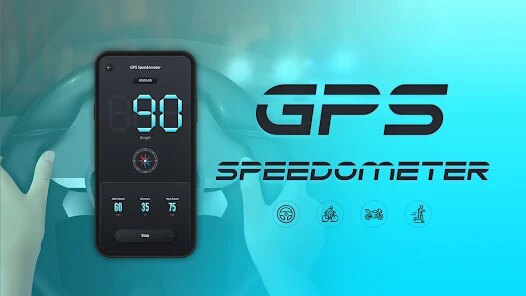
The GPS Speedometer app tackles a straightforward but common problem: knowing exactly how fast you're moving in real time. It uses your phone's GPS to calculate and display your speed in a clear, easy-to-read format. That core function works reliably. I tested it during a few long drives and in the city, comparing it with my car's built-in speedometer, and it consistently matched within a mile or two. For anyone who has ever wondered if their car's speedometer is slightly off -- maybe after changing tire sizes or just out of curiosity -- this app provides a handy second opinion.
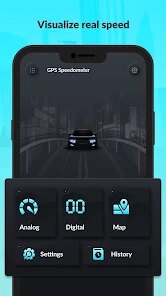
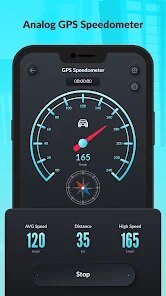
The user interface is very simple. There are no confusing menus or unnecessary options. It opens straight to a large speedometer display that looks like an analog gauge, with your current speed in big numbers in the center. Underneath, you can see a digital readout of your maximum speed, average speed, and total distance. These extras are useful for tracking a road trip or a bike ride. Personally, I used it to check how accurately my car's cruise control was working, and it gave me peace of mind on a long highway journey. I also appreciated the option to choose between miles per hour and kilometers per hour, which is necessary for anyone traveling between countries.
I would recommend this app to drivers who want a supplementary speed readout, cyclists or runners who want to track their pace without a dedicated fitness device, or anyone whose vehicle has a broken or unreliable speedometer. It's best suited for open-road scenarios where GPS signals are strong. Dense urban areas or tunnels can cause the readout to lag or become inaccurate, so it's not a total replacement for a working car speedometer. But for its intended purpose, it's a solid, no-fuss tool.
Key Functional Highlights
- 🎯 Real-time analog speedometer: The main display is a large, classic speedometer dial with a needle showing your current speed. The needle moves smoothly as you accelerate and decelerate, providing a very intuitive way to track changes at a glance.
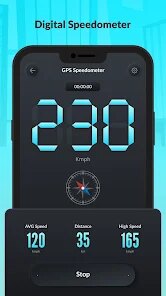
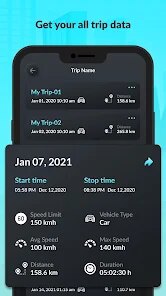
- 📊 Digital data readout: Below the dial, you get precise digital numbers for current speed, average speed, maximum speed achieved, and total distance traveled. It's useful for reviewing your trip afterward, especially if you've been pushing a top speed on a straightaway.
- ⚙️ Unit switching: You can instantly switch between mph and km/h with a single tap inside the settings. This is a genuinely helpful feature if you drive across the US-Canada border or use a bike computer that displays one unit while you prefer another.
- 📍 Background tracking option: The app can continue to log your data even when you switch to another app or lock your phone. This meant I could run Google Maps for navigation while the speedometer quietly collected my stats in the background.
Advantages & Benefits
- ✅ Rock-solid core function: The GPS speed reading is accurate and responsive. It does exactly what it promises without any fluff or unnecessary complexity.
- ✅ Clean, distraction-free design: The interface has no ads cluttering the screen while you're driving. It's just the speedometer and your data, making it safe to glance at while on the road.
- ✅ Lightweight and fast: The app installs instantly, launches fast, and doesn't drain battery life excessively compared to other GPS-heavy applications I've tried.
Areas for Improvement
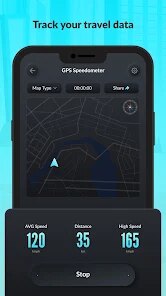
- ❌ No map or route display: Unlike some speedometer apps, this one doesn't show your current location on a map. You'll need a separate navigation app for directions, which feels like a missed opportunity.
- ❌ Accuracy suffers in poor GPS conditions: Dense tree cover, tunnels, or city canyons cause the speed reading to freeze or lag behind reality. This is a limitation of GPS itself, but it's worth noting for urban users.
- ❌ Sparse settings menu: There are very few customization options. You cannot change the color scheme, adjust the speedometer's sensitivity, or set a speed warning alert. A basic alert feature would be a welcome addition for safety.
Recommended Apps
![]()
Bikii Cloud Game
Bikii Game Dev3.5

![]()
Prank App - Funny Prank Sounds
Trusted Apps & Utilities Tools 20244.4![]()
Halloween Call: Monster
TeH Software0![]()
Idol Prank: Video Call & Chat
BUGUN SOFTWARE COMPANY LIMITED3.3![]()
eBay online shopping & selling
eBay Mobile4.6![]()
Photo Tool
COLIFER LAB4![]()
Passport Parking
Passport Labs, Inc.2.5![]()
YouVersion Bible App + Audio
Life.Church4.9![]()
Anime Girl Wallpapers
Wallpaper World Designs4.7![]()
EasyPark - Parking made easy
EasyPark AS4.8![]()
FaceApp: Perfect Face Editor
FaceApp Technology Ltd4.4![]()
Picsart AI Photo Editor, Video
PicsArt, Inc.4.1![]()
Rolling Icon: 3D Wallpaper
Maxlabs Personalization Tools4.4![]()
SHEIN-Shopping Online
Roadget Business PTE. LTD.4.6![]()
Talkie: Soulful Character AI
SUBSUP4.2














You May Like
-
![]()
3D Wallpaper Steampunk Energy
Keyboard Background for Android Apps4.6 -
![]()
My Cartoon Character
Andromeda App3.7 -
![]()
Fingerprint Scan Simulator
Dream-Up3.6 -
![]()
Skin Editor 3D for Minecraft
Remoro Studios4.4 -
![]()
My Name Meaning - Name Facts
DroidX Studio0 -
![]()
PND AI Photo Enhancer HD
PND AI 3604.8 -
![]()
What is my name meaning
Code Play0 -
![]()
Glitter Live Wallpaper Glitzy
Wallpapers by Vinwap4.3 -
![]()
Beauty Camera -Selfie, Sticker
Leopard V74.7 -
![]()
Allergy Plus by Pollen.com
IQVIA Inc.3.9 -
![]()
Monster Call: Prank Video Call
TeH Software4.2 -
![]()
Old Me: AI Age & Future Aging
happy.ai.app2.4 -
![]()
ThemeKit - Themes & Widgets
ThemeKit4.4 -
![]()
How Did You Die In The Past?
BuzzMoy0 -
![]()
Zodiac Palm Reader: MagicWay
Reatility Media4.6