LEGO® DUPLO® Peppa Pig
StoryToys
Installs
10M+
Developer
StoryToys
-
Category
Educational
-
Content Rating
Everyone
Developer Email
Privacy Policy
https://www.storytoys.com/privacy
Screenshots
In-Depth Game Analysis
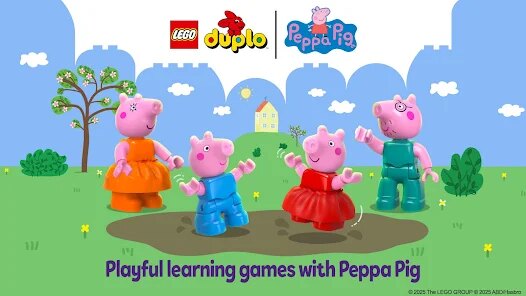
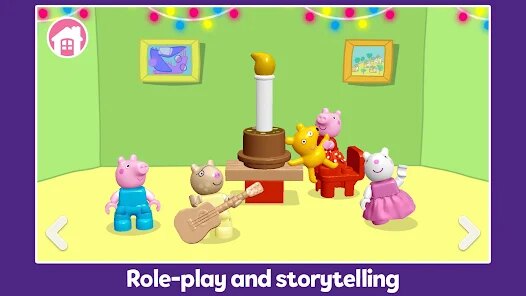
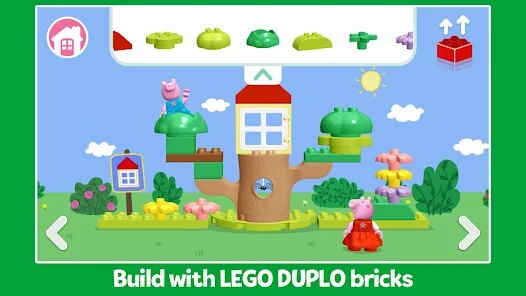
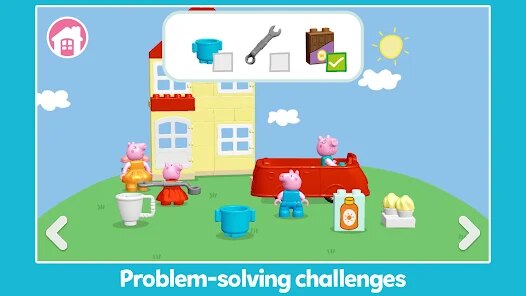
If you've ever watched a toddler's eyes light up at the sight of Peppa Pig, you already know the magnetic pull of this world. LEGO® DUPLO® Peppa Pig, developed by StoryToys, takes that familiar animated charm and drops it into a sandbox of building and imaginative play. It's not a competitive game or a puzzle-heavy adventure; it's a cozy, digital playset designed for preschoolers and their grown-ups. The core loop is simple: you explore iconic locations like Peppa's house, the playgroup, or the beach, tap on characters to make them interact, and use chunky DUPLO blocks to build objects, vehicles, or silly contraptions. There's no fail state, no timer, no score—just pure, undirected fun. This is squarely aimed at the 2-5 age bracket, but honestly, parents might find themselves quietly enjoying the tactile satisfaction of snapping blocks together on a tablet. I first heard about it through a friend whose kid is obsessed, and the initial trailer—showing Peppa literally built out of DUPLO bricks—sold me on the concept instantly. It looked like the perfect bridge between screen time and physical building toys, and I was curious if the execution could match the promise.
My first session with my own nephew (age four) started with a bit of hesitation—he loves the TV show, but tablets usually mean fast-paced games with lots of noise. The difference here was night and day. As soon as the game loaded, the familiar theme tune played, and Peppa's house appeared, gently rendered in that blocky LEGO style. He tapped on Peppa, and she jumped, giggling in that classic voice. Then he tapped on George, who ran over holding his dinosaur. The controls are incredibly forgiving—there's no pinch-to-zoom confusion or pixel-perfect tapping required. Everything is big, bold, and responsive. We spent about twenty minutes just walking characters around, opening doors, and discovering hidden animations. But the standout moment came when we found the building station. We could drag a DUPLO brick onto the screen, and it would snap into place with a satisfying "click" sound. My nephew started stacking bricks haphazardly, but the game gently provided a "ghost" outline for the intended build—a slide or a playhouse—so he felt guided without being forced. He built his first slide by himself, and when he placed Peppa on top of it, she slid down with a triumphant "Wheee!" The pure joy on his face was worth the download alone. Performance-wise, it ran flawlessly on a standard iPad, and the load times were practically non-existent. The learning curve is zero, which is precisely the point.
As someone who has reviewed countless kids' games over the years, I've seen too many that just slap a franchise skin on a slot-machine mechanic or a forced ad-filled video player. What made me keep coming back to this one—and why I bought the full version—is the respect it shows for its young players. The progression isn't about earning stars or unlocking loot boxes; it's about the intrinsic satisfaction of building something and watching it come to life. The game encourages trial and error without punishment. If you knock a brick off the screen, it just disappears; there's no frustration. Compared to other licensed games like Daniel Tiger's Neighborhood or even some of the better PBS Kids apps, this one has a much richer sense of physicality. The LEGO bricks clatter when they fall and interlock with a satisfying snap, grounding the digital experience in the real-world feel of the physical toy. It also nails the audio-visual fidelity of the show—voices, music, and visual gags are all spot-on, which matters enormously for little fans. It stands out because it doesn't dumb down the IP; it translates the intelligence of LEGO's building philosophy into a format that a toddler can grasp. Yes, it's simple, but it's rarely easy to make "simple" this deeply engaging without resorting to cheap distractions.
Core Gameplay Features
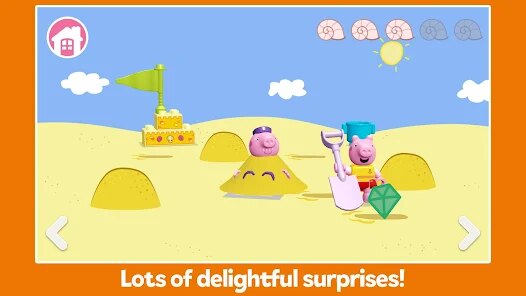
- Interactive Playhouse Layout 🏠: The game presents a living diorama of familiar Peppa Pig locations. You can pan across the screen to move between the house, the garden, and the street. Every door opens, every character reacts to a tap, and there are hidden surprises scattered around—like George's dinosaur popping out of a bush. It feels less like a static menu and more like a miniature toy town you can walk around in.
- Simple Drag-and-Drop Building 🧱: The star of the show is the building mechanic. When you enter a build mode, a set of chunky LEGO bricks appears at the bottom. You drag them up and snap them onto a highlighted base. The game guides you with clear outlines, but you can place bricks anywhere you want, creating custom structures. There's no complexity like rotation or angles—just straightforward, pick-up-and-stack fun.
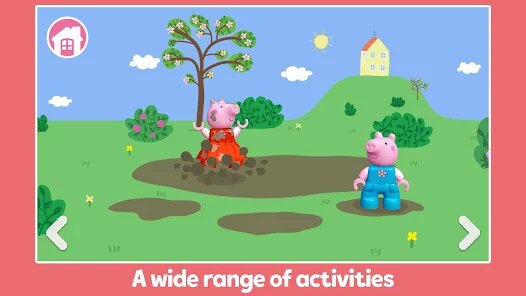
- Character-Driven Interactions 🐷: Each character—Peppa, George, Mummy Pig, Daddy Pig, even Suzy Sheep—has a unique set of animations and sounds. Tapping them repeatedly triggers different reactions, from giggles to jumping in muddy puddles. The interactions are context-sensitive, so if you place Peppa near a picnic table, she'll start eating; near a slide, she'll climb and slide down. It rewards mobile exploration.
- Durable Free Play Mode 🆓: Beyond the guided build activities, there's a free play mode where you can use any unlocked blocks to build whatever you like. There's no goal, no time limit, just a blank canvas and a bunch of bricks. This encourages open-ended creativity, allowing kids to make a tower, a car, or just a weird jumble of colors without any pressure to complete a task.
- Child-Friendly Menu System 🖱️: The user interface is beautifully simplified. There are no text-heavy menus or confusing icons. A big green "play" arrow starts the activity, and a house icon always takes you back to the map. There are no in-app purchase prompts breaking the flow, and the parental gate is a simple hold-and-confirm action that a toddler can't accidentally trigger.
Strengths & Highlights
- Perfectly Captures the Show's Spirit ✨: The voice acting, music, and sound effects are borrowed straight from the series. Hearing Peppa's giggle or Daddy Pig's low chuckle is instantly comforting for kids. It's not a cheap imitation; it's a lovingly crafted recreation that makes kids feel like they're stepping into the actual cartoon. This fidelity is what hooks them from the first second.
- Zero Frustration Design 🎉: My favorite aspect is the absolute lack of fail states. If a child tries to make a slide and places the slide part upside-down, the game just lets it be. There's no "wrong" answer. This is astonishingly rare in children's games, which often force linear paths or harshly penalize mistakes. It teaches that play is about experimentation, not punishment.
- Offline Accessibility 📴: After the initial download, the entire game works offline. For parents on a road trip or in a waiting room with sketchy Wi-Fi, this is a lifesaver. No annoying buffering screens or failed connections. It's a complete, self-contained package that respects your time and patience.
- Subtle Educational Value 🧠: While it's not a "learning game" in the traditional sense, it sneaks in fine motor skills through the dragging and dropping actions. Also, the planning involved in matching the ghost outlines helps with spatial awareness. It teaches cause and effect—build a ramp, then the character uses it. That's a valuable, age-appropriate lesson in logic.
Limitations to Consider
- Limited Content Variety 🔒: While the free play is nice, the number of guided build activities is relatively small. You have a house, a playgroup, and a beach, but kids might tire of the four or five structured builds after a week. There's no seasonal content or new locations released regularly, so the shelf life might be shorter than I'd like for the price.
- Lack of Co-op or Multiplayer 👥: The game is strictly single-player. For siblings who want to build together on the same screen, there's no two-touch multiplayer support. It would be incredible to have two kids interacting with the same build simultaneously, but right now, you have to take turns, which can lead to squabbles.
- No Voice-Over Narration for Instructions 🗣️: While the game is easy to intuit, the occasional written instruction is only displayed as text, not spoken aloud. For non-reading toddlers, this means an adult has to explain what to do for the first few minutes. Given that the game is aimed at 2-year-olds, having a cheerful voice guide would be a huge quality-of-life improvement.
- Occasional Repetitive Animations 🔁: The same chuckle and jump can get a bit stale after a long session. The animations loop rather than cycle through a variety of options, so a five-minute continuous tapping session will show the same three reactions repeatedly. It's a minor nitpick, but more variety would significantly boost long-term engagement.
Recommended Apps
![]()
BGMI: Online Multiplayer Game
KRAFTON, Inc.4.4
![]()
Shape Transform: Shifting Car
Rebel Actions4.5
![]()
Hair Salon Fashion for Girl
Happy Run3.3![]()
ZooTone: Animal Voice Fun
JUP Game Studio4.5![]()
Chapters: Interactive Stories
Crazy Maple Studio Dev4.4![]()
Gabbys Dollhouse: Games & Cats
Play Piknik4.1![]()
Going Balls
Supersonic Studios LTD4.3![]()
Zootopia Crime Files
Disney4.2![]()
Sword Play! Ninja Slice Runner
CASUAL AZUR GAMES4.6![]()
Sonic Dash Endless Runner Game
SEGA4.7![]()
IQ test
Digerati.CZ3.8![]()
SAKURA School Simulator
GARUSOFT K.K.4.4![]()
Temple Run 2: Endless Escape
Imangi Studios4.2![]()
Kingshot
Century Games PTE. LTD.4.5![]()
Hole.io
VOODOO3









You May Like
-
![]()
Mega Truck Simulator Games 3D
GamePark4.4 -
![]()
LEGO® DUPLO® Peppa Pig
StoryToys4.2 -
![]()
Cube Escape Collection
Rusty Lake4.6 -
![]()
Gugu Gaga Penguin: Mini Games
Kids Games LLC3 -
![]()
Asphalt 9: Legends
Gameloft SE4.4 -
![]()
Color Oasis - Color by Number
Tap Color Studio4.8 -
![]()
Hay Day
Supercell4.4 -
![]()
Meme Hunters: Hide & Seek
playducky.com4.4 -
![]()
Face Scan: Funny Test Filter
Braly JSC0 -
![]()
I Am Cat
Estoty4.5 -
![]()
Monster Remix Beat Maker
Brocker Bus Studio3.4 -
![]()
Cute Cat Care and Babyshower
Lion Roar4.4 -
![]()
Pou
Zakeh4.3 -
![]()
DriveCSX Car Crash Simulator
Studio WW Games4.2 -
![]()
Block Blast!
HungryStudio4.8