GPS Map Camera - Timestamp
Sliver AI Photo Editor
Installs
5M+
Developer
Sliver AI Photo Editor
-
Category
Productivity
-
Content Rating
Everyone
Developer Email
Privacy Policy
https://docs.google.com/document/d/e/2PACX-1vQ7Y9FW4r7ixX1mzXahMPH2gEliZwbNP9lmCBaryzyflmmX83TJ96Q8h7VOcuhPtFSOe4g0RuXxk8-l/pub
Screenshots
Expert Review
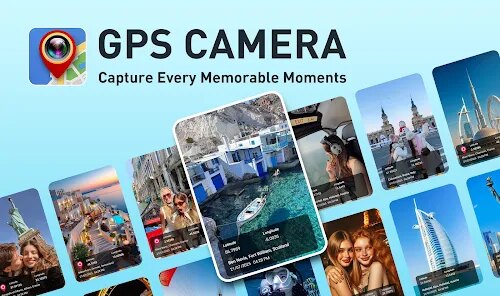
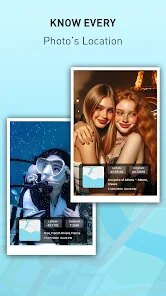
GPS Map Camera is a utility app designed to overlay location data, timestamps, and map information directly onto photos. At its core, it solves a simple but specific problem: capturing proof of where and when a picture was taken without relying on metadata that can be easily stripped or edited. The target audience is surprisingly broad, ranging from real estate agents documenting property conditions, to field workers logging site visits, to travelers wanting to automatically embed location details into their vacation snapshots.
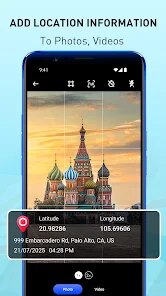
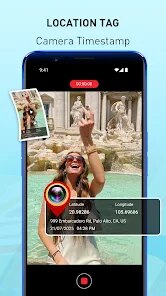
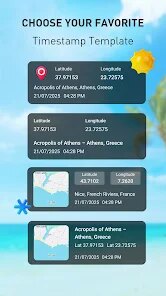
The core functionality is straightforward and works exactly as advertised. You take or import a photo, and the app layers on customizable data including date, time, GPS coordinates, street address, weather information, and even a live map. What surprised me was how much I ended up using this for personal documentation. I recently started a small garden project and used the app to track plant progress day by day with precise timestamps. It also saved me during a rental dispute when I needed photographic evidence of an apartment condition with irrefutable date and location proof. The additional features, like customizing font styles, watermark opacity, and template saving, genuinely enhance the experience rather than feeling like bloated additions.
I would recommend this app to anyone who needs verifiable photo documentation, whether for professional compliance, personal record-keeping, or creative travel journals. It's most useful when you need photos that speak for themselves in terms of authenticity and context.
Key Functional Highlights
- 📸 Real-time GPS stamping pulls latitude, longitude, and reverse-geocoded address data directly from your device's location services, which means no manual typing or second-guessing the accuracy of where you actually were when you shot the photo.
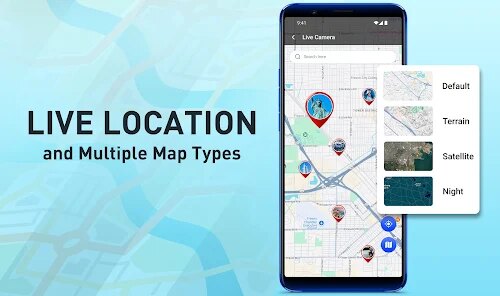
- 🗺️ Interactive map overlay inserts a cropped map snippet into your photo. You can choose between standard, satellite, or hybrid views, and the map updates dynamically as you move, creating a visual breadcrumb trail that pairs beautifully with the timestamp.
- ⏰ Custom date and time formats let you choose from dozens of templates including 12-hour, 24-hour, and localized date styles. You can also manually adjust the timestamp if your device clock was off, useful for batch-editing older photos.
- 🌦️ Weather integration pulls current conditions from your location at the time of capture, adding temperature, humidity, and weather icon overlays. This is surprisingly handy for outdoor professionals tracking environmental conditions alongside visual records.
Advantages & Benefits
- ⚡ Batch processing is a lifesaver. You can select dozens of photos at once and apply your chosen template to all of them, saving hours of manual editing.
- 🔒 Watermark customization gives you control over opacity, position, font, and color, so your photos don't end up looking like cluttered surveillance footage.
- 🌐 Offline mode actually works. Address lookup requires internet, but GPS coordinates and timestamps are saved locally, which is critical for field workers in remote areas.
- 📱 Minimal impact on original photo quality. The processed files retain decent resolution, unlike some competing apps that compress images aggressively.
Areas for Improvement
- 📡 Occasional address lookup failures happen in rural or poorly mapped areas, leaving the street address field blank or showing an outdated location name.
- 📲 Battery drain is noticeable during continuous use. GPS and map rendering chew through power quickly, so you will want a portable charger for extended sessions.
- 🎨 Font options feel limited for serious customization. While there are enough for casual use, designers or branding-conscious users may find the typography choices restrictive.
- 🚫 No direct integration with cloud storage platforms like Google Drive or Dropbox. You must manually export photos, which adds an extra step to workflows.
Recommended Apps
![]()
Bugzz: Insect Prank Filters
Smart Utilities Hub3.8

![]()
FaceLab: Face Editor, Aging
Lyrebird Studio4.4![]()
TickTock-TikTok Live Wallpaper
TikTok Pte. Ltd.4.5![]()
Mirror of Past Life : Magic, P
Game Palette3.3![]()
The Choicer Voicer
KARBON COFFEE GAME1.2![]()
GPS Speedometer: Speed Tracker
SM Infotech3.2![]()
4D Live Wallpaper–HD Wallpaper
ZERO Tech4.5![]()
ParkMobile: Park. Pay. Go.
Parkmobile, LLC4.3![]()
Santa Prank Call: Fake video
Era Global Publishing4![]()
Picsart AI Photo Editor, Video
PicsArt, Inc.4.1![]()
FaceMagic - AI Face Editor
Apero Vision Lab3.9![]()
Reverse Voice - Voice Changer
Hammad670![]()
Life Palmistry - Palm & Aging
Bluewolf Technology Limited4.3![]()
FWC2026 Mobile Tickets
FIFA2.1![]()
Find Your Phone By Clap
Trusted App Global4.5












You May Like
-
![]()
Boom Chip Blast: 2-Player
Black Pyramid 3D Games Studio0 -
![]()
Pets Translator: Dog & Cat
JanDeveloper0 -
![]()
Labyrinthos Tarot Cards
Labyrinthos Academy4.7 -
![]()
Hailuo Al: Image&Video Maker
MiniMax AI4 -
![]()
Brain Test: Alzheimer's
Living Maples Healthy Aging0 -
![]()
Poe - Fast AI Chat
Quora, Inc.4.7 -
![]()
Simple Calendar - easy planner
Komorebi Inc.4.7 -
![]()
Face Changer 2
Scoompa4.3 -
![]()
Mirror of Past Life : Magic, P
Game Palette3.3 -
![]()
Direct Express®
i2c Inc.4.3 -
![]()
Voice Changer – Voice Effects
All Excellent Apps0 -
![]()
The Choicer Voicer
KARBON COFFEE GAME1.2 -
![]()
Scan My Teeth
Tabica Group1.8 -
![]()
K-Pop Girls Fashion Dress Up
cinnamonroll4 -
![]()
Call Santa Claus: Prank Call
Jaadoo Studio0