Reverse Voice - Voice Changer
Hammad67
Installs
100K+
Developer
Hammad67
-
Category
Entertainment
-
Content Rating
Everyone
Developer Email
Privacy Policy
https://voicechangerappprivacypolicy.blogspot.com/2025/11/privacy-policy-of-prank-voice-voice.html
Screenshots
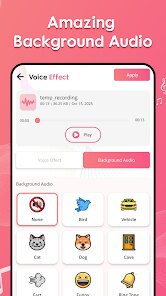
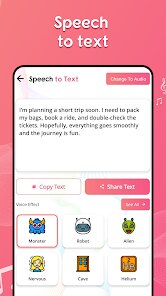
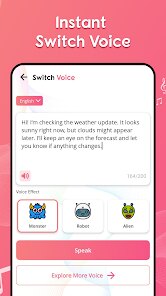
Expert Review
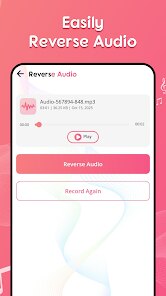
Reverse Voice is a utility app that focuses on one specific trick: playing audio recordings in reverse. The core idea is simple – you record a voice message or import an audio file, and the app flips it backward. It's not trying to be a full audio editor or a professional voice changer; instead, it solves a very niche problem. Some people use reversed audio for fun pranks, creating secret messages, or just exploring how speech sounds when played backward. Others might find it helpful for creative sound design or even certain puzzles and games where hidden messages need to be decoded by reversing them.
The app targets casual users who want a quick, no-fuss way to reverse audio without learning complex software. If you've ever tried to reverse a voice clip using a full DAW or video editor, you know it can be a hassle. This app strips away all that complexity and gives you a one-button solution. In my own testing, I recorded a short voice message and hit reverse – the result was immediate and clean. The reversed audio sounded exactly as expected, with no glitches or dropped quality. It helped me create a silly “backwards message” for a friend's birthday, which was a hit. For anyone looking to do similar lightweight audio tricks, this app works fine.
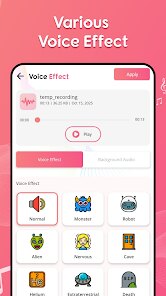
That said, this is not a tool for serious audio work. There is no pitch shifting, no speed control, and no multi-track editing. It does exactly one thing. If you need more advanced voice changing features or want to layer effects, you'll need a different app. I'd recommend Reverse Voice to people who want a simple, fun way to play with sound, especially for social media content or casual jokes. It's best used in moments where you just need a quick reversal without any learning curve.
Key Functional Highlights
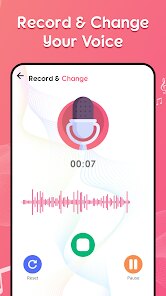
- 🎤 Straightforward recording and playback: The app lets you record directly inside the interface or import existing audio files. Once you have your clip, one tap reverses it instantly. The reversed version plays back immediately, so you can hear the result right away. There is no waiting, no rendering – it's refreshingly fast.
- 🎤 Clean, minimal interface: The design is very basic. You see a record button, a play button, and a reverse button. That is pretty much it. There are no confusing menus or hidden settings. For users who just want to reverse audio without thinking, this simplicity is a strength.
- 🎤 Basic file management: You can save reversed clips and access them later from a simple list. The app organizes your recordings by date, making it easy to find what you created earlier. While it is not a full library system, it works for light use.
- 🎤 No account or login required: The app does not ask for an account, email, or any personal data. You download it and start using it immediately. This is a nice touch for privacy-conscious users who just want a tool without signing up for anything.
Advantages & Benefits
- ✅ Instant results: The biggest strength is speed. Record, reverse, play – the whole process takes seconds. No loading bars, no delays.
- ✅ Super easy to use: Anyone can figure it out in ten seconds. The one-function focus means there is zero learning curve.
- ✅ No distractions: The app doesn't try to sell you premium features or bombard you with ads for other products. It stays focused on its single purpose.
Areas for Improvement
- ❌ Extremely limited functionality: This app does nothing beyond reversing audio. There is no pitch adjustment, speed control, or even basic trimming. If you need any variation, you are out of luck.
- ❌ No export options: You cannot share the reversed clip directly to social media or messaging apps from within the app. You have to save it to your device first and then manually upload it elsewhere.
- ❌ No audio quality settings: The app does not let you choose output quality or format. You get whatever default it uses, which may not be ideal for all uses.
- ❌ Very basic visual design: The interface feels dated and could use a refresh. It works but looks like a hobby project from a few years ago.
Recommended Apps
![]()
Mivo: Face swap video bride
Mivo studio4.3
![]()
iControl: Easy Widgets Themes
Fancy keyboard for theme apps4.6
![]()
Version AI: AI Photo Generator
Apptribe Dijital4.5![]()
My Name Facts - Name Meaning
videostatus studio4.4![]()
ParkMobile: Park. Pay. Go.
Parkmobile, LLC4.3![]()
The Prank App - Funny Sounds
Apps from da Woodz4.5![]()
Face Live Camera: Face Filters
Lyrebird Studio4.1![]()
Google Voice
Google LLC4.3![]()
Culver's
Culver's3.3![]()
Pet Translator: Dog & Cat Talk
Revivoskin0![]()
GRUBL™ 4D Live Wallpapers + AI
TarrySoft4.6![]()
Video Call Elssa
Kids Fun and Leaning Apps3.6![]()
Live wallpaper - dope & anime
Jelly Dev4.4![]()
ChatOn - AI Chat Bot Assistant
AIBY Inc.4.4![]()
Tripo - AI 3D Model Generator
Tripo AI4.4















You May Like
-
![]()
Funny Prank: Monster Sound
Mirai Global Publishing0 -
![]()
Perfect Me -Face & Body Editor
ryzenrise4.5 -
![]()
Time Warp Scan : Face Scanner
Apps Resort - Daily Tool Apps4.4 -
![]()
Custom Kicks
Sneakerz4.5 -
![]()
Live Score Football
YakinGlobal4.5 -
![]()
TickTock-TikTok Live Wallpaper
TikTok Pte. Ltd.4.5 -
![]()
Girly Lock Screen Wallpaper
Prometheus Interactive LLC3.9 -
![]()
Zodiac Palm Reader: MagicWay
Reatility Media4.6 -
![]()
Pregnancy App & Baby Tracker
BabyCenter4.9 -
![]()
Subway®
SUBWAY Restaurants4.2 -
![]()
NCAA March Madness Live
NCAA Digital4.7 -
![]()
Curso Inglés, Aprender Inglés
TomatoTB4.9 -
![]()
Brain Test: Alzheimer's
Living Maples Healthy Aging0 -
![]()
AI Chat・Ask Chatbot Assistant
AI Chat Studio4.5 -
![]()
Shot Fx - Super power Video Fx
Southern Studio4.6