AI Chat・Ask Chatbot Assistant
AI Chat Studio
Installs
10M+
Developer
AI Chat Studio
-
Category
Productivity
-
Content Rating
Everyone
Developer Email
Privacy Policy
https://aichat.emoji-keyboard.com/privacy.html
Screenshots


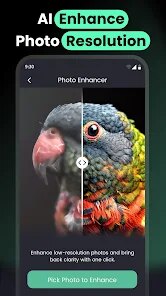
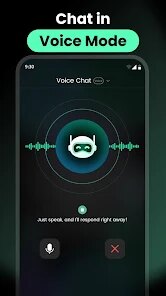
Expert Review
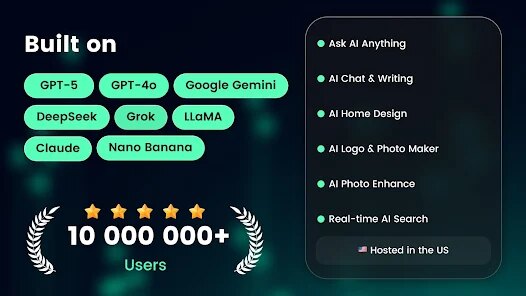
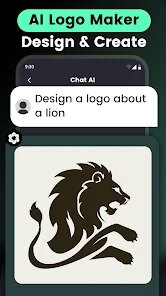
AI Chat・Ask Chatbot Assistant steps into a space packed with conversational AI apps, yet it still manages to carve out a distinct presence. Its core purpose is straightforward: provide a versatile chatbot assistant that helps with daily questions, creative tasks, and productivity needs, all through natural conversation. The interface is clean, the responses come quickly, and the free tier offers solid functionality without demanding a subscription right away. I downloaded it originally just to test how it compared to other tools, but I quickly found myself using it for drafting emails, generating quick outlines for articles, and sometimes just asking it to explain concepts in simpler terms.
The app targets a broad audience, from students needing study help and professionals looking for writing or brainstorming support to casual users curious about AI. It solves the problem of having to switch between multiple apps or websites to get varied types of information or assistance. Instead of opening a search engine, a note app, and maybe a dictionary separately, this one tool can handle a lot of those individual tasks in a single chat session. The most impressive part for me was when I asked it to organize a messy weekly to-do list into a structured schedule, and it actually delivered something usable, saving me a solid 10 minutes of manual sorting.
That said, the app is not for everyone. If your needs are deeply technical, like writing complex code or parsing advanced research papers, you might find the responses too general. But for everyday questions, content drafting, and light explanation tasks, it works really well. I would recommend it to anyone who often finds themselves juggling multiple small tasks throughout the day and wants a single assistant to manage the chaos.
Key Functional Highlights
- 🔄 The app supports continued conversations, meaning it remembers context and can build on previous questions. This makes it much more useful than simple single-response chatbots, especially when you need to refine an idea over several messages.
- 📁 There's a built-in history feature that saves your past conversations. I actually found this helpful when I needed to revisit a draft I had generated earlier in the week, and I didn't have to rewrite the request from scratch.
- 📝 You can use it to generate longer pieces of text, such as stories, blog posts, or professional correspondence. The quality is decent for a mobile app, and it gives you a strong starting point that you can edit further.
- 🎨 The interface is minimal and not cluttered with ads or confusing menus. This makes the experience of asking questions feel clean and focused, which is rare in free utility apps.
Advantages & Benefits
- ⚡ Response speed is reliably fast, even with longer queries. I never felt stuck waiting, which kept my workflow smooth.
- 🔒 The app does not seem to push unnecessary permissions or demand account creation immediately. That gave me more trust when I first started using it.
- 🌐 It works offline for previously cached conversations, which was unexpected but genuinely useful during a commute with spotty signal.
Areas for Improvement
- ⚠️ The free tier has a daily usage limit that can feel restrictive if you rely on it heavily throughout the day.
- 🧠 Some advanced queries, especially those requiring nuanced reasoning, return answers that feel too generic or slightly off-topic.
- ⚙️ There is little customization available for the tone or personality of the assistant, which limits how much you can tailor it to your specific style of working.
Recommended Apps
![]()
How I will die - Predict death
Bimdu3.2
![]()
Learn to Draw Flower
Creative APPS4.2![]()
SillyGlow: Smile Wallpaper 4K
BizApp Inc.0![]()
Google Chat
Google LLC4.4![]()
K-Pop Girls Fashion Dress Up
cinnamonroll4![]()
Girly Wallpapers
Wallpaper World Designs4.7
![]()
Anime Girl Wallpapers
Wallpaper World Designs4.7![]()
How Did You Die In The Past?
BuzzMoy0![]()
Cute Wallpapers Cool Wallpaper
DevTeamIn20200![]()
eBay online shopping & selling
eBay Mobile4.6![]()
Diamond Live Wallpaper HD
Live Wallpapers and Emoji Keyboard Themes4.4![]()
Blood Pressure Log
Sharon Evans4.1![]()
Tripo - AI 3D Model Generator
Tripo AI4.4![]()
Kpop Demon Draw and Coloring
Youssoft LTD0![]()
Allergy Plus by Pollen.com
IQVIA Inc.3.9














You May Like
-
![]()
Hearing Age
Mobile Solutions Tech0 -
![]()
Crafto
Kutumb App4.7 -
![]()
Monster Detector: Alien, Ghost
Game Palette3.8 -
![]()
Piano: Learn & Play Piano
Enable Startup4.1 -
![]()
FalFal: Astrology, Tarot, Love
FalFal Team4.8 -
![]()
Future Self Face Aging Changer
AMOBEAR TECHNOLOGY GROUP4 -
![]()
Boom Chip Blast: 2-Player
Black Pyramid 3D Games Studio0 -
![]()
Emoji Battery Widget
MIA Studio Inc0 -
![]()
Gay Dating & LGBT Hookup App
Hookup Apps to Hook up Local Dating4.5 -
![]()
Neon LED Keyboard: RGB & Emoji
AZ Mobile Software4.6 -
![]()
Face Camera: Live Stickers
Selfie Camera & Photo Editor & Beauty Snap4.3 -
![]()
GigaBody: AI Muscle filter
Bellential Inc.4.4 -
![]()
GPS Camera Timestamp & Geotag
Betasoft Mobile0 -
![]()
iCut: Video Editor & Maker
iCut -Video Editor & Video Maker App3.8 -
![]()
Photo Effects, Photo Editor
Lyrebird Studio4.1