Tripo - AI 3D Model Generator
Tripo AI
Installs
500K+
Developer
Tripo AI
-
Category
Art & Design
-
Content Rating
Everyone
Developer Email
Privacy Policy
https://www.tripo3d.ai/privacy
Screenshots
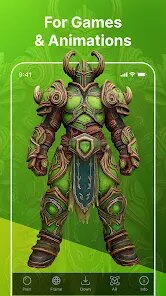
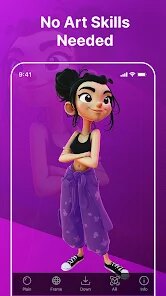

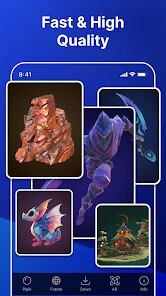
Expert Review
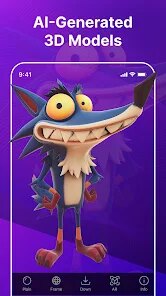
Tripo is an AI-powered platform that turns text descriptions or 2D images into fully textured 3D models in under a minute. Instead of wrestling with complex modeling software like Blender or Maya, you simply type what you need, or upload a reference photo, and the system generates a usable asset. The main draw is speed and accessibility—it collapses what used to be hours of work into a single coffee break. I've spent way too many evenings troubleshooting topology issues in the past, so this felt like a cheat code when I first tried it.
For someone like me who does hobbyist game prototyping but lacks deep sculpting skills, Tripo solves a very specific headache: getting a decent base mesh without paying an artist or sinking days into learning a new tool. The generated models come with UV maps and multiple formats (OBJ, FBX, GLB), which means they slot straight into Unity or Blender for further tweaking. I tested it with a prompt like "steampunk owl with brass wings and a glowing monocle," and the result was surprisingly coherent—the proportions were solid and the texture baked in nicely. It even handled a more abstract request, "a chair made of melted jellyfish," without collapsing into a mess. The additional features, like remeshing and animation-ready rigging, feel less polished but do add real value if you pay for a subscription.
Honestly, the biggest win for me was using it to block out level props. I needed a dozen different crates, barrels, and scaffolding pieces for a demo level, and Tripo let me generate variations in an afternoon. It didn't fix my texturing problem entirely, but it got me to playable state much faster. I'd recommend this to indie developers, 3D printing enthusiasts who want quick concept verifications, or educators teaching geometry through tangible objects. If you need production-ready, AAA-quality models with strict art direction, you'll still need a human artist. But for brainstorming, pre-visualization, or just getting unstuck creatively, Tripo is a genuinely handy tool to have around.
Key Functional Highlights
- 🖱️ Text-to-3D and image-to-3D generation: You type a prompt or upload a picture, and the engine reconstructs a model with clean geometry. The image-to-3D path is especially good—I threw in a rough sketch of a robot hand, and it interpreted the angles better than I expected.
- 🖱️ PBR texture baking: The models come with physically-based rendering maps (albedo, normal, roughness), so they look decent under different lighting without extra work. This saved me from manually hand-painting diffuse maps for every single asset.
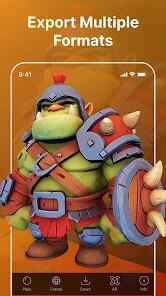
- 🖱️ Multi-format export with topology control: You can pick from glTF, OBJ, and FBX, plus adjust the polygon count before exporting. I found the auto-retopology decent for medium-poly assets, although high-poly organic shapes still need manual cleanup.
- 🖱️ Animation-ready rigging: A newer feature that attempts to auto-rig characters and creatures. It works reasonably well for bipeds—my walking robot test moved smoothly—but quadruped rigs are still hit-or-miss.
Advantages & Benefits
- ⚡ Blazing fast iteration loops: The generation time is truly impressive, usually under 60 seconds. I could cycle through twenty variations of a sci-fi weapon and pick the best one without ever feeling frustrated.
- ⚡ Low barrier to entry: The interface is minimal—just a prompt box and an "Upload" button. There's no steep learning curve, which is rare for tools in this space.
- ⚡ Decent base mesh quality: The underlying geometry is often more reliable than what you get from other AI generators. Edges are generally well-defined, and the UVs don't explode randomly when you open them in an editor.
Areas for Improvement
- 🐢 Inconsistent detail control: Sometimes the AI adds weird, unnecessary details like extra rivets or random spikes that you didn't ask for. There's no slider to cap the complexity level.
- 🐢 Texture resolution ceiling: The baked textures are acceptable for web previews or low-res game assets, but they look noticeably soft if you zoom in for close-up shots or print them at a large scale.
- 🐢 Limited style variety after a while: I noticed the outputs start to look aesthetically similar—a certain "AI sheen" that makes everything feel slightly glossy and over-optimized. Breaking away from that styling requires heavy manual post-processing.
Recommended Apps
![]()
Steam
Valve Corporation3
![]()
SillyGlow: Smile Wallpaper 4K
BizApp Inc.0![]()
Glam AI: Video & Photo Editor
Glam Labs, Inc.4.6
![]()
Boom Chip Blast: 2-Player
Black Pyramid 3D Games Studio0![]()
GigaBody: AI Muscle filter
Bellential Inc.4.4![]()
Hearing Age
Mobile Solutions Tech0![]()
Meta AI
Meta Platforms, Inc.4.7![]()
ITVX
ITV PLC4![]()
Prank Call - Fake Call & Chat
Bravestars Casual4.1![]()
Bug Filter: Funny Prank App
HKL Game Studio0![]()
ThemeKit - Themes & Widgets
ThemeKit4.4![]()
Tripo - AI 3D Model Generator
Tripo AI4.4![]()
NeuroNation - Brain Training
NeuroNation4.7![]()
Girly Wallpapers
Wallpaper World Designs4.7![]()
American Airlines
American Airlines, Inc.4.8












You May Like
-
![]()
Face Dance: AI Photo Animator
Codeway Dijital4.1 -
![]()
Dress Up Games
Dress Up Makeover Girls Games4.1 -
![]()
SkinSAFE: Ingredient Scanner
SkinSAFE4.3 -
![]()
FaceApp: Perfect Face Editor
FaceApp Technology Ltd4.4 -
![]()
Funny Insect Prank Filter
GAdventure0 -
![]()
Wallpaper 4K, HD – Wallcraft
Nebuchadnezzar DOO4.4 -
![]()
GRUBL™ 4D Live Wallpapers + AI
TarrySoft4.6 -
![]()
Silly Smiley Live Wallpaper
LuX GLOBAL3.7 -
![]()
Shot Fx - Super power Video Fx
Southern Studio4.6 -
![]()
Funny Prank: Monster Sound
Mirai Games3.4 -
![]()
FishAngler: Fishing Guide App
FishAngler, LLC4.3 -
![]()
ITVX
ITV PLC4 -
![]()
Football Wallpaper HD 4K
Orange Infotech Studio4.6 -
![]()
Metal Detector - Gold Finder
Appwest Limited3.9 -
![]()
Brain Test: Alzheimer's
Living Maples Healthy Aging0