
Genie: AI Photo Video Editor
AIGX-Studio
Installs
50K+
Developer
AIGX-Studio
-
Category
Generative AI
-
Content Rating
Teen
Developer Email
Privacy Policy
https://home.aigxapp.com/website-cfg/policy
Screenshots





Expert Review
Genie: AI Photo Video Editor is a tool that focuses on using artificial intelligence for various photo and video editing tasks. It seems to target a broad user base, including casual social media users, content creators, and even professionals looking for quick AI-powered solutions. The main problem it tries to solve is the complexity and time consumption often associated with traditional editing software, offering automated alternatives for common editing needs.
After spending some time with the app, I found its core functionality quite impressive for handling specific tasks. The AI-powered background removal, for instance, works surprisingly well on images, handling complex edges like hair and fur with decent accuracy. It noticeably simplified what used to be a tedious manual process in other apps. However, not all additional features feel essential. The various artistic filters, while fun to experiment with, can produce inconsistent results, sometimes delivering stunning visuals and other times feeling a bit generic or over-processed. Personally, the ability to quickly enhance old family photos and upscale their resolution was a standout feature, giving a new lease on life to some cherished memories without needing any technical know-how. For video editing, the basic AI tools are present but feel less polished than their image counterparts, with the process seeming a little clunky at times.
I would recommend Genie to anyone who needs fast, AI-driven edits without wanting to invest time in learning complex software. It's particularly useful for social media managers, bloggers, or anyone who regularly creates visual content and needs a quick turnaround. The app shines brightest when dealing with straightforward edits like removing backgrounds, sharpening details, or applying consistent filters. For heavy-duty, frame-by-frame video work or professional-grade color grading, traditional software remains a better choice. This app is best used as a powerful supplement in your editing toolkit, not a complete replacement.
Key Functional Highlights
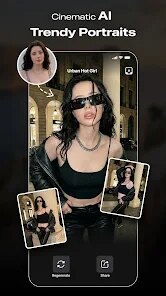
- 🤖 AI Face Swap and Enhancement: This feature lets you swap faces in photos with surprising ease. It also offers tools to smooth skin, remove blemishes, and adjust facial features like eye size or jawline. I found it works best on well-lit, front-facing portraits. It does a good job maintaining natural skin texture if you don't overdo the sliders.
- 🖼️ Intelligent Background Editor: Beyond just removing backgrounds, this tool can replace them entirely with AI-generated scenes or solid colors. You can also blur the background to create a depth-of-field effect that mimics professional cameras. It's especially handy for product photos, as it isolates the item cleanly for a consistent look.
- 🎨 AI Artistic Filters and Styles: This library of presets can transform your photos into paintings, sketches, or anime-style illustrations with a single tap. The results vary, but some filters are genuinely impressive, especially the watercolor and oil painting effects. It's a fun way to repurpose images for different platforms or artistic projects.
- 📹 AI Video Enhancement Tools: You can increase video resolution, reduce noise, and stabilize shaky footage. However, processing times are significantly longer for videos compared to photos, and the quality improvement is more noticeable on lower-resolution clips. It's a good option for cleaning up old phone videos, but don't expect cinema-grade results here.
Advantages & Benefits
- 🔥 Excellent AI for Photos: The backend AI is clearly powerful and well-trained for image tasks like upscaling and object removal. It often feels like magic when restoring old, blurry snapshots, pulling back details I thought were lost forever.
- ⚡ Speed for Simple Tasks: Basic edits like removing a color cast or enhancing contrast are near-instantaneous. This keeps the workflow smooth and encourages experimentation without waiting forever for results.
- 🧭 Intuitive User Interface: The layout is straightforward, with clearly labeled tools and a simple workflow. It makes the advanced AI feel accessible even to someone with no prior editing experience.
Areas for Improvement
- 🪤 Free Version Limitations: The free tier is heavily restricted, with daily limits on the number of AI-enhanced exports. This can be very frustrating if you need to edit a batch of images or a long video clip.
- 🫧 Video Tools Feel Unfinished: The video editing features lack the finesse and speed of the photo tools. The interface can be laggy during processing, and the final output quality doesn't always match the preview shown.
- 📡 Heavy Data Usage: Using the AI features requires a constant internet connection, and processing consumes a noticeable amount of mobile data. This makes the app less useful in areas with weak wifi or limited data plans.
Recommended Apps
![]()
Bugzz: Insect Prank Filters
Smart Utilities Hub3.8

![]()
FaceLab: Face Editor, Aging
Lyrebird Studio4.4![]()
TickTock-TikTok Live Wallpaper
TikTok Pte. Ltd.4.5![]()
Mirror of Past Life : Magic, P
Game Palette3.3![]()
The Choicer Voicer
KARBON COFFEE GAME1.2![]()
GPS Speedometer: Speed Tracker
SM Infotech3.2![]()
4D Live Wallpaper–HD Wallpaper
ZERO Tech4.5![]()
ParkMobile: Park. Pay. Go.
Parkmobile, LLC4.3![]()
Santa Prank Call: Fake video
Era Global Publishing4![]()
Picsart AI Photo Editor, Video
PicsArt, Inc.4.1![]()
FaceMagic - AI Face Editor
Apero Vision Lab3.9![]()
Reverse Voice - Voice Changer
Hammad670![]()
Life Palmistry - Palm & Aging
Bluewolf Technology Limited4.3![]()
FWC2026 Mobile Tickets
FIFA2.1![]()
Find Your Phone By Clap
Trusted App Global4.5













You May Like
-
![]()
Boom Chip Blast: 2-Player
Black Pyramid 3D Games Studio0 -
![]()
Pets Translator: Dog & Cat
JanDeveloper0 -
![]()
Labyrinthos Tarot Cards
Labyrinthos Academy4.7 -
![]()
Hailuo Al: Image&Video Maker
MiniMax AI4 -
![]()
Brain Test: Alzheimer's
Living Maples Healthy Aging0 -
![]()
Poe - Fast AI Chat
Quora, Inc.4.7 -
![]()
Simple Calendar - easy planner
Komorebi Inc.4.7 -
![]()
Face Changer 2
Scoompa4.3 -
![]()
Mirror of Past Life : Magic, P
Game Palette3.3 -
![]()
Direct Express®
i2c Inc.4.3 -
![]()
Voice Changer – Voice Effects
All Excellent Apps0 -
![]()
The Choicer Voicer
KARBON COFFEE GAME1.2 -
![]()
Scan My Teeth
Tabica Group1.8 -
![]()
K-Pop Girls Fashion Dress Up
cinnamonroll4 -
![]()
Call Santa Claus: Prank Call
Jaadoo Studio0