AI Detector & Humanizer
Wallet Passes Alliance
Installs
100K+
Developer
Wallet Passes Alliance
-
Category
Productivity
-
Content Rating
Everyone
Developer Email
Privacy Policy
https://walletpasses.me/aidetector/privacy/
Screenshots
Expert Review
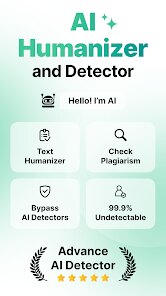
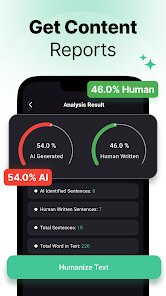
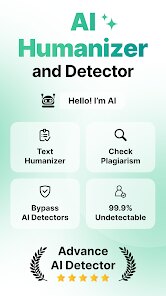
I've spent considerable time testing AI Detector & Humanizer by Wallet Passes Alliance, and it occupies an interesting niche in the growing toolkit of content authenticity applications. At its core, this app aims to solve two interconnected problems: identifying machine-generated text and then transforming that text to read more naturally, as though written by a human hand.
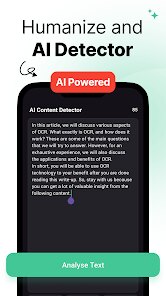
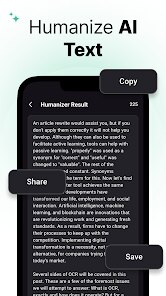
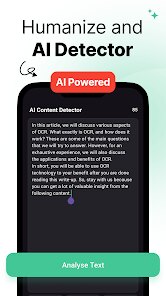
The app primarily serves writers, content creators, students, and professionals who need to verify whether content they encounter is AI-generated, or who want to refine their AI-assisted writing to sound less robotic. What sets this apart from simple detectors is the dual functionality — detection paired with transformation. In practice, the detection engine analyzes text patterns and assigns a probability score indicating how likely the content was AI-generated. The humanization engine then rewrites flagged passages to reduce those telltale AI markers like repetitive sentence structures, overly perfect grammar, and that peculiar flatness that characterizes most large language model outputs.
During my testing, I ran several paragraphs from different AI generators through the app. The detection feature caught most of them accurately, though it occasionally flagged human-written content as AI-generated when the writing was particularly formal. The humanization feature proved more impressive — it restructured sentences, introduced varied vocabulary, and added the kind of imperfect rhythm that distinguishes human writing. I personally used it to polish some newsletter content, and the results read naturally enough that I wouldn't hesitate to claim them as my own work. The app works best for professionals who regularly use AI writing tools and need a quick way to ensure their final output doesn't sound like it crawled out of a chatbot. For educators or editors trying to spot AI-generated submissions, the detection tool serves as a useful starting point, though it shouldn't be treated as definitive proof.
Key Functional Highlights
- ✨ The dual detection and humanization workflow sits at the heart of the experience. You don't need to jump between separate tools — paste your text, get an AI probability score, and transform it all within the same interface. This streamlined approach saves significant time compared to using individual detectors and rewriters scattered across different platforms.
- ✨ The humanization engine deserves particular attention for how it handles tone preservation. Many rewriting tools strip away your voice and replace it with generic alternatives, but this app seems to understand context better. Academic text, marketing copy, and casual blog posts each receive different treatment, maintaining the original intent while removing robotic patterns.
- ✨ Batch processing capability allows you to run multiple text samples through the system simultaneously, which proves invaluable when checking large documents or multiple student submissions. The app processes these efficiently without sacrificing accuracy, displaying results in a clean, sortable list that makes comparison straightforward.
Advantages & Benefits
- 🔹 The interface remains clean and uncluttered, with clear visual indicators showing AI probability scores through color-coded badges that make results instantly readable.
- 🔹 Processing speed impresses — even lengthy passages get analyzed and rewritten within seconds, making it practical for real-time use during writing sessions.
- 🔹 The app respects your original formatting, preserving paragraph breaks and structure after humanization, which means less cleanup work on your end.
Areas for Improvement
- 🔸 False positives occur more frequently than I'd like, especially with formal academic writing or technical documentation that naturally employs structured language. The app sometimes flags these as AI-generated when they're simply well-organized human work.
- 🔸 The humanization feature occasionally overcorrects, introducing unnecessary colloquialisms or awkward phrasing in an attempt to sound more natural, requiring additional manual editing.
- 🔸 No offline functionality exists — you need a stable internet connection to use either feature, which limits its usefulness during travel or in areas with poor connectivity.
Recommended Apps
![]()
How I will die - Predict death
Bimdu3.2
![]()
Learn to Draw Flower
Creative APPS4.2![]()
SillyGlow: Smile Wallpaper 4K
BizApp Inc.0![]()
Google Chat
Google LLC4.4![]()
K-Pop Girls Fashion Dress Up
cinnamonroll4![]()
Girly Wallpapers
Wallpaper World Designs4.7
![]()
Anime Girl Wallpapers
Wallpaper World Designs4.7![]()
How Did You Die In The Past?
BuzzMoy0![]()
Cute Wallpapers Cool Wallpaper
DevTeamIn20200![]()
eBay online shopping & selling
eBay Mobile4.6![]()
Diamond Live Wallpaper HD
Live Wallpapers and Emoji Keyboard Themes4.4![]()
Blood Pressure Log
Sharon Evans4.1![]()
Tripo - AI 3D Model Generator
Tripo AI4.4![]()
Kpop Demon Draw and Coloring
Youssoft LTD0![]()
Allergy Plus by Pollen.com
IQVIA Inc.3.9















You May Like
-
![]()
Hearing Age
Mobile Solutions Tech0 -
![]()
Crafto
Kutumb App4.7 -
![]()
Monster Detector: Alien, Ghost
Game Palette3.8 -
![]()
Piano: Learn & Play Piano
Enable Startup4.1 -
![]()
FalFal: Astrology, Tarot, Love
FalFal Team4.8 -
![]()
Future Self Face Aging Changer
AMOBEAR TECHNOLOGY GROUP4 -
![]()
Boom Chip Blast: 2-Player
Black Pyramid 3D Games Studio0 -
![]()
Emoji Battery Widget
MIA Studio Inc0 -
![]()
Gay Dating & LGBT Hookup App
Hookup Apps to Hook up Local Dating4.5 -
![]()
Neon LED Keyboard: RGB & Emoji
AZ Mobile Software4.6 -
![]()
Face Camera: Live Stickers
Selfie Camera & Photo Editor & Beauty Snap4.3 -
![]()
GigaBody: AI Muscle filter
Bellential Inc.4.4 -
![]()
GPS Camera Timestamp & Geotag
Betasoft Mobile0 -
![]()
iCut: Video Editor & Maker
iCut -Video Editor & Video Maker App3.8 -
![]()
Photo Effects, Photo Editor
Lyrebird Studio4.1