Glam AI: Video & Photo Editor
Glam Labs, Inc.
Installs
Developer
Glam Labs, Inc.
-
Category
Generative AI
-
Content Rating
Teen
Developer Email
+17538456734
Privacy Policy
https://getglam.app/privacy/
Screenshots
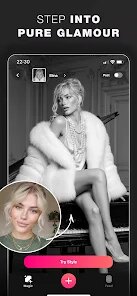
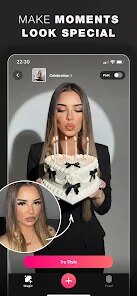
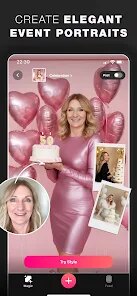
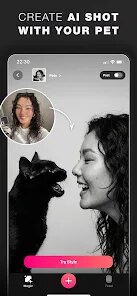
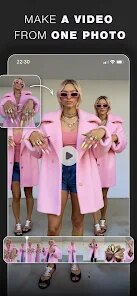
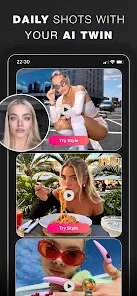
Expert Review
Maybe I'm a little late to the party, but Glam AI has been sitting in my app folder for a while before I finally gave it a real try. If you've ever struggled with editing photos or videos and wished you had a personal studio right in your pocket, this app tries pretty hard to be that solution. It uses AI to handle stuff like retouching, background changes, color grading, and even generating full images from text. The target audience is pretty wide — anyone from casual social media users to small business owners who need quick, decent visuals without hiring a designer or learning complex editing software.
As someone who manages content for a small blog, my pain point has always been time. I spend hours adjusting lighting, removing messy backgrounds, or trying to make an otherwise boring selfie look halfway decent for a thumbnail. Glam AI does shave off a lot of that time. The retouching tool worked surprisingly well — it didn't plasticize my face like some other editors do, and the background removal was accurate enough for most of my flat-lay photos. The AI video editing part is still a bit hit or miss though. It handles simple cuts and color filters just fine, but when I tried some of the more advanced motion tracking, it stumbled enough that I had to redo parts manually. Over the past couple of weeks, I've found myself using it mostly for quick edits where speed matters more than perfection.
I'd recommend Glam AI mostly to people who are doing social media content creation, especially on visual-heavy platforms like Instagram or TikTok. It's not really built for professional photographers who need pixel-level control, but if your main goal is to make your content look polished without spending an hour on each image, this does the job. Also, if you are someone who hates learning new software or just does not have the patience to sit through video tutorials, the simplicity here is a big plus.
Key Functional Highlights
- ✏️ AI photo retouching that actually looks natural — It smooths skin and evens tone without making you look like a cartoon character, which is a problem I have had with most beauty apps. The facial feature tweaks also give you fine control, so if you want subtle changes, you can get them.
- ✏️ Background removal and replacement — This one works fast, and the edge detection is surprisingly sharp even on complex hair outlines. You can swap in a solid color, a gradient, or upload your own image, which I use a lot for product photography.
- ✏️ AI text-to-image generation — You type a description and the app creates an image for you. The results vary — sometimes they look like something from a dream, other times they are just weird. But for generating creative backgrounds or concepts, it is handy to have built-in.
Advantages & Benefits
- ✅ The interface is clean and intuitive — Everything is where you expect it to be, and you do not have to hunt through menus to find basic tools. That makes a big difference when you are in a rush.
- ✅ Processing speed is generally fast — Most edits apply in a few seconds. Even the heavier AI tasks do not keep you waiting long, which is rare in this category of apps.
- ✅ The variety of styles and filters — Unlike some editors that give you ten basic filters and call it a day, this one has a large library, and new ones are added regularly. Keeps the output feeling fresh.
Areas for Improvement
- ❌ The free version is very limited — You hit a paywall pretty fast. Most of the useful features require a subscription, and the pricing is on the higher side compared to similar apps in the market.
- ❌ AI video editing features are inconsistent — For simple tasks they are fine, but the more complex ones like object tracking or automated scene transitions bugged out on me a few times and needed manual correction.
- ❌ Export quality could be better — Even on the highest settings, the exported images sometimes show a slight loss of sharpness compared to what you see in the editor. For print use, that might be a dealbreaker.
Recommended Apps
![]()
Wallpaper 4K, HD – Wallcraft
Nebuchadnezzar DOO4.4
![]()
Santa Prank Call: Fake video
Era Global Publishing4![]()
Future You: See your old face
Future Self Studio3.4![]()
Air Horn Sounds : Siren Prank
AA Studio Game4.6
![]()
16Personalities
16Personalities4![]()
Amazon Shopping
Amazon Mobile LLC4.1![]()
Prank Zone - Hilarious Call
Allegany Boys Camp Inc4.1![]()
Screen Recorder Video Recorder
Video Screen Recorder, Voice Audio Editor, Cut MP34.4![]()
Famous Birthdays
Famous Birthdays4.1![]()
Alien Detector : Alien Radar,
Game Palette4.3![]()
Allergy Plus by Pollen.com
IQVIA Inc.3.9![]()
Duolingo: Language & Chess
Duolingo4.7![]()
Dress Up Games
Dress Up Makeover Girls Games4.1![]()
ZEPETO: Avatar, Connect & Play
Naver Z Corporation4.3![]()
Heaven: Gay & LGBT+ Dating
Paradiz Social Ltd3.2











You May Like
-
![]()
What is my name meaning
Code Play0 -
![]()
Future Self Face Aging Changer
AMOBEAR TECHNOLOGY GROUP4 -
![]()
Finelo: Master Trading
Finelo Limited4.3 -
![]()
Funny Prank: Monster Sound
Mirai Global Publishing0 -
![]()
Perfect365 Video Makeup Editor
Perfect365, Inc.4.7 -
![]()
Instagram
Instagram3.9 -
![]()
Zodiac Palm Reader: MagicWay
Reatility Media4.6 -
![]()
Seekee - Ai Search & Assistant
Seekee Ltd4.6 -
![]()
Photo Effects, Photo Editor
Lyrebird Studio4.1 -
![]()
Tripo - AI 3D Model Generator
Tripo AI4.4 -
![]()
Anti Theft Alarm–Find my Phone
Phone Lock & Utilities Apps4.3 -
![]()
Culver's
Culver's3.3 -
![]()
Pollo AI: AI Video Generator
COCOSOFT TECHNOLOGY PTE. LTD.4.4 -
![]()
Neon LED Keyboard: RGB & Emoji
AZ Mobile Software4.6 -
![]()
Google Earth
Google LLC3.8