FunVid: Funny Face Filters
Vibe Filter Club
Installs
Developer
Vibe Filter Club
-
Category
Video Players & Editors
-
Content Rating
Everyone
Developer Email
Privacy Policy
https://sites.google.com/view/innovatex-privacy-policy/home
Screenshots


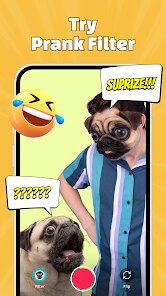
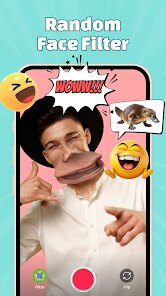


Expert Review
FunVid: Funny Face Filters takes a straightforward concept and executes it with enough polish to stand out in the crowded mobile camera app market. At its heart, the app provides a collection of real-time face filters that warp, distort, and embellish your appearance during video recording or live streaming. The main purpose is simple: inject humor and absurdity into everyday video calls, social media clips, or casual hangouts.
The target audience here is broad but skews toward younger users, teens, and anyone who enjoys lighthearted digital play. It solves the problem of boring, static video content by offering a toolkit that turns a plain selfie into a bunny-eared, big-eyed, or even alien-skinned spectacle. The core mechanics work smoothly. Filters snap onto your face with impressive tracking, even when you tilt your head or move around. I tested it during a dimly lit evening call, and the app still managed to anchor the effects without lag. Extra touches, like sound-reactive filters that wiggle when you speak, add genuine value rather than feeling tacked on.
Personally, I found the app helpful for livening up family group chats. My nephews and I spent a good half hour layering different effects, and the laughter was real. It also served me well for creating funny reaction clips for a friends' private channel. No, it does not replace professional video tools, but it never tries to. Based on my experience, I would recommend FunVid to social butterflies, content creators who need quick comic relief, and parents looking to entertain kids during a rainy afternoon. Casual users who just want to make a friend smile will find it just as useful as those who post daily stories. The app thrives in low-stakes, high-fun scenarios where the goal is connection over perfection.
Key Functional Highlights
- 🎭 Real-Time Distortion Effects: The library includes a wide array of effects that alter facial proportions, such as enlarging the nose, stretching the chin, or adding a swirling vortex for eyes. Each one updates instantly, and you can switch between them mid-recording without breaking the video stream.
- 🎭 Sound-Activated Animations: This is a clever twist. Certain filters respond to volume levels, so a loud laugh triggers an explosion of cartoon stars or a rainbow overflow. It makes the app feel alive and encourages playful interaction beyond passive filter selection.
- 🎭 Background Replacement with Masking: Beyond face warping, you can swap your backdrop with quirky patterns or moving scenes like a disco floor or a space station. The edge detection is surprisingly clean, and it works with moving hair and shoulders, avoiding the fuzzy cutout look typical of cheaper apps.
- 🎭 Quick-Share Export: After recording, you can save the clip in various resolutions or share directly to popular social platforms. The export process is fast, and the file size stays reasonable without visible quality loss.
Advantages & Benefits
- 😄 Effortless Usability: You do not need a manual. The interface is composed of large preview cards and simple sliders. Within a minute of opening the app, I had created my first funny video with no friction.
- 😄 Impressive Tracking Stability: In a market where filters often jump or clip off the face, FunVid maintains a firm lock. I moved my head rapidly and even covered one eye; the effect stayed glued to its anchor points without lag or distortion.
- 😄 Light on System Resources: Compared to other editing apps that heat up my phone quickly, this one ran cool. Even during a five-minute recording session, the battery drain was minimal, and the frame rate stayed steady.
Areas for Improvement
- 😒 Limited Filter Depth: While the variety is decent, many effects feel like variations on a theme, such as different sizes of eye bulging. A broader range of thematic filters, like animal transformations or artistic styles, would improve longevity.
- 😒 No Cloud Backup: Your custom created filter combinations or favorite lists are stored locally. If you switch phones, all that personalization disappears, which is a frustrating hurdle for dedicated users.
- 😒 Occasional Watermark: The free tier puts a small watermark in the corner of exported videos. While not intrusive, it lowers the perceived professionalism, especially if you want to post content to a public profile without branding.
Recommended Apps
![]()
Bugzz: Insect Prank Filters
Smart Utilities Hub3.8

![]()
Scan My Teeth
Tabica Group1.8![]()
WeChat
WeChat International Pte. Ltd.3.5![]()
Idol Prank Call - Video & Chat
LeafMotion Software4.7![]()
WhatsApp Messenger
WhatsApp LLC4.5![]()
Name Meanings with Impact
Alif Innovative Solution3.7![]()
Rythmix: AI Music & Song Maker
PROMINENT FORTUNE PTE. LTD.4![]()
Silly Sounds: Prank Sounds App
Zenspin by Mindscape Applab llc0![]()
Drawify - Pencil Photo Sketch
Waitos AI4.4![]()
April Fools Pranks Funny Prank
Express Dev Inc4.7![]()
HairApp: Hair Styler App, Bald
Lyrebird Studio Teknoloji Limited Şirketi3.5![]()
BESTPLAY Play to earn & donate
Bestplay4.7![]()
Gay Dating & LGBT Hookup App
Hookup Apps to Hook up Local Dating4.5![]()
PolyBuzz: Chat with AI Friends
CLOUD WHALE INTERACTIVE TECHNOLOGY LLC.3.8![]()
Finelo: Master Trading
Finelo Limited4.3














You May Like
-
![]()
AI Chatbot - Nova
ScaleUp4.7 -
![]()
My Name Meaning - Name Facts
DroidX Studio0 -
![]()
Call Mirabel Encanto Fake Chat
Brovo developer4.6 -
![]()
Future You: See your old face
Future Self Studio3.4 -
![]()
Astroscope: Astrology Guide
Astroscope App4.5 -
![]()
Walloop - Live Wallpapers
Walloop4.5 -
![]()
Eye Test
arabtok0 -
![]()
My Prediction Future Wedding
Now Tech3.3 -
![]()
Google Gemini
Google LLC4.6 -
![]()
Hearing Age
Mobile Solutions Tech0 -
![]()
Live football TV
Findy360 Software LLC3.7 -
![]()
Microsoft Copilot
Microsoft Corporation4.8 -
![]()
Video Live Wallpaper Maker
ZipoApps4.5 -
![]()
Wonder - LGBTQ+ Dating App
Bumpy Inc.4.3 -
![]()
GPS Speedometer: Speed Tracker
SM Infotech3.2