Subway®
SUBWAY Restaurants
Installs
10M+
Developer
SUBWAY Restaurants
-
Category
Food & Drink
-
Content Rating
Everyone
Developer Email
Privacy Policy
https://www.subway.com/en-US/Legal/PrivacyStatement-FWH
Screenshots
Expert Review
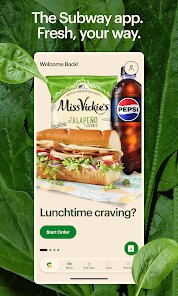
You know that feeling when a sudden hunger pang hits and you have absolutely no idea what you want to eat, but you know it needs to happen right now? Subway has managed to bottle that indecision and turn it into a surprisingly functional digital experience. The app is essentially a mobile ordering platform that tries to strip away every excuse for not getting a footlong. Its main purpose is making the customization process less of a hassle, letting you build your sandwich without that awkward back-and-forth with the person behind the counter. The app targets anyone who regularly finds themselves in the line of fire when a lunch craving strikes, from office workers pinching pennies to road warriors who want their meal waiting when they walk through the door.
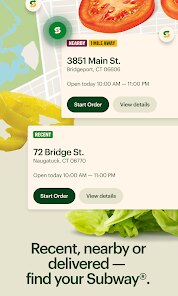
I downloaded this after way too many standing-in-line disasters where I'd get flustered and forget that olives exist. The core ordering feature is exactly as advertised. You pick your bread, your proteins, your veggies, your sauces, and everything between. It's a very faithful digital recreation of that step-by-step process you go through in the store. But what actually makes this stick is the location-based store detection. It automatically finds the nearest Subway, shows you that specific store's pricing (because they do vary from location to location), and tracks your order. I used it recently when I was stuck in a meeting that ran way over schedule. I placed my order on my phone, and by the time I walked the two blocks to the shop, it was already sitting on the rack with my name on it. That alone saved me fifteen minutes of my lunch break. The app seems most useful for people who know exactly what they want and just want to skip the waiting part of the transaction. It is less helpful for browsers who like to stare at the menu board until inspiration strikes. This is a tool for getting in, getting fed, and getting on with your day.
Key Functional Highlights
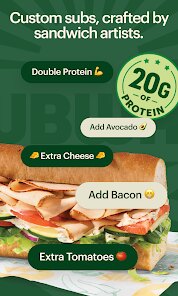
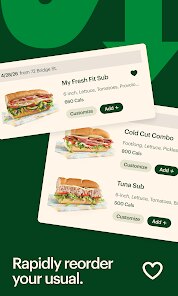
- 🥪 The customization system is genuinely thorough. You pick bread, cheese, and every single vegetable and sauce option just like you would in person. There is no stripped-down mobile menu that limits what you can add. The app remembers recent orders, so if you tend to build the same sandwich over and over, it's about three taps to reorder. It even lets you mark what you do not want, like a note for light sauce or extra pickles, and it actually follows those notes.
- 📍 The location services go beyond just finding a restaurant. The app knows your current location and automatically sorts nearby stores by distance. It also shows each store's current operating hours, so you do not end up walking to one that closed early. If you are ordering for pickup, it gives you an estimated ready time, which updates if the store gets backed up. That real-time feedback is surprisingly helpful when you are trying to time your lunch break.
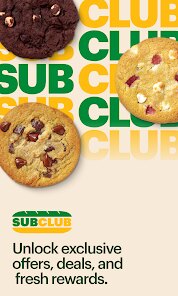
- 💳 Subway Rewards integration is baked directly into the ordering flow. You accumulate points automatically on every purchase made through the app, and the app actually tells you how many points you have before you check out. There is also a dedicated section for current promotions and exclusive mobile deals, like a free cookie or a discounted sub that only appears if you order through the app. The whole thing is tied to Subway's regular loyalty program, so existing members do not have to start over from zero.
- 🚗 There is an order scheduling feature for people who plan ahead. You can set a pickup time for later in the day, up to a certain number of hours in advance. This is not just for lunch rushes. If you know you will be passing by a certain Subway on your drive home tomorrow, you can place the order tonight and pick it up when you roll through that neighborhood. It is a small feature, but it changes the app from reactive to proactive for frequent users.
Advantages & Benefits
- ⏱ Speed of pickup is the app's strongest argument. The order is tied to your name and shows up in the store's tablet system instantly. No fumbling for order numbers or waiting behind a line of indecisive customers. You walk in, grab your bag from the rack, and walk out.
- 🔄 Consistency across locations is a genuine advantage. The app forces you through the same ordering flow regardless of which store you pick. This eliminates the confusion of different store policies, like one location charging for extra sauce while another does not. The price you see is the price you pay.
- ⚙ The customization is precise. You can select specific amounts of vegetables and sauces, down to a single pump or a pinch. The app does not just let you say "yes" to lettuce; it lets you say "a little" or "a lot" for essentially every ingredient.
Areas for Improvement
- 🗺 The store locator does occasionally glitch, especially in areas with multiple Subways close together. It sometimes defaults to a store a little further away instead of the one right next to you, which can be irritating when you are trying to pick up quickly. You have to manually scroll through the list and verify which location you actually want.
- 🍕 Not every menu item is available through mobile ordering. Limited-time specials, regional sandwiches, and some breakfast options are not listed in the app, so you still have to order those in person. This makes the app less useful during promotional periods when you actually want the new item.
- 📱 The app occasionally logs you out for no apparent reason, requiring a fresh sign-in and a lost order. This seems to happen more often after app updates, and there is no way to recover a partially built order after a forced logout.
Recommended Apps
![]()
GRUBL™ 4D Live Wallpapers + AI
TarrySoft4.6

![]()
Heaven Messenger - chat, map
SKYTRACK0![]()
iCut: Video Editor & Maker
iCut -Video Editor & Video Maker App3.8![]()
Secret Crush Detector App
Hopeitz Software4.8![]()
Football Jersey Maker
AJ DEVS3.4![]()
How Old Are Your Ears Fun Test
team5stars0![]()
Future Self Face Aging Changer
AMOBEAR TECHNOLOGY GROUP4![]()
ALDI Grocery Pickup & Delivery
ALDI International Services SE & Co. oHG4.6![]()
PixVerse: AI Video Generator
PixVerse4.5![]()
Ghost Photo Prank
Nachosware Prank Games4![]()
Voice Changer – Voice Effects
All Excellent Apps0![]()
Football Wallpaper HD 4K
Orange Infotech Studio4.6![]()
Brainzzot Universe: Prank Call
TeH Software0![]()
ChatGPT
OpenAI4.8![]()
TickTock-TikTok Live Wallpaper
TikTok Pte. Ltd.4.5














You May Like
-
![]()
Beauty Camera -Selfie, Sticker
Leopard V74.7 -
![]()
YouTube
Google LLC4.1 -
![]()
Anti Theft Alarm–Find my Phone
Phone Lock & Utilities Apps4.3 -
![]()
AR Draw Sketch - Trace & Paint
MØ Studios0 -
![]()
AI Detector & Humanizer
Wallet Passes Alliance4.4 -
![]()
Google Voice
Google LLC4.3 -
![]()
Face Camera: Live Stickers
Selfie Camera & Photo Editor & Beauty Snap4.3 -
![]()
Monster Detector: Alien, Ghost
Game Palette3.8 -
![]()
FunVid: Funny Face Filters
Vibe Filter Club0 -
![]()
Idol Prank Video Call & Chat
84devs Studio0 -
![]()
Old Me: AI Age & Future Aging
happy.ai.app2.4 -
![]()
Wave Live Wallpapers Maker 3D
Live Wallpapers by Wave Studio4.3 -
![]()
Medic Scanner - skin analyze
Investment Analytics3.7 -
![]()
GoFan: Buy Tickets to Events
GoFan4.8 -
![]()
Neon Love Theme
Delicate theme for Android App4.6