Touchless: Gesture Controller
Wonderful AI
Installs
50K+
Developer
Wonderful AI
-
Category
Productivity
-
Content Rating
Everyone
Developer Email
Privacy Policy
https://videomaker.cool/touchless/privacy.html
Screenshots
Expert Review
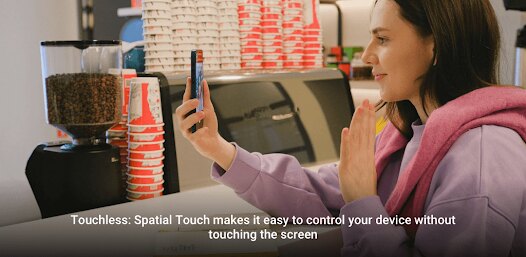
Touchless: Gesture Controller is an ambitious mobile app that transforms your smartphone into a hands-free gaming and device control hub. At its core, it's a gesture recognition tool that uses your phone's camera to track hand movements, allowing you to play games, navigate menus, or control media without ever touching the screen. It belongs to the niche but fascinating genre of alternative control schemes and motion gaming. This app is a playground for tech enthusiasts, curious gamers tired of traditional inputs, and anyone who's ever wanted to feel a bit like a futuristic wizard waving their hands to command their digital world. What initially caught my attention was the sheer novelty and promise; in an era of touchscreens and controllers, the idea of a reliable, camera-based gesture system that works on a standard phone felt like a glimpse into next-gen accessibility and gaming.
My gameplay experience was a mix of genuine "wow" moments and periods of calibration frustration. The fun is absolutely immediate—there's an undeniable thrill in seeing your on-screen cursor or character move in sync with your finger's wiggle. The learning curve is shallow for basic pointer control but steepens significantly for complex game commands. Performance is highly dependent on lighting conditions; a well-lit room makes tracking smooth, while dim environments cause the cursor to jitter or vanish. One standout moment was successfully playing a simple arcade shooter by just pointing and making a fist to "shoot." The immersion when it works is fantastic, making you feel connected to the game in a uniquely physical way. However, this immersion is fragile, often broken by the need to recalibrate or adjust my hand position. I found the experience was greatly enhanced by using a phone stand, freeing me from holding the device and allowing for more natural, broader gestures.
As someone who has tinkered with everything from VR hand-tracking to old-school Wii remotes, I kept coming back to Touchless because of its sheer accessibility and low barrier to entry. You don't need special hardware—just your phone. Where it stands out in its category is its attempt to be a universal platform, a single tool for multiple games and apps, rather than a one-off gimmick built for a specific title. It does the foundational tech better than many similar proof-of-concept apps I've tried, feeling less like a tech demo and more like a usable, if imperfect, product. Its potential for custom mapping means the community could theoretically build support for almost anything, which is a powerful draw. However, its need to stand out will depend less on the concept—which is brilliant—and more on achieving a level of rock-solid reliability that can compete with the tactile certainty of a touchscreen or button.
Key Functional Highlights
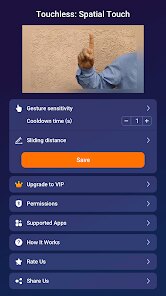
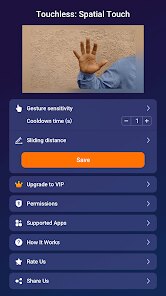
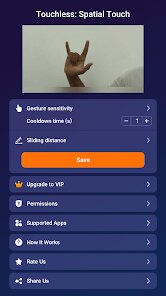
- Camera-Based Tracking 👁️: Uses your phone's front or rear camera to detect and follow specific hand landmarks (like your index finger tip) in real-time, translating their movement into cursor or command input on your screen.
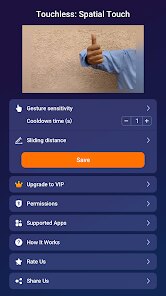
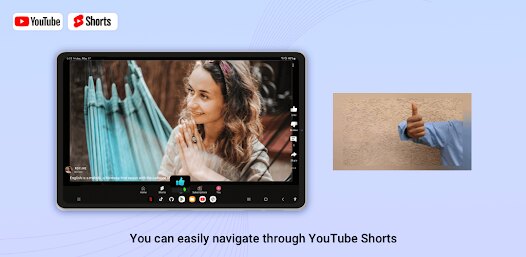
- Custom Gesture Mapping ✋: Allows you to define what specific hand poses or motions do. For example, you can set an open palm to act as a mouse click, a peace sign to jump, or a swipe to go back.
- Universal Control Layer 🎮: Functions as an overlay system that can work with other installed games and apps, aiming to provide gesture control across your device rather than being locked to one experience.
- Calibration Suite ⚙️: Includes tools to set your neutral hand position, adjust tracking sensitivity, and define the active motion zone to personalize the system to your environment and physical setup.
- Profile System 💾: Lets you save different gesture configurations for different games or applications, so you can quickly switch between a control scheme for a racing game and one for a media player.
Advantages & Benefits
- The "Magic" Feeling of Control 🪄: When the tracking is locked on, there's a profound sense of novelty and fun. Controlling a game with just your finger in the air feels innovative and immersive, offering a fresh way to interact with digital content.
- Hardware-Agnostic Approach 📱: The fact that it turns a device nearly everyone already owns into a gesture controller is its biggest strength. It democratizes motion control, requiring no expensive peripherals, which is fantastic for experimentation.
- Creative Freedom in Mapping 🗺️: The ability to create and save your own gesture commands is deeply rewarding. It turns gameplay into a puzzle of efficiency—figuring out the most intuitive swipe or pose for a "grenade throw" is a fun meta-game in itself.
Areas for Improvement
- Inconsistent Tracking Reliability 🎯: The app is extremely sensitive to lighting, background clutter, and even the color of your clothing. Tracking can drop or become jittery without warning, breaking immersion during critical gameplay moments.
- Significant Input Lag ⏳: There's a noticeable delay between your movement and the on-screen action. This makes fast-paced or precision-based games very difficult to enjoy, as the controls never feel truly instantaneous or responsive.
- High Battery and CPU Drain 🔋: Running the camera and processing video frames continuously is a major resource hog. Your phone will heat up, and the battery life plummets, making long sessions impractical without being tethered to a charger.
Recommended Apps
![]()
Perfect365 Video Makeup Editor
Perfect365, Inc.4.7

![]()
Wise: International Transfers
Wise Payments Ltd.4.7![]()
Lethal Love: a Yandere game
AniByte!4.4![]()
Face DNA: AI Ethnicity Test
Ineptlyawesome4![]()
Gopuff - Grocery Delivery
Gopuff4.5![]()
Chatbot AI & Smart Assistant
Codespace Dijital4.5![]()
Funny Gay Test
Test Master Lab4.2![]()
Zoom - One Platform to Connect
zoom.us4.1![]()
AnimalFace - face types test
Lucky Puzzle Team4![]()
Wallpaper 4K, HD – Wallcraft
Nebuchadnezzar DOO4.4![]()
Neku: OC character creator
Neku Avatar Studio4.6![]()
Toyota
Toyota Motor North America, Inc.4.7![]()
Funny Insect Prank Filter
GAdventure0![]()
Dog Prank Call & Chat
GOBEEZ YAZILIM TİCARET3.4![]()
Weather Radar & Weather Live
Avn Global Application4












You May Like
-
![]()
Instagram
Instagram3.9 -
![]()
Calorie Control & Diet Tracker
Willson Studio3.8 -
![]()
Pollo AI: AI Video Generator
COCOSOFT TECHNOLOGY PTE. LTD.4.4 -
![]()
Affirm: Buy now, pay over time
Affirm, Inc4.7 -
![]()
TouchTunes: Live Bar JukeBox
Touchtunes Interactive Networks3.2 -
![]()
Monster Girl Maker 2
GHOULKISS4.3 -
![]()
Mini Quiz Filter Challenge
GjangHa3.9 -
![]()
Spotify: Music and Podcasts
Spotify AB4.3 -
![]()
Sora by OpenAI
OpenAI4.7 -
![]()
How Old Are Your Ears Fun Test
team5stars0 -
![]()
Live Wallpapers HD 4K
Wallpaper app4.4 -
![]()
Wise: International Transfers
Wise Payments Ltd.4.7 -
![]()
Heaven: Gay & LGBT+ Dating
Paradiz Social Ltd3.2 -
![]()
Find Your Phone By Clap
Trusted App Global4.5 -
![]()
PayPal - Send, Shop, Manage
PayPal Mobile4.3