Perfect365 Video Makeup Editor
Perfect365, Inc.
Installs
1M+
Developer
Perfect365, Inc.
-
Category
Video Players & Editors
-
Content Rating
Everyone
Developer Email
Privacy Policy
https://www.perfect365.com/about/privacy-policy/
Screenshots
Expert Review
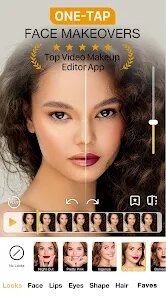
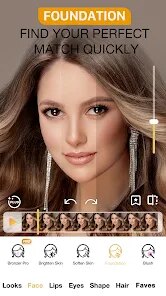
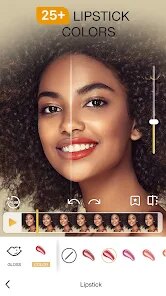
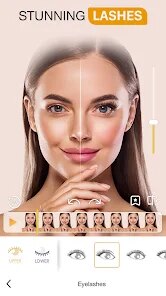
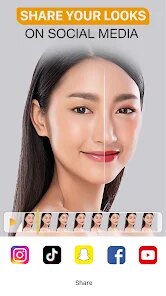
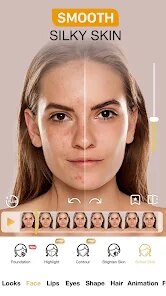
Perfect365 is a makeup and beauty app that lets users try on virtual makeup, edit their photos, and enhance their selfies with a broad range of cosmetic tools. It's mainly built for people who enjoy experimenting with different looks, whether they're preparing for a night out, want to see how a new lipstick shade might suit them, or just want to touch up a photo before posting it on social media. The core function is pretty straightforward: you upload a picture, and the app maps your facial features with surprisingly good accuracy, then lets you apply foundation, eye shadow, lip color, blush, lashes, and even contouring. What I found impressive is the face detection technology. It adjusts to angles and lighting decently well, so it doesn't just smear color all over the place. In my own testing, I took a dimly lit mirror selfie and was still able to get smooth, natural-looking results without the app messing up the edges of my face. Besides the standard makeup options, there are also tons of filters, skin smoothing tools, and even virtual hairstyles. They aren't all perfect, and some of the bigger changes like hair color can look a bit artificial if you push them too far. But for quick edits, it's surprisingly fun. On a more personal level, this app helped me decide if I actually wanted to buy a bold red lipstick I was eyeing online. I uploaded a normal selfie, tried on three different red shades, and realized the cool-toned ones washed me out. Saved me a return trip for sure. I'd recommend Perfect365 to anyone who loves taking selfies, beauty enthusiasts who want to test looks without committing, or even casual users who just want to clean up a photo for a profile picture. It's especially useful for content creators and people exploring makeup routines from home.
Key Functional Highlights
- 🪞 Advanced Face Detection Technology — The app maps your facial features accurately even in less-than-ideal lighting or with slight head tilts. You don't need to stare dead-on into the camera for good results, which makes it much easier to use casually.
- 🪞 Real-Time Preview with Video Integration — You can apply makeup to video clips or use the live camera mode, not just static photos. That's a huge plus if you're trying to see how a look behaves when you move your face or smile.
- 🪞 Extensive Customization Per Feature — Take eye shadow, for example. You can choose from dozens of shades, adjust intensity, shimmer level, and even blend multiple colors within the same tool. That level of detail carries over to contour, blush, and lip colors.
- 🪞 Built-In Tutorials and Look Suggestions — The app provides curated looks for different occasions, like “natural day” or “glam night out,” along with step-by-step instructions for applying those looks yourself. It's handy if you're not sure where to start.
Advantages & Benefits
- 👍 Ease of Use — The interface is intuitive, with clear icons and sliders. Even someone who never edits photos can jump in and get decent results within a minute.
- 👍 Realistic Makeup Application — The blending and shading algorithms do a good job of making virtual makeup look natural instead of painted-on. The results hold up even in zoomed view.
- 👍 Regular Content Updates — The app frequently adds new makeup palettes and trending looks, so it stays fresh. You never feel like you are stuck with the same old options.
Areas for Improvement
- 👎 Heavy Reliance on In-App Purchases — Many of the best looks and premium makeup collections are locked behind a paywall. The free version feels quite limited after the first few uses.
- 👎 Occasional Lag on Older Devices — On phones with lower RAM, the video feature stutters noticeably, especially when you try to stack multiple makeup layers at once.
- 👎 Skin Smoothing Can Look Overdone — The skin tools default to a heavy blur even at the lowest setting, which makes texture vanish entirely and can look unnatural in close-up shots.
Recommended Apps
![]()
Perfect365 Video Makeup Editor
Perfect365, Inc.4.7

![]()
Wise: International Transfers
Wise Payments Ltd.4.7![]()
Lethal Love: a Yandere game
AniByte!4.4![]()
Face DNA: AI Ethnicity Test
Ineptlyawesome4![]()
Gopuff - Grocery Delivery
Gopuff4.5![]()
Chatbot AI & Smart Assistant
Codespace Dijital4.5![]()
Funny Gay Test
Test Master Lab4.2![]()
Zoom - One Platform to Connect
zoom.us4.1![]()
AnimalFace - face types test
Lucky Puzzle Team4![]()
Wallpaper 4K, HD – Wallcraft
Nebuchadnezzar DOO4.4![]()
Neku: OC character creator
Neku Avatar Studio4.6![]()
Toyota
Toyota Motor North America, Inc.4.7![]()
Funny Insect Prank Filter
GAdventure0![]()
Dog Prank Call & Chat
GOBEEZ YAZILIM TİCARET3.4![]()
Weather Radar & Weather Live
Avn Global Application4










You May Like
-
![]()
Instagram
Instagram3.9 -
![]()
Calorie Control & Diet Tracker
Willson Studio3.8 -
![]()
Pollo AI: AI Video Generator
COCOSOFT TECHNOLOGY PTE. LTD.4.4 -
![]()
Affirm: Buy now, pay over time
Affirm, Inc4.7 -
![]()
TouchTunes: Live Bar JukeBox
Touchtunes Interactive Networks3.2 -
![]()
Monster Girl Maker 2
GHOULKISS4.3 -
![]()
Mini Quiz Filter Challenge
GjangHa3.9 -
![]()
Spotify: Music and Podcasts
Spotify AB4.3 -
![]()
Sora by OpenAI
OpenAI4.7 -
![]()
How Old Are Your Ears Fun Test
team5stars0 -
![]()
Live Wallpapers HD 4K
Wallpaper app4.4 -
![]()
Wise: International Transfers
Wise Payments Ltd.4.7 -
![]()
Heaven: Gay & LGBT+ Dating
Paradiz Social Ltd3.2 -
![]()
Find Your Phone By Clap
Trusted App Global4.5 -
![]()
PayPal - Send, Shop, Manage
PayPal Mobile4.3