AR Draw Sketch - Trace & Paint
MØ Studios
Installs
5K+
Developer
MØ Studios
-
Category
Art & Design
-
Content Rating
Everyone
Developer Email
Privacy Policy
https://sites.google.com/view/mostudios/privacy-policy
Screenshots
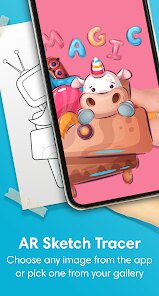
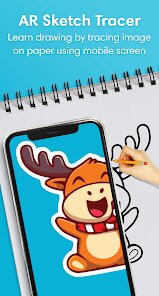
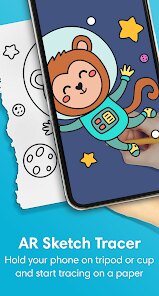
Expert Review
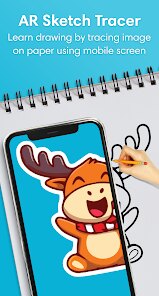
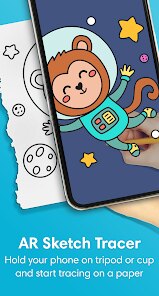
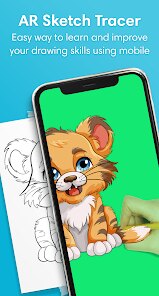
AR Draw Sketch - Trace & Paint from MØ Studios brings a clever twist to digital art creation by blending augmented reality with traditional tracing techniques. The app essentially turns your device's camera into a projector, letting you trace real-world images onto paper or canvas through your screen. This is a game-changer for beginners who struggle with proportions and perspective, but also serves as a useful tool for more experienced artists looking to speed up their workflow or tackle complex subjects.
The core functionality works surprisingly well. After selecting a reference image from your gallery or the built-in library, the app locks it onto your camera feed, creating a semi-transparent overlay that you can follow with your pencil or brush. The tracking is responsive enough for most scenarios, though it does require a stable hand and proper lighting conditions. What really stood out to me was how this solved a personal frustration I've had for years: I love painting but my freehand sketching has always been shaky and imprecise. Using this app, I finally managed to create a detailed portrait of my dog that actually looked like her, which felt incredibly rewarding. The process of tracing and then painting over the lines gave me confidence I never had before.
I'd recommend AR Draw Sketch primarily to hobbyists and casual creators who want to produce impressive artwork without years of technical training. It's perfect for people who enjoy painting but feel held back by their sketching abilities, or for those quick creative sessions where you just want to get something down on paper without fighting with proportions. It's less suited for professional illustrators seeking a pure freehand tool, but as a warm-up or reference aid, even seasoned artists might find it useful.
Key Functional Highlights
- 🎨 Live AR Tracing Overlay: This is the star of the show. The app uses your camera to create a transparent projection of any reference image directly onto your drawing surface. You can adjust opacity, brightness, and even lock the image in place to prevent shifting while you work. The precision surprised me -- with a phone stand and good lighting, the lines stay accurately aligned as you trace.
- 🖼️ Built-in Reference Library: Beyond importing your own photos, the app includes a decent collection of categorized images spanning animals, landscapes, and simple objects. This is helpful when you want to practice but don't have a specific reference handy. The library is modest but covers enough ground for beginners to find something that interests them.
- 📸 Photo Import and Adjustment Tools: You can pull images straight from your camera roll, crop them, adjust contrast, and even convert to line art or grayscale before tracing. These tweaks make a real difference when working with complex or low-contrast photos, helping you see the essential shapes without getting lost in detail.
- 🔦 Flashlight and Grid Overlays: Small but practical additions. The flashlight mode helps when working in dim environments, and the grid overlay assists with proportion checking. They don't revolutionize the experience but add a layer of polish that shows the developers thought about real-world usage scenarios.
Advantages & Benefits
- ✨ Low Barrier to Entry: You don't need drawing skills to get satisfying results. Within minutes, even complete beginners can produce recognizable artwork, which builds confidence and encourages continued practice.
- 📱 Simple Interface: The controls are intuitive and minimal. There's no cluttered menu or steep learning curve -- you open the app, choose an image, and start tracing almost immediately. This keeps the focus on creating rather than figuring out how the app works.
- 💡 Practical Tool, Not a Gimmick: Unlike many AR apps that feel like tech demos, this one genuinely serves a purpose. The tracing overlay works as advertised and solves a real problem for people who want to draw but lack technical skill.
Areas for Improvement
- 📷 Lighting Sensitivity: The AR tracking depends heavily on consistent, even lighting. Shadows, reflections, or moving your hand across the camera view can cause the overlay to jump or lose alignment, which interrupts the flow of drawing.
- 🔋 Battery Drain: Running the camera continuously with the AR overlay active drains battery noticeably faster than standard apps. Longer sessions require a charger nearby, which can be inconvenient if you like drawing away from a desk.
- 🎯 Limited Free Content: While the app is free to try, the more useful reference categories and adjustment tools are locked behind a subscription. The free version feels somewhat restricted, which might frustrate users who just want to explore before committing.
Recommended Apps
![]()
Cute Wallpapers Cool Wallpaper
DevTeamIn20200
![]()
NAMA: Flower language keyboard
Andromeda App3.7
![]()
Bugzz: Insect Prank Filters
Smart Utilities Hub3.8![]()
Colliz - DIY Wallpaper Craft
Braly JSC2.9![]()
My Name Meaning
Capital Aerrow0![]()
Kpop Demon Draw and Coloring
Youssoft LTD0![]()
Piano: Learn & Play Piano
Enable Startup4.1![]()
Emoji Home: Make Messages Fun
Emoji Home4.5![]()
Notepad, Notes, Easy Notebook
Simple Design Ltd.4.8![]()
Eye Test
arabtok0![]()
Photo Frames
Csmartworld4.4![]()
Love Tester Find Real Love App
Happy-verse4.6![]()
Kissing Test Calculator
We Love pranks3![]()
Emoji background changer
Judi Studio4.4![]()
Pretty Makeup - Beauty Camera
Photo Editor Perfect Corp.4.4









You May Like
-
![]()
Future You: See your old face
Future Self Studio3.4 -
![]()
Football Jersey Maker
AJ DEVS3.4 -
![]()
Funny Reverse Audio - Singing
PlayStudioInc0 -
![]()
Girly Wallpapers
Wallpaper World Designs4.7 -
![]()
iControl: Easy Widgets Themes
Fancy keyboard for theme apps4.6 -
![]()
4K Wallpaper & HD Background
MobWally5 -
![]()
Drone App: Forecast for UAV
Go Dreams4.4 -
![]()
Monster Detector: Alien, Ghost
Game Palette3.8 -
![]()
Boom Chip Blast: 2-Player
Black Pyramid 3D Games Studio0 -
![]()
Google One
Google LLC4.1 -
![]()
QLIST: LGBTQ+ Map & Guide
Wapo y Wapa Ltd - LGBTQ+ Dating Apps4.3 -
![]()
Drawify - Pencil Photo Sketch
Waitos AI4.4 -
![]()
Japevox - Funny Prank Sound
SecureTool4.3 -
![]()
Google Meet (original)
Google LLC3.9 -
![]()
Lockscreen Drawing
EZTech Apps4.4