DIY Battery: 3D Charge & Emoji
Braly JSC
Installs
500K+
Developer
Braly JSC
-
Category
Productivity
-
Content Rating
Everyone
Developer Email
Privacy Policy
https://bralyvn.com/privacy-policy.php
Screenshots
Expert Review
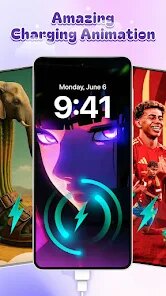
DIY Battery: 3D Charge & Emoji takes a completely fresh angle on something we usually ignore - the battery indicator sitting at the top of your screen. Instead of the boring green bar we are all used to, this app turns battery status into a playful visual experience where you can build your own battery design using 3D models, animated emojis, and custom colors. The core idea is simple but clever: give users a way to express themselves through something as mundane as a phone charge display.
This app is clearly built for people who enjoy customizing every corner of their device. If you are someone who changes wallpapers weekly, collects widget packs, or just likes your phone to feel uniquely yours, this will likely click with you. It solves the problem of having zero personality in system UI elements - specifically that lifeless battery icon we see dozens of times daily. For me personally, I found it oddly satisfying to watch a tiny animated pizza slice fill up as my phone charged. It turned checking battery level from a reflex into something I actually looked forward to. The 3D models are surprisingly well rendered for a utility app, and the emoji animations run smoothly without draining extra battery - which would be ironic if they did.
I would recommend DIY Battery to anyone who loves personalization tools, especially younger users or those active on social platforms where unique phone setups get noticed. It is also great for people who want a bit more visual feedback from their device. However, if you prefer minimalism or never notice your battery icon, this might feel unnecessary. The app shines brightest when you want to inject some fun into daily phone use - whether that is a cyberpunk style battery or a cute animal theme. Just keep in mind it works best as a decorative layer rather than a serious tool.
Key Functional Highlights
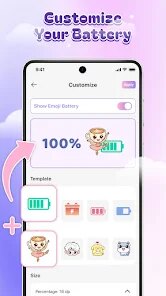
- 🔋 The 3D battery builder is the star here. You start with a blank battery shape and then layer on textures, metallic finishes, glowing effects, and even floating particles. I built one that looks like a lava lamp and another that mimics an old CRT monitor screen. The depth effect is convincing enough that the battery appears to pop off the screen slightly. You can rotate the model in real time while editing, which helps fine tune the angle you see most often.
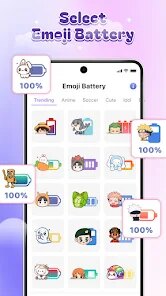
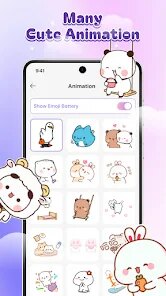
- 🫐 Emoji charge animation is where the fun really kicks in. Instead of a standard fill bar, you pick an emoji that gradually lights up or scales up as the percentage increases. I set mine to a taco that gets fully loaded at 100 percent. The animation speed is adjustable too, so you can have a slow satisfying glow or a fast energetic bounce. It supports both system emojis and some custom animated ones built into the app.
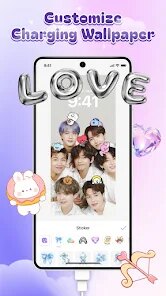
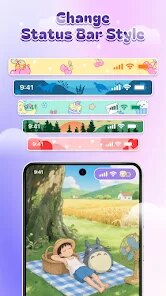
- 🎨 Color synchronization with wallpaper is a thoughtful touch. The app can sample the dominant colors from your current wallpaper and automatically apply them to your battery design. This makes the battery feel like a native part of your home screen rather than a tacked on decoration. It works with both static and dynamic wallpapers, and you can manually override the sampled colors if the auto pick misses the mark.
Advantages & Benefits
- ✨ The visual quality is genuinely impressive for a battery app. The 3D rendering feels premium and the animations are butter smooth even on mid range devices. I tested it on a phone from two years ago and saw no lag or stuttering during the emoji fill animations.
- 💡 Battery impact is negligible, which is a huge relief. I was worried a 3D animated battery would drain power, but the app seems well optimized. Over a full day of use, I noticed no extra battery loss compared to my standard system battery icon.
- 🔄 The customization depth is surprisingly wide. Between materials, lighting angles, animation curves, and emoji choices, there are enough combinations to keep you tweaking for weeks without repeating a design.
Areas for Improvement
- ⚠️ The app is clearly designed for fun over function. It does not provide any advanced battery health stats, charging speed data, or usage breakdowns. If you want real battery analytics, you need a separate app for that.
- 🚫 Some of the cooler 3D models and emoji packs are locked behind a paywall. The free options are decent but limited, and the pricing for the full unlock feels slightly steep compared to other personalization apps on the market.
- 🔄 Occasional sync issues when switching between portrait and landscape mode. The 3D battery sometimes resets its rotation angle or takes a second to re-render properly, which breaks the immersion briefly.
Recommended Apps
![]()
Perfect365 Video Makeup Editor
Perfect365, Inc.4.7

![]()
Wise: International Transfers
Wise Payments Ltd.4.7![]()
Lethal Love: a Yandere game
AniByte!4.4![]()
Face DNA: AI Ethnicity Test
Ineptlyawesome4![]()
Gopuff - Grocery Delivery
Gopuff4.5![]()
Chatbot AI & Smart Assistant
Codespace Dijital4.5![]()
Funny Gay Test
Test Master Lab4.2![]()
Zoom - One Platform to Connect
zoom.us4.1![]()
AnimalFace - face types test
Lucky Puzzle Team4![]()
Wallpaper 4K, HD – Wallcraft
Nebuchadnezzar DOO4.4![]()
Neku: OC character creator
Neku Avatar Studio4.6![]()
Toyota
Toyota Motor North America, Inc.4.7![]()
Funny Insect Prank Filter
GAdventure0![]()
Dog Prank Call & Chat
GOBEEZ YAZILIM TİCARET3.4![]()
Weather Radar & Weather Live
Avn Global Application4













You May Like
-
![]()
Instagram
Instagram3.9 -
![]()
Calorie Control & Diet Tracker
Willson Studio3.8 -
![]()
Pollo AI: AI Video Generator
COCOSOFT TECHNOLOGY PTE. LTD.4.4 -
![]()
Affirm: Buy now, pay over time
Affirm, Inc4.7 -
![]()
TouchTunes: Live Bar JukeBox
Touchtunes Interactive Networks3.2 -
![]()
Monster Girl Maker 2
GHOULKISS4.3 -
![]()
Mini Quiz Filter Challenge
GjangHa3.9 -
![]()
Spotify: Music and Podcasts
Spotify AB4.3 -
![]()
Sora by OpenAI
OpenAI4.7 -
![]()
How Old Are Your Ears Fun Test
team5stars0 -
![]()
Live Wallpapers HD 4K
Wallpaper app4.4 -
![]()
Wise: International Transfers
Wise Payments Ltd.4.7 -
![]()
Heaven: Gay & LGBT+ Dating
Paradiz Social Ltd3.2 -
![]()
Find Your Phone By Clap
Trusted App Global4.5 -
![]()
PayPal - Send, Shop, Manage
PayPal Mobile4.3