Rezona: Make Memeplays
Stratava Group
Installs
5M+
Developer
Stratava Group
-
Category
Entertainment
-
Content Rating
Teen
Developer Email
Privacy Policy
https://rezona.ai/privacy
Screenshots
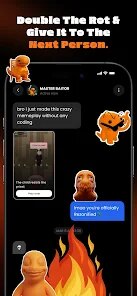

Expert Review
Rezona: Make Memeplay is an app that lets you slap reaction memes, stickers, and captions onto short video clips. It's built for anyone who wants to spice up their social media content, whether you're a casual user looking to make your friends laugh or someone trying to grow an audience on platforms like TikTok or Instagram. At its core, the app solves the problem of having to jump between multiple editing tools just to add a meme overlay. Instead of stitching together a video in one app and then adding text or images in another, Rezona brings everything into one streamlined process. You record or import a clip, and then you can layer meme stickers, sound effects, and text directly on top of it, all without leaving the interface.
From my own use, the core features worked pretty well for what they promise. I recorded a short video of my cat doing something clumsy, and within a few minutes, I had slapped a “WTF” face sticker on the screen and thrown in a caption that bounced along with the motion. The app handled the overlay timing nicely. The extra features, like a small library of recorded sound effects and the ability to trim clips down to specific moments, added real convenience. I didn't have to leave the app to get a funny sound or shorten my footage, which is more than I can say for some other meme-making tools I've tried.
If you like making quick, goofy videos for sharing with friends or followers, I would recommend Rezona. It shines best when you need fast edits without too much fuss. If you're aiming for professional-level video production with layered masks and advanced transitions, this would probably not be your first pick. But for the everyday humor creator, especially on social media where speed and relatability matter, this app hits the mark. It worked well for me when I wanted to respond to a friend's video with a silly meme overlay, and it took me almost no time to get the result I wanted.
Key Functional Highlights
- 🤣 You can drag and drop meme faces or reaction stickers right onto your video timeline. The app syncs them with motion tracking so the sticker follows someone's head or object movement. It makes those “facepalm” or “crying laughing” stickers actually feel part of the scene, not just pasted on top.
- 🎬 The clip trimmer and speed tool are built directly into the meme editor. You don't need to open a separate app to shorten a 20-second clip to 8 seconds or to slow down a funny jump. I found this cut down my editing time by maybe half on each video.
- 🔊 A soundboard of viral effects, like airhorns, sad trombones, and record scratches, is available to drag into your timeline at any point. You can also import your own audio, but the presets saved me from digging through my files for a quick edit.
- ✏️ Captioning here is more flexible than I expected. You can adjust font size, color, and outline, plus set the text to appear letter by letter for that dramatic buildup effect. It worked great for punchlines or reaction texts.
Advantages & Benefits
- ⚡ The app is fast. From recording a clip to exporting the final meme, the whole process rarely takes more than three or four minutes. That speed makes it practical for making rapid reaction posts.
- 🎯 The motion tracking for stickers is surprisingly accurate, even on phone cameras. I tested it on a shaky walking video, and the sticker stayed locked onto the movement without sliding off.
- 🔄 Exporting to social media sizes is straightforward. The app offers preset crop ratios for TikTok, Instagram Stories, and YouTube Shorts, which saves the step of manually reframing later.
Areas for Improvement
- 💾 The meme sticker library feels limited. After a few days of use, I started seeing the same reaction faces repeating. More variety, especially for niche meme formats, would help keep content fresh.
- 🔇 The audio effects sound compressed, not crisp. When I used the “record scratch” sound, it came out slightly muffled compared to what I expected from the original file.
- 📏 The text tool does not support custom fonts. You only get the preselected typefaces, so if your style relies on a specific font, you will be stuck with the defaults.
Recommended Apps
![]()
Perfect365 Video Makeup Editor
Perfect365, Inc.4.7

![]()
Wise: International Transfers
Wise Payments Ltd.4.7![]()
Lethal Love: a Yandere game
AniByte!4.4![]()
Face DNA: AI Ethnicity Test
Ineptlyawesome4![]()
Gopuff - Grocery Delivery
Gopuff4.5![]()
Chatbot AI & Smart Assistant
Codespace Dijital4.5![]()
Funny Gay Test
Test Master Lab4.2![]()
Zoom - One Platform to Connect
zoom.us4.1![]()
AnimalFace - face types test
Lucky Puzzle Team4![]()
Wallpaper 4K, HD – Wallcraft
Nebuchadnezzar DOO4.4![]()
Neku: OC character creator
Neku Avatar Studio4.6![]()
Toyota
Toyota Motor North America, Inc.4.7![]()
Funny Insect Prank Filter
GAdventure0![]()
Dog Prank Call & Chat
GOBEEZ YAZILIM TİCARET3.4![]()
Weather Radar & Weather Live
Avn Global Application4











You May Like
-
![]()
Instagram
Instagram3.9 -
![]()
Calorie Control & Diet Tracker
Willson Studio3.8 -
![]()
Pollo AI: AI Video Generator
COCOSOFT TECHNOLOGY PTE. LTD.4.4 -
![]()
Affirm: Buy now, pay over time
Affirm, Inc4.7 -
![]()
TouchTunes: Live Bar JukeBox
Touchtunes Interactive Networks3.2 -
![]()
Monster Girl Maker 2
GHOULKISS4.3 -
![]()
Mini Quiz Filter Challenge
GjangHa3.9 -
![]()
Spotify: Music and Podcasts
Spotify AB4.3 -
![]()
Sora by OpenAI
OpenAI4.7 -
![]()
How Old Are Your Ears Fun Test
team5stars0 -
![]()
Live Wallpapers HD 4K
Wallpaper app4.4 -
![]()
Wise: International Transfers
Wise Payments Ltd.4.7 -
![]()
Heaven: Gay & LGBT+ Dating
Paradiz Social Ltd3.2 -
![]()
Find Your Phone By Clap
Trusted App Global4.5 -
![]()
PayPal - Send, Shop, Manage
PayPal Mobile4.3