Seekee - Ai Search & Assistant
Seekee Ltd
Installs
50M+
Developer
Seekee Ltd
-
Category
Generative AI
-
Content Rating
Teen
Developer Email
Privacy Policy
https://h5.seekee.ai/in/art/Seekeeai_Android_Privacy_Policy
Screenshots

Expert Review
Seekee is an all-in-one mobile assistant that aims to combine several common digital needs into a single application. The app offers AI-powered search functionality alongside practical tools like document scanning, text extraction, and translation services. It positions itself as a productivity companion designed for students, professionals, and casual users who frequently need to capture and process written information on the go.
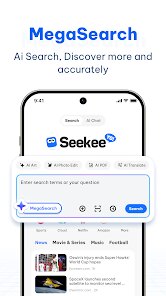
The core feature that caught my attention is the simple scanning capability, which allows you to capture text from physical documents, signs, or screens and immediately extract the content. It works surprisingly well in good lighting and with clean fonts. I tested it with a printed restaurant menu and a book page, and both were processed accurately. The search tool, which supposedly offers AI-enhanced results, feels less refined compared to the scanning feature. It works for basic queries but occasionally returns somewhat vague answers that require follow-up.
For someone like me who constantly finds myself needing to capture small pieces of text during the day, this app genuinely saves time. I often jot down notes during meetings on paper and later struggle to make sense of my own handwriting in a digital context. With Seekee, I can quickly scan those pages after the meeting and have the content ready for editing directly on my phone. The translation tool works adequately for short phrases, but for longer texts it tends to miss cultural nuances or produce awkward phrasing.
I would recommend Seekee to students who frequently work with printed study materials and need to convert them into editable notes, or to travelers who need quick translations of signs and menus abroad. It also makes sense for busy professionals who want a single app for scanning, translating, and light AI-assisted research. However, if you require a deeply reliable AI search engine or high-quality professional translation, you may want to pair this with a more specialized solution.
Key Functional Highlights
- 📄 Smart Document Scanning and Text Extraction - The app processes images of printed or handwritten text and converts them into digital, editable content with good accuracy. It handles multiple formats from small receipt fragments to full book pages.
- 🔍 AI-Powered Search Assistant - You can ask questions directly in the app and receive summarized responses. The assistant pulls from general knowledge but works best for straightforward fact-based queries rather than complex research topics.
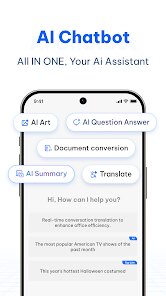
- 🌐 Built-in Translation Tool - Seekee translates extracted or typed text into several languages. The tool supports full sentences but works noticeably better for short phrases and simple structures than for technical or creative content.
- 📱 Integrated Document Management - The app organizes your scanned files and search history in one place. You can tag and search within your saved content, which helps when you need to find specific notes from weeks ago.
Advantages & Benefits
- ⚡ Fast and responsive scanning - The camera captures text quickly without requiring perfect alignment. Results appear in seconds, making it practical for on-the-spot use.
- 📱 Clean user interface - The layout is straightforward with clear icons and minimal clutter. New users can understand the main functions in under a minute.
- 🔄 Seamless text editing - Once extracted, text can be immediately edited within the app. This removes the need to export content to another program for simple corrections.
Areas for Improvement
- 🔍 Inconsistent AI search results - The assistant sometimes returns incomplete or slightly off-target answers for queries that require current information or deeper context.
- 🌐 Translation quality drops with longer text - While short phrases work fine, translating full paragraphs often results in awkward phrasing that needs manual correction.
- ⚙️ Occasional lag when processing complex images - Pages with unusual fonts, heavy formatting, or poor lighting require multiple attempts to get clean extraction.
Recommended Apps
![]()
Get FFF Daily Diamonds Tips
Reallust Softech0
![]()
WhatsApp Messenger
WhatsApp LLC4.5
![]()
Photo Editor - Lumii
InShot Video Editor4.7![]()
BESTPLAY Play to earn & donate
Bestplay4.7![]()
Gay Dating & LGBT Hookup App
Hookup Apps to Hook up Local Dating4.5![]()
Future Self Face Aging Changer
AMOBEAR TECHNOLOGY GROUP4![]()
Character AI: Chat, Talk, Text
Character.AI3.4![]()
Flipped:Chat with AI Character
First Group pte ltd4.1![]()
Customuse: Skins Maker Roblox
Customuse4.7![]()
TickTock-TikTok Live Wallpaper
TikTok Pte. Ltd.4.5![]()
Duolingo: Language & Chess
Duolingo4.7![]()
Anime Girl Wallpapers
Wallpaper World Designs4.7![]()
Neon Love Theme
Delicate theme for Android App4.6![]()
Passport Parking
Passport Labs, Inc.2.5![]()
Parallax 3D Live Wallpapers
TarrySoft4.3














You May Like
-
![]()
Themepack - App Icons, Widgets
YoloTech4.8 -
![]()
Crafty Craft: Mcpe mods maker
Bejan Alexandru2.3 -
![]()
Battle Challenge: Funny Filter
Braly JSC0 -
![]()
Ai Smart Remote
whitesandmedia4.8 -
![]()
GPS Speedometer: Speed Tracker
SM Infotech3.2 -
![]()
Zodiac Palm Reader: MagicWay
Reatility Media4.6 -
![]()
Prank Sounds: Hair Cut & Fart
Smart Utilities Hub4.2 -
![]()
Perplexity - Ask Anything
PerplexityAI4.7 -
![]()
Voice Changer – Voice Effects
All Excellent Apps0 -
![]()
FaceMagic - AI Face Editor
Apero Vision Lab3.9 -
![]()
Google Earth
Google LLC3.8 -
![]()
ChatOn - AI Chat Bot Assistant
AIBY Inc.4.4 -
![]()
Ghost Photo Prank
Nachosware Prank Games4 -
![]()
God messages
dragonplay0 -
![]()
YouTube
Google LLC4.1