Volume Control Sound Launcher
AtomApplications
Installs
500K+
Developer
AtomApplications
-
Category
Productivity
-
Content Rating
Everyone
Developer Email
Privacy Policy
https://phonevolumecontrol.com/privacy-policy
Screenshots
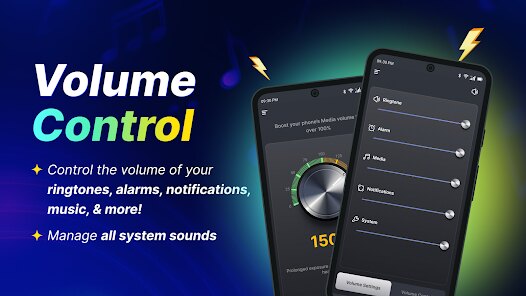
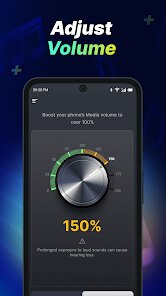
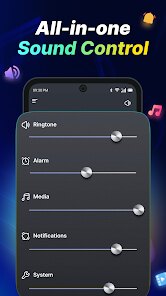
Expert Review
Volume Control Sound Launcher by AtomApplications aims to provide a solution for users who frequently adjust their device's audio settings. Unlike standard volume controls, this app creates a centralized hub for managing sound presets and launching audio-based tasks. The core concept revolves around reducing the number of steps needed to switch between different listening profiles, such as 'Silent,' 'Vibrate,' 'Meeting,' or 'Full Volume.'
For the target audience, it is clearly designed for individuals who find themselves constantly toggling their phone's ringer or media volume throughout the day. This includes professionals in meetings, students in libraries, or anyone who gets frustrated digging through system menus to change audio states. The app's main selling point is the ability to create custom sound profiles with specific volume levels for ringtone, media, alarms, and notifications, then assign these profiles to a widget or a quick-launch shortcut. I personally found this useful at work, where I could instantly switch from a 'Loud' outdoor profile to a 'Vibrate Only' profile when entering a conference room, saving me about five taps each time.
In terms of performance, the core profile switching works reliably and quickly. The sound launcher aspect is also handy, allowing me to start my podcast app or music player directly from the same control panel. However, the interface does have a slight learning curve. I would recommend this app to Android users who heavily customize their phones and are tired of the stock volume panel. It's particularly useful for those who need rigid separation of work and personal audio settings, or for people who just want a more efficient way to manage their phone's sound without rooting the device.
Key Functional Highlights
- 🎛️ Custom Sound Profiles: This is the heart of the app. You can create multiple profiles with independent volume sliders for ringtone, media, alarms, system sounds, and notifications. For instance, you can save a 'Night' profile that mutes everything except the alarm, and a 'Drive' profile that maximizes media volume for navigation and podcasts.
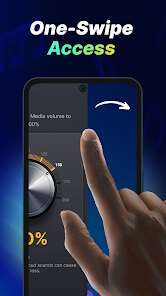
- ⚡ One-Tap Widgets: Instead of fumbling through settings, you can place a dedicated widget on your home screen. Tapping this widget instantly switches to your predefined sound scenario. This eliminates the two to three step process usually required by native Android controls, making it ideal for rapid environment changes.
- 🎵 Sound Launch Integration: The app also serves as a launcher for your audio apps. You can assign a specific playlist or a podcast app to a particular profile. When you switch to that profile, it can automatically start playing your chosen audio content, creating a seamless transition from 'silent work' to 'music break.'
Advantages & Benefits
- ✅ Significant Time Savings: The primary strength is the sheer efficiency it brings. Automating profile switches via widgets or timers drastically reduces manual interaction with the volume rocker and system panel.
- ✅ Highly Customizable Granularity: Unlike simple 'silent' or 'ring' modes, this app offers precise control down to each audio channel. This is invaluable for users who want their alarms loud but their notifications whisper quiet.
- ✅ Stable Background Operation: Once configured, the app runs smoothly in the background without crashing or forgetting the profile settings, which is crucial for reliability in professional settings.
Areas for Improvement
- ❌ Permissions Overhead: To function correctly, the app requires rather broad permissions, including 'Notification Access' and 'Modify System Settings.' Some users may be uncomfortable granting this level of access to a third-party utility.
- ❌ Interface is Dated: The user interface looks somewhat old-school, lacking the polish of modern Material Design apps. The icons and menus can feel clunky, which might annoy users who value aesthetic consistency.
- ❌ Limited Scheduling Logic: While you can set timers for profiles, the automation lacks a proper scheduler with recurring rules. You cannot easily set a 'Weekday Work' profile to activate at 9 AM; it feels more like a manual timer than a smart automation.
Recommended Apps
![]()
AI Art Generator - AI Yearbook
Smart AI DEV3.9

![]()
Afterpay - Buy Now Pay Later
Afterpay3.8![]()
Anime Shimeji Screen Pets
NovaSoftLC Labs3.9![]()
Parallax: 4K 3D Live Wallpaper
Nebuchadnezzar DOO4.6![]()
Telegram
Telegram FZ-LLC4.2![]()
Elevate - Brain Training Games
The Mind Company4.6![]()
Heaven: Gay & LGBT+ Dating
Paradiz Social Ltd3.2![]()
Drone App: Forecast for UAV
Go Dreams4.4![]()
Google Gemini
Google LLC4.6![]()
Customuse: Skins Maker Roblox
Customuse4.7![]()
Brainzzot Universe: Prank Call
TeH Software0![]()
Prank Sounds: Hair Cut & Fart
Smart Utilities Hub4.2![]()
Photo Editor - Lumii
InShot Video Editor4.7![]()
GigaBody: AI Muscle filter
Bellential Inc.4.4![]()
FunVid: Funny Face Filters
Vibe Filter Club0













You May Like
-
![]()
Moonphase Filter: Love Test
Braly JSC0 -
![]()
How Did You Die In The Past?
BuzzMoy0 -
![]()
Secret Crush Detector App
Hopeitz Software4.8 -
![]()
Walli - HD, 4K Wallpapers
Tap AI4.4 -
![]()
Ace Hardware
Ace Hardware Corporation4.7 -
![]()
Planner 5D: Home Design, Decor
Planner 5D4.1 -
![]()
Snapchat
Snap Inc4.1 -
![]()
Live wallpaper - dope & anime
Jelly Dev4.4 -
![]()
WhatsApp Messenger
WhatsApp LLC4.5 -
![]()
Eye Test
arabtok0 -
![]()
Uber - Request a ride
Uber Technologies, Inc.4.5 -
![]()
Prank Call & Funny Video
TeH Software0 -
![]()
Bug Filter - Bug on Face Prank
Hades Bit0 -
![]()
Dola: Smart AI Assistant
SPRING (SG) PTE. LTD.3.9 -
![]()
Crush Love Finder: Fun Filter
Braly JSC0