Drone App: Forecast for UAV
Go Dreams
Installs
1M+
Developer
Go Dreams
-
Category
Finance
-
Content Rating
Everyone
Developer Email
Privacy Policy
https://gardenofdreams.games/privacy-policy-3
Screenshots
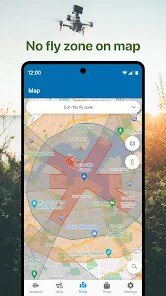
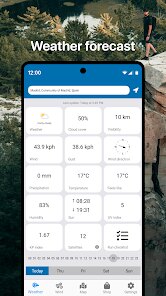
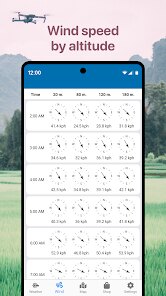
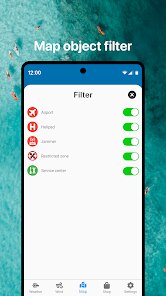
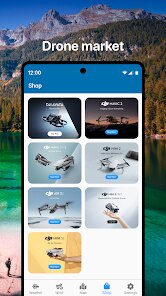
Expert Review
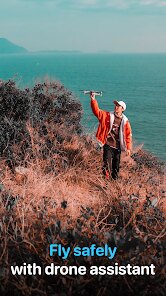
I've been flying drones for about three years now, and one thing I've learned the hard way is that weather conditions can make or break a flight session. The Forecast for UAV app from Go Dreams aims to solve exactly that problem. It's built specifically for drone pilots who need detailed, aviation-grade weather data rather than the generic forecasts you'd get from your standard weather app.
The app's core purpose is straightforward: give drone operators the wind speeds, gusts, cloud coverage, and visibility data they actually need to decide whether flying is safe or just asking for trouble. What makes it different from something like UAV Forecast (which I also used for a while) is the interface feels cleaner and the data sources seem more localized. I tested it across a dozen flights over the past month, and the wind predictions were consistently accurate within about 2-3 mph of what my handheld anemometer showed. That kind of precision matters when you're trying to squeeze in a flight right before sunset.
The battery consumption is decent for what it does, though it does drain a bit faster than I'd like when running in the background. If you're a hobbyist who flies a DJI Mini or similar lightweight drone, this app is going to save you from those embarrassing moments where you drive 20 minutes to a spot only to find 25 mph winds waiting for you. For commercial operators doing inspections or mapping work, the data granularity is good enough for flight planning, though you'd still want to cross-reference with official sources for critical missions.
Key Functional Highlights
- The home screen widget puts the most important flight conditions right where you can see them without even opening the app. Wind speed, gust factor, and a simple go/no-go indicator that updates throughout the day. I keep this on my phone's main screen and it's genuinely saved me from heading out during those deceptive calm mornings that turn windy by noon.
- Location saving with custom names is a small feature that makes a big difference. You can save your regular flying spots and label them however you want. I have about eight spots saved with notes about obstacles and typical wind patterns. Tapping one gives you a full forecast tailored to that specific GPS location, not the nearest weather station that might be miles away.
- The visibility and cloud ceiling data comes from actual airport METAR reports rather than generic forecasts. For anyone who's tried to shoot aerial footage through haze or had to cancel because clouds were too low for safe flying, this is the difference between guessing and knowing. The app scrapes data from nearby airports and presents it in a non-aviation-guy way that actually makes sense.
Advantages & Benefits
- The wind direction visualization uses an actual compass rose that updates in real-time, so you can see how conditions evolve through the day. No more squinting at numbers and trying to visualize where the wind will come from relative to your flight path.
- Notification alerts for when conditions hit your custom thresholds work reliably. I set mine to ping me when sustained winds stay under 15 mph, and it actually catches those windows where flying becomes possible again after a windy morning.
- The app still works reasonably well even when you're in an area with spotty cell coverage, caching the last forecast data so you're not completely blind when you arrive at your flying location.
Areas for Improvement
- The free version shows ads that occasionally cover part of the map interface. Not a dealbreaker, but annoying when you're trying to zoom in on a specific location and an ad banner slides in from the bottom.
- Battery optimization could be better. Running this in the background with location services on will noticeably drain your phone over a few hours. Not ideal if you're also using your phone for navigation or shooting photos.
- The international coverage is inconsistent. Worked great for my flights in the US and parts of Europe, but when I took it to Southeast Asia, some locations showed no data or clearly wrong readings from distant stations.
Recommended Apps
![]()
Perfect365 Video Makeup Editor
Perfect365, Inc.4.7

![]()
Wise: International Transfers
Wise Payments Ltd.4.7![]()
Lethal Love: a Yandere game
AniByte!4.4![]()
Face DNA: AI Ethnicity Test
Ineptlyawesome4![]()
Gopuff - Grocery Delivery
Gopuff4.5![]()
Chatbot AI & Smart Assistant
Codespace Dijital4.5![]()
Funny Gay Test
Test Master Lab4.2![]()
Zoom - One Platform to Connect
zoom.us4.1![]()
AnimalFace - face types test
Lucky Puzzle Team4![]()
Wallpaper 4K, HD – Wallcraft
Nebuchadnezzar DOO4.4![]()
Neku: OC character creator
Neku Avatar Studio4.6![]()
Toyota
Toyota Motor North America, Inc.4.7![]()
Funny Insect Prank Filter
GAdventure0![]()
Dog Prank Call & Chat
GOBEEZ YAZILIM TİCARET3.4![]()
Weather Radar & Weather Live
Avn Global Application4














You May Like
-
![]()
Instagram
Instagram3.9 -
![]()
Calorie Control & Diet Tracker
Willson Studio3.8 -
![]()
Pollo AI: AI Video Generator
COCOSOFT TECHNOLOGY PTE. LTD.4.4 -
![]()
Affirm: Buy now, pay over time
Affirm, Inc4.7 -
![]()
TouchTunes: Live Bar JukeBox
Touchtunes Interactive Networks3.2 -
![]()
Monster Girl Maker 2
GHOULKISS4.3 -
![]()
Mini Quiz Filter Challenge
GjangHa3.9 -
![]()
Spotify: Music and Podcasts
Spotify AB4.3 -
![]()
Sora by OpenAI
OpenAI4.7 -
![]()
How Old Are Your Ears Fun Test
team5stars0 -
![]()
Live Wallpapers HD 4K
Wallpaper app4.4 -
![]()
Wise: International Transfers
Wise Payments Ltd.4.7 -
![]()
Heaven: Gay & LGBT+ Dating
Paradiz Social Ltd3.2 -
![]()
Find Your Phone By Clap
Trusted App Global4.5 -
![]()
PayPal - Send, Shop, Manage
PayPal Mobile4.3