Football Jersey Maker
AJ DEVS
Installs
5M+
Developer
AJ DEVS
-
Category
Entertainment
-
Content Rating
Everyone
Developer Email
Privacy Policy
https://jerseymakr.com/privacy-policy
Screenshots
Expert Review
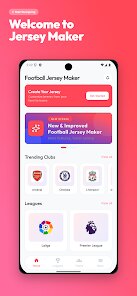
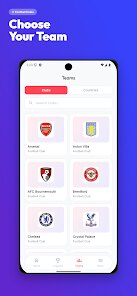
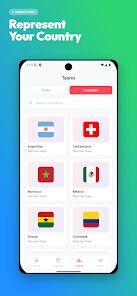
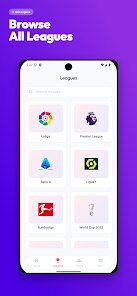
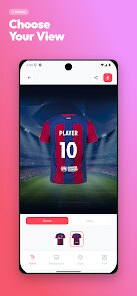
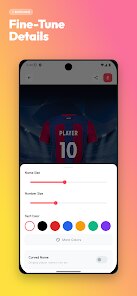
Football Jersey Maker is a mobile app designed for football enthusiasts and creative individuals who want to design custom football jerseys without needing professional graphic design skills. It acts as a digital toolkit that allows users to mix and match colors, add numbers, text, and logos to create a personalized jersey look. The app is aimed at players, coaches, and fans who want to visualize a team kit, create a playful design for fun, or even prototype ideas before ordering real jerseys. It solves the problem of limited customization options in retail stores and removes the entry barrier of complex design software.
The core feature lets you pick from predefined jersey templates and tweak the colors of different sections like the body, sleeves, and collar. I found it straightforward to use, especially if you already have a color scheme in mind. The text addition tool inserts player names and numbers cleanly, though the font selection feels a bit limited. The logo upload function is handy, but I had some trouble resizing images precisely on smaller screens. After playing around with it for a while, I was able to create a design that matched my local team's look, which I then used to print stickers for water bottles. That alone made the app worth it for me.
I would recommend Football Jersey Maker to casual users who want to experiment with visual concepts quickly. It is ideal for situations like planning a charity match, customizing a birthday gift, or just having some creative fun during downtime. However, if you need high-resolution files suitable for professional printing or expect a huge library of authentic sponsor logos and textures, you will likely find this app underdeveloped. Think of it as an idea sketchpad rather than a finished design studio.
Key Functional Highlights
- ⚽ Template system: Choose from several basic jersey silhouettes, including long sleeve, short sleeve, v-neck, and crew neck options. Each template acts as a starting canvas, so you don't have to build from scratch. The base options cover most real-world kit styles, which saves time during early brainstorming.
- ⚽ Color customization: Pick colors for the main body, sleeves, collar, and trim independently. The color picker uses a familiar wheel interface, and you can also input hex codes if you need specific brand colors. This flexibility lets you match your team's existing palette or invent something entirely new.
- ⚽ Text and numbering: Add player names and numbers with a few taps. You can adjust the text size and reposition it roughly, but the placement is limited to preset zones like the back and chest. The number font sets are standard block styles, so do not expect anything flashy like brush strokes or metallic effects.
- ⚽ Logo integration: Import images from your gallery to use as team badges or sponsor logos. The app supports basic cropping and scaling, but precise alignment can be tricky because the touch controls are not very fine. Still, for casual mockups, this feature gets the job done.
Advantages & Benefits
- 📈 Simple learning curve: Most people can pick it up within five minutes. There is no clutter or overwhelming menus, so you can focus on the design task instead of figuring out the interface.
- 📈 Quick results: From starting the app to saving a final image takes under ten minutes for a basic design. That speed is great for brainstorming sessions or last-minute ideas.
- 📈 No account required: You can use the core features without signing up or handing over personal data. That feels rare these days and respects user privacy.
Areas for Improvement
- 🌧 Limited font library: The text options are sparse. If you want curved text, italic styles, or creative typefaces, you are out of luck. This restricts how original the final design can look.
- 🌧 No advanced layering: You cannot place elements in front of or behind each other. For example, putting a sponsor logo over a stripe pattern requires workarounds, which is frustrating.
- 🌧 Ads interrupt frequently: Free users see an ad after saving or exporting. While understandable, the frequency breaks the creative flow, especially when you are iterating on small changes.
Recommended Apps
![]()
Cute Wallpapers Cool Wallpaper
DevTeamIn20200
![]()
NAMA: Flower language keyboard
Andromeda App3.7
![]()
Bugzz: Insect Prank Filters
Smart Utilities Hub3.8![]()
Colliz - DIY Wallpaper Craft
Braly JSC2.9![]()
My Name Meaning
Capital Aerrow0![]()
Kpop Demon Draw and Coloring
Youssoft LTD0![]()
Piano: Learn & Play Piano
Enable Startup4.1![]()
Emoji Home: Make Messages Fun
Emoji Home4.5![]()
Notepad, Notes, Easy Notebook
Simple Design Ltd.4.8![]()
Eye Test
arabtok0![]()
Photo Frames
Csmartworld4.4![]()
Love Tester Find Real Love App
Happy-verse4.6![]()
Kissing Test Calculator
We Love pranks3![]()
Emoji background changer
Judi Studio4.4![]()
Pretty Makeup - Beauty Camera
Photo Editor Perfect Corp.4.4







You May Like
-
![]()
Future You: See your old face
Future Self Studio3.4 -
![]()
Football Jersey Maker
AJ DEVS3.4 -
![]()
Funny Reverse Audio - Singing
PlayStudioInc0 -
![]()
Girly Wallpapers
Wallpaper World Designs4.7 -
![]()
iControl: Easy Widgets Themes
Fancy keyboard for theme apps4.6 -
![]()
4K Wallpaper & HD Background
MobWally5 -
![]()
Drone App: Forecast for UAV
Go Dreams4.4 -
![]()
Monster Detector: Alien, Ghost
Game Palette3.8 -
![]()
Boom Chip Blast: 2-Player
Black Pyramid 3D Games Studio0 -
![]()
Google One
Google LLC4.1 -
![]()
QLIST: LGBTQ+ Map & Guide
Wapo y Wapa Ltd - LGBTQ+ Dating Apps4.3 -
![]()
Drawify - Pencil Photo Sketch
Waitos AI4.4 -
![]()
Japevox - Funny Prank Sound
SecureTool4.3 -
![]()
Google Meet (original)
Google LLC3.9 -
![]()
Lockscreen Drawing
EZTech Apps4.4