Heaven Messenger - chat, map
SKYTRACK
Installs
Developer
SKYTRACK
-
Category
Social
-
Content Rating
Mature 17+
Developer Email
Privacy Policy
https://heavenplatform.com/docs/politika_konfidencialnosti_heaven_messenger_892
Screenshots



Expert Review
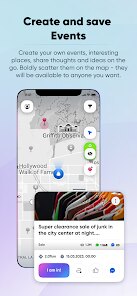
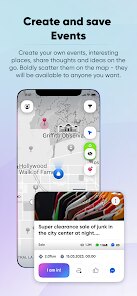
Heaven Messenger presents itself as a communication tool paired with location tracking. At its core, it aims to bridge messaging with real-time map sharing, letting users see where their contacts are while they chat. For people who need to coordinate meetups, keep tabs on family members, or manage group outings, this dual functionality could be genuinely helpful. The app pulls together two needs that usually require separate applications.
The target audience seems to be younger adults or groups who frequently organize gatherings in real-time. Think of friends trying to find each other at a festival, parents checking on their kids' locations during a trip, or colleagues coordinating deliveries. The messaging side works like most chat apps do. It sends texts, images, and lets you create group conversations. The map component shows contact locations on a shared map, updating as people move. This integration is the main selling point. I gave it a try with a small group of friends while planning a weekend hike, and the ability to see where everyone was on the trail felt useful. We didn't have to keep asking for location updates because we could just check the map. The app solved the specific annoyance of constantly texting where-are-you messages.
I would recommend Heaven Messenger to anyone frequently organizing group activities where location matters. It's best used in situations where meeting points shift or when you want to track a group's movement without constant check-ins. For casual chat-only needs, standard messaging apps might be simpler, but for location-aware communication, this fills a gap.
Key Functional Highlights
- 🗺️ The integrated map updates contacts' positions in real-time so you can see where everyone is without asking for updates. It shows names and approximate locations right inside the chat interface, which cuts down on back-and-forth messages.
- 💬 Standard messaging features include text, image sharing, and group chats. Conversations happen in a familiar layout, making the transition from other apps fairly simple. Reactions and read receipts are present, though nothing groundbreaking.
- 📍 Location sharing can be set to continuous or one-time, giving some control over privacy. You can choose to show your position for a specific duration or just send a static pin, which works well for both tracking and single meetups.
- 🔔 Notifications alert you when contacts approach a certain area or leave a marked spot. This geo-fencing feature is handy for parents or coordinators who need to know about movements without staring at the screen constantly.
Advantages & Benefits
- 🎯 Real-time location integrated with chat is the standout feature. It genuinely reduces the hassle of coordinating meetups.
- ⚡ Setup is quick. You can create a group, share locations, and start chatting within minutes.
- 🔒 Privacy options like temporary sharing give you control over how long your location is visible.
Areas for Improvement
- 📶 Battery drain is noticeable when location sharing runs in the background for extended periods. This is common with such features but still a downside.
- 📱 The user base is small. You need contacts who also use the app for it to be useful, which limits practical adoption.
- 🌐 Some map loading delays occurred during my tests, especially in areas with weaker signal. This can make the tracking feel less reliable.
Recommended Apps
![]()
Perfect365 Video Makeup Editor
Perfect365, Inc.4.7

![]()
Wise: International Transfers
Wise Payments Ltd.4.7![]()
Lethal Love: a Yandere game
AniByte!4.4![]()
Face DNA: AI Ethnicity Test
Ineptlyawesome4![]()
Gopuff - Grocery Delivery
Gopuff4.5![]()
Chatbot AI & Smart Assistant
Codespace Dijital4.5![]()
Funny Gay Test
Test Master Lab4.2![]()
Zoom - One Platform to Connect
zoom.us4.1![]()
AnimalFace - face types test
Lucky Puzzle Team4![]()
Wallpaper 4K, HD – Wallcraft
Nebuchadnezzar DOO4.4![]()
Neku: OC character creator
Neku Avatar Studio4.6![]()
Toyota
Toyota Motor North America, Inc.4.7![]()
Funny Insect Prank Filter
GAdventure0![]()
Dog Prank Call & Chat
GOBEEZ YAZILIM TİCARET3.4![]()
Weather Radar & Weather Live
Avn Global Application4













You May Like
-
![]()
Instagram
Instagram3.9 -
![]()
Calorie Control & Diet Tracker
Willson Studio3.8 -
![]()
Pollo AI: AI Video Generator
COCOSOFT TECHNOLOGY PTE. LTD.4.4 -
![]()
Affirm: Buy now, pay over time
Affirm, Inc4.7 -
![]()
TouchTunes: Live Bar JukeBox
Touchtunes Interactive Networks3.2 -
![]()
Monster Girl Maker 2
GHOULKISS4.3 -
![]()
Mini Quiz Filter Challenge
GjangHa3.9 -
![]()
Spotify: Music and Podcasts
Spotify AB4.3 -
![]()
Sora by OpenAI
OpenAI4.7 -
![]()
How Old Are Your Ears Fun Test
team5stars0 -
![]()
Live Wallpapers HD 4K
Wallpaper app4.4 -
![]()
Wise: International Transfers
Wise Payments Ltd.4.7 -
![]()
Heaven: Gay & LGBT+ Dating
Paradiz Social Ltd3.2 -
![]()
Find Your Phone By Clap
Trusted App Global4.5 -
![]()
PayPal - Send, Shop, Manage
PayPal Mobile4.3